From Manual Testing to Repeatable Detection Validation with Atomic Red Team
How to Validate PowerShell Detections in Splunk with Sysmon, Atomic Red Team, and MITRE ATT&CK


A detection that works in one SIEM is useful, but a detection whose behavioral logic can be expressed independently of the SIEM, converted back into a platform-specific query, and then validated against adversary-simulation telemetry is much more interesting.
That was the goal of this project.
In my previous article, I created a Splunk detection for suspicious PowerShell execution and validated it against an Atomic Red Team simulation.
The rule looked for:
The original Splunk search was:
index=* EventCode=1 Image="*powershell.exe"
(CommandLine="*-EncodedCommand*"
OR CommandLine="*-WindowStyle Hidden*")
| stats count by host User CommandLine ParentImage
This query contains several things that are specific to my Splunk implementation.
For example:
index=*
EventCode=1
| stats ...
These are useful in Splunk, but they are not the actual behavioral requirement of the detection.
The behavioral requirement is much simpler:
Windows process creation
        AND
PowerShell
        AND
(
    Encoded PowerShell
    OR
    Hidden PowerShell window
)
That distinction became the foundation of this project.
Before writing the Sigma rule, I deliberately separated the detection into two layers.
index
EventCode
Splunk field names
result formatting
stats
Process creation
AND
PowerShell
AND
(
    EncodedCommand
    OR
    WindowStyle Hidden
)
This distinction matters because Sigma is designed to describe detection logic in a vendor-neutral format rather than reproduce an individual SIEM’s complete query. Sigma describes itself as a generic, vendor-agnostic format intended to make detection methods shareable across different environments. Sigma
Therefore, I did not attempt to translate the original SPL line-for-line.
Instead, I asked:
What behavior am I actually trying to detect?
That produced the following Sigma rule.
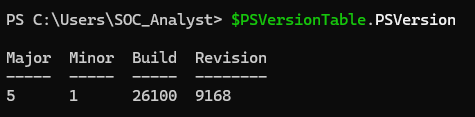
PowerShell environment used for Sigma rule development and validation.
The initial rule was:
title: Suspicious PowerShell Execution Parameters
id: 7b5d6f8e-9f2a-4d3c-a1b7-82c6e4f51903
status: experimental
description: Detects PowerShell process creation using encoded commands or hidden window execution.
author: citadelcybersec
date: 2026/09/13

logsource:
    product: windows
    category: process_creation

detection:
    selection_image:
        Image|endswith:
            - '\powershell.exe'
            - '\pwsh.exe'

    selection_encoded:
        CommandLine|contains:
            - '-EncodedCommand'
            - '-enc '

    selection_hidden:
        CommandLine|contains:
            - '-WindowStyle Hidden'
            - '-w hidden'

    condition: selection_image and (selection_encoded or selection_hidden)

falsepositives:
    - Legitimate administrative scripts using encoded PowerShell commands.
    - Legitimate automation using hidden PowerShell windows.

level: medium

tags:
    - attack.execution
    - attack.t1059.001
    - attack.defense_evasion
Several things are intentionally absent.
There is no:
EventCode: 1
source: WinEventLog:Microsoft-Windows-Sysmon/Operational
index: "*"
| stats count ...
Those belong to the implementation and investigation layer of my Splunk environment. The Sigma rule instead expresses the detection requirements.

Sigma CLI installed locally and ready for detection-rule validation and conversion.
I then validated the rule using Sigma CLI:
sigma check C:\Sigma\suspicious_powershell_execution.yml
The rule itself parsed successfully, but Sigma reported an issue with the ATT&CK tagging:
InvalidATTACKTagIssue
tag=attack.defense_evasion
The problem was the ATT&CK tag:
- attack.defense_evasion
I removed the invalid tag and retained the more specific technique mapping:
tags:
    - attack.execution
    - attack.t1059.001
I then ran the validation again. The rule passed without rule or condition errors.
This was a useful reminder that writing a syntactically valid detection is not the same as writing a correctly structured detection.
Instead of ignoring the warning, I investigated it, identified the problematic metadata, corrected the rule, and revalidated it before moving forward.

Successful validation of the Sigma rule after correcting the ATT&CK metadata.
With the rule validated, the next question was if the vendor-neutral rule could be converted back into a Splunk detection.
I installed the Sigma Splunk backend and attempted the conversion:
sigma convert -t splunk C:\Sigma\suspicious_powershell_execution.yml
The conversion did not immediately work. Sigma returned:
Processing pipeline required by backend!
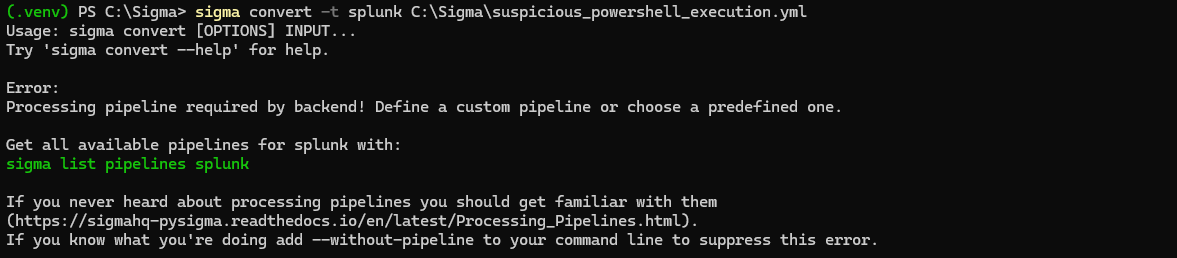
Initial Sigma-to-Splunk conversion fails because the Splunk backend requires a processing pipeline.
This was another useful discovery. Installing a backend is not necessarily enough. The conversion process can also require an appropriate processing pipeline to translate the generic rule into the target platform’s field and query conventions.
Sigma’s CLI identified the available Splunk pipelines, including:
splunk_windows
Because the detection concerns Windows process-creation telemetry, I selected the Windows pipeline rather than adding unrelated pipelines simply to make the conversion work.
The conversion command became:
sigma convert -t splunk `
    -p splunk_windows `
    C:\Sigma\suspicious_powershell_execution.yml
Then, the conversion succeeded.

Sigma successfully converted into Splunk SPL using the splunk_windows processing pipeline.
The generated query was:
Image IN ("*\\powershell.exe", "*\\pwsh.exe")
CommandLine IN ("*-EncodedCommand*", "*-enc *")
OR CommandLine IN ("*-WindowStyle Hidden*", "*-w hidden*")
At first glance, this looked unusual.
My Sigma condition was:
condition: selection_image and (selection_encoded or selection_hidden)
So I expected the generated SPL to visibly contain equivalent grouping.
Instead, the output appeared as:
Image
AND
EncodedCommand
OR
HiddenWindow
That raised an important question:
Did the conversion actually preserve my intended detection logic?
Rather than assuming that it did, I investigated the generated query.
There was an important detail in the target language.
Splunk’s search command supports implicit AND between conditions and has specific grouping behavior for combinations of AND and OR. Splunk documents that:
A B OR C
is processed equivalently to:
A AND (B OR C)
unless explicit grouping changes the expression. Splunk Documentation
That means the generated query:
Image IN ("*\\powershell.exe", "*\\pwsh.exe")
CommandLine IN ("*-EncodedCommand*", "*-enc *")
OR CommandLine IN ("*-WindowStyle Hidden*", "*-w hidden*")
is effectively interpreted as:
Image IN (PowerShell)
AND
(
    CommandLine IN (EncodedCommand)
    OR
    CommandLine IN (HiddenWindow)
)
That is the same behavioral logic expressed by the Sigma condition.
This was an important lesson in the project:
A generated query does not necessarily need to look textually identical to the source rule to preserve its logical meaning.
The target language’s own evaluation rules matter.
EventCode=1 Is Not in the Sigma RuleOne of the most important questions in this project was:
Why didn’t Sigma generate
EventCode=1?
The answer goes back to the distinction between behavioral logic and environment-specific implementation.
My original detection used:
EventCode=1
because I know that my Windows telemetry is coming from Sysmon and that Event ID 1 represents process creation in that telemetry.
The Sigma rule instead describes:
logsource:
    product: windows
    category: process_creation
The detection is therefore concerned with the process-creation behavior, rather than hard-coding the Sysmon event identifier used by my particular Splunk deployment.
The same reasoning applies to:
index=*
and:
| stats count ...
Those are not part of the behavioral detection itself.
The generated SPL therefore did not reproduce my entire original Splunk query. It reproduced the detection portion of it.
That is exactly what I wanted to investigate.
At this point, I compared the two implementations.
index=* EventCode=1 Image="*powershell.exe"
(CommandLine="*-EncodedCommand*" OR CommandLine="*-WindowStyle Hidden*")
| stats count by host User CommandLine ParentImage
Image IN ("*\\powershell.exe", "*\\pwsh.exe")
CommandLine IN ("*-EncodedCommand*", "*-enc *")
OR CommandLine IN ("*-WindowStyle Hidden*", "*-w hidden*")
The queries are clearly not identical.
The original query contains:
The Sigma-generated query contains:
That difference demonstrates the purpose of the abstraction. The Sigma rule captured the behavioral detection logic, while the target backend generated an implementation appropriate for Splunk.
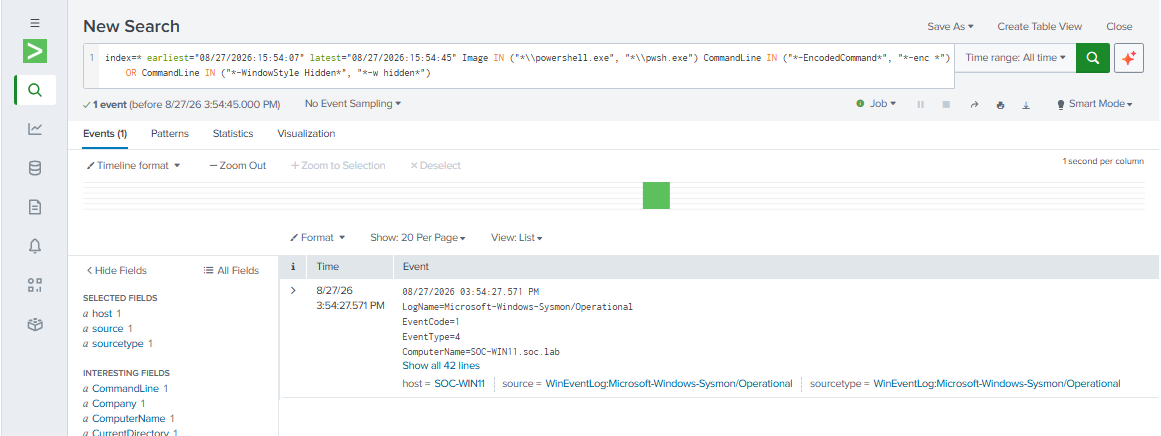
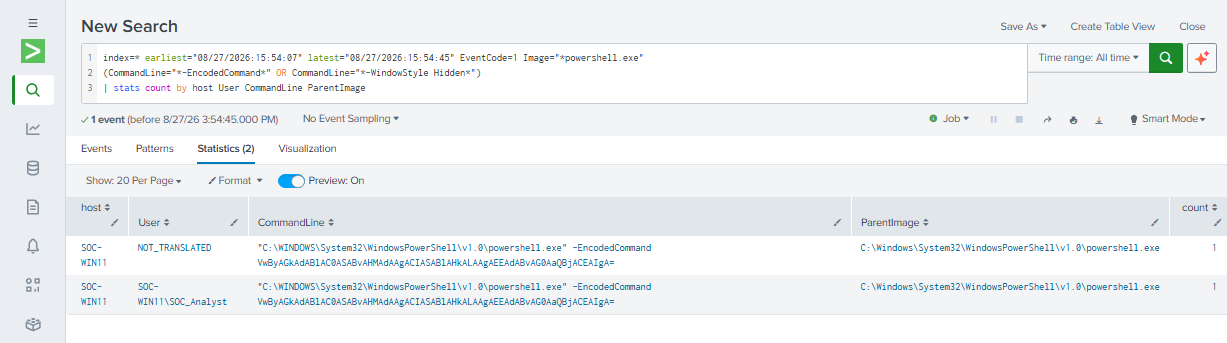
Comparing the original Splunk implementation with the SPL generated from the vendor-neutral Sigma rule.
Before generating another attack simulation, I tested the generated query against telemetry from the earlier Atomic Red Team exercise.
Using the relevant time window, I ran:
index=* earliest="08/27/2026:15:54:07" latest="08/27/2026:15:54:45"
Image IN ("*\\powershell.exe", "*\\pwsh.exe")
CommandLine IN ("*-EncodedCommand*", "*-enc *")
OR CommandLine IN ("*-WindowStyle Hidden*", "*-w hidden*")
The search returned the expected PowerShell event. I then inspected the event fields to verify that the detection was actually matching the expected process-creation telemetry:
index=* earliest="08/27/2026:15:54:07" latest="08/27/2026:15:54:45"
Image IN ("*\\powershell.exe", "*\\pwsh.exe")
CommandLine IN ("*-EncodedCommand*", "*-enc *")
OR CommandLine IN ("*-WindowStyle Hidden*", "*-w hidden*")
| table _time host EventCode Image CommandLine ParentImage ParentCommandLine User ParentUser

Verifying the actual telemetry fields involved in the new detection
This confirmed that the generated detection could identify the telemetry associated with the previously validated attack simulation.
However, this test alone was not enough. The event already existed. I wanted to test whether the detection would identify new telemetry generated after the Sigma rule was created.
The final validation stage was therefore a fresh Atomic Red Team execution.
I used the same Windows workstation in my SOC lab and executed the Atomic Red Team test for:
T1027 — Obfuscated Files and Information
specifically the test that generates encoded PowerShell activity.
I recorded the time immediately before and after execution:
Get-Date

Invoke-AtomicTest T1027 `
   -TestNumbers 2 `
   -PathToAtomicsFolder "C:\AtomicRedTeam\atomics"

Get-Date
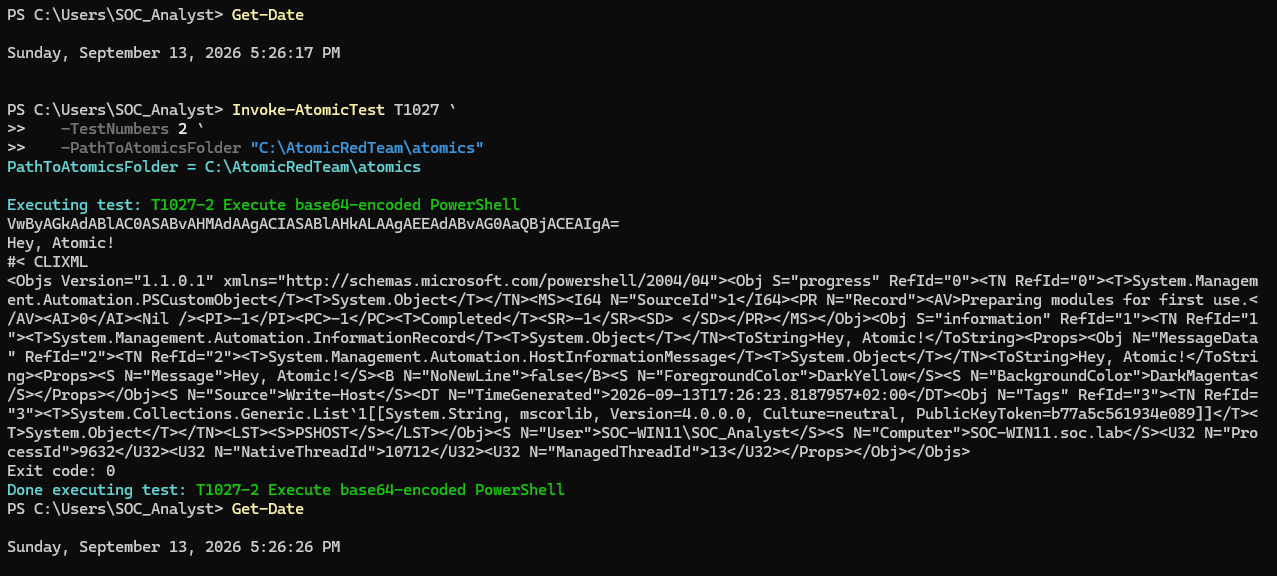
Executing Atomic Red Team’s AtomicTest T1027, which generated a fresh adversary-simulation event, reproducing the same activity I was using for detection.
The timestamp gave me a narrow window in which to search for the newly generated telemetry.
This is important because the validation is now reproducible:
Atomic Red Team
       ↓
Generate activity
       ↓
Sysmon
       ↓
Splunk
       ↓
Sigma-generated detection
I then ran the generated detection against the new event:
index=* earliest="09/13/2026:17:26:17" latest="09/13/2026:17:26:26"
Image IN ("*\\powershell.exe", "*\\pwsh.exe")
CommandLine IN ("*-EncodedCommand*", "*-enc *")
OR CommandLine IN ("*-WindowStyle Hidden*", "*-w hidden*")
| table _time host EventCode Image CommandLine ParentImage ParentCommandLine User ParentUser ProcessId ParentProcessId
| sort _time
The query returned the newly generated PowerShell process-creation telemetry.

Sigma-generated Splunk detection identifying the freshly generated Atomic Red Team T1027 encoded PowerShell execution.
This provided the first half of the final validation:
The Sigma-generated Splunk detection identified newly generated Atomic Red Team telemetry.
The Sigma rule reproduced the behavioral detection logic, while leaving SIEM-specific implementation details such as the index, event ID, and result formatting to the target environment.
I then ran the original detection over exactly the same time window:
index=* earliest="09/13/2026:17:26:17" latest="09/13/2026:17:26:26"
EventCode=1 Image="*powershell.exe"
(CommandLine="*-EncodedCommand*" OR CommandLine="*-WindowStyle Hidden*")
| stats count by host User CommandLine ParentImage
The original detection also identified the same Atomic Red Team execution.

Original hand-written Splunk detection identifying the same Atomic Red Team execution.
This provided the second half of the validation:
The original Splunk implementation and the Sigma-generated implementation both detected the same freshly generated adversary-simulation activity.
The two queries are visibly different. The most meaningful conclusion is:
The Sigma rule preserved the behavioral detection logic of the original Splunk detection and produced a Splunk query capable of detecting the same simulated attack activity.
The experiment demonstrated the following chain:
Splunk-specific detection
        ↓
Behavioral abstraction
        ↓
Vendor-neutral Sigma rule
        ↓
Sigma validation
        ↓
Splunk backend + Windows processing pipeline
        ↓
Generated Splunk query
        ↓
Existing telemetry validation
        ↓
Fresh Atomic Red Team execution
        ↓
Successful detection
The intent has been to create small detection-engineering workflow than simply writing a YAML file.
One of the most useful lessons was learning to distinguish the what from the how.
The detection requirement was:
Detect PowerShell
+
detect suspicious execution parameters
The Splunk implementation added:
index
EventCode
field extraction
query syntax
result formatting
Keeping those concepts separate makes detections easier to reason about and potentially easier to migrate between platforms.
The ATT&CK tag issue and the processing-pipeline problem were not merely installation inconveniences.
They demonstrated why detection development should include validation at multiple stages:
Rule structure
        ↓
Metadata
        ↓
Conversion
        ↓
Generated query
        ↓
Actual telemetry
A detection should not be considered finished simply because a YAML file parses successfully.
The first generated SPL looked unusual. Instead of assuming it was correct, or assuming it was broken, I examined the Boolean semantics of the target language. That investigation showed that Splunk’s search semantics preserved the intended grouping.
This was an important practical lesson:
Detection engineering requires understanding both the source detection language and the target query language.
Testing the Sigma-generated detection against an existing event demonstrated that it could find known telemetry, but the fresh Atomic Red Team test provided stronger evidence, since the event did not exist when I wrote the Sigma rule. I generated the activity afterward and then asked Splunk to detect it. That makes the final test closer to a controlled detection-validation experiment.
This project has several limitations:
First, this was a small home-lab environment rather than a production SOC. The validation used a controlled Windows environment and simulated adversary activity rather than real-world malicious activity, where the activity could be part of a more complex attack in a more extensive environment.
Second, keep in mind this exercise is focused in one detection for one kind of case. Successful detection of one Atomic Red Team test does not prove that the detection has comprehensive coverage of general PowerShell abuse. For example, attackers can use many different PowerShell execution patterns that this single rule does not attempt to detect.
Third, the Sigma rule is intentionally focused on the detection behavior demonstrated in this project. A production detection would require additional testing, tuning, false-positive analysis, and potentially broader telemetry coverage.
Finally, converting a rule successfully does not automatically make it production-ready. The resulting detection still needs to be reviewed in the context of the target SIEM, available fields, data sources, performance requirements, alerting strategy, and expected false positives.
There are several natural directions for extending this work.
The first would be to expand the rule’s validation coverage with additional Atomic Red Team tests and benign administrative PowerShell activity.
That would allow me to measure:
Detection coverage
False positives
Detection gaps
I could also investigate whether the detections should be expanded into multiple related Sigma rules rather than attempting to make one rule detect every form of suspicious PowerShell execution.
This project started with a simple question:
Can I take a detection written specifically for Splunk and turn its behavioral logic into something more portable?
The answer was yes, but the more important lesson was everything that happened between those two states.
I had to:
And the result was useful:
The vendor-neutral Sigma rule preserved the core behavioral intent of my original detection and produced a Splunk implementation that successfully detected the same simulated attack activity.
For me, this was the real value of the exercise:
I started with a working SIEM query. I finished with a better understanding of detection abstraction, validation, query translation, and detection engineering.
How to Validate PowerShell Detections in Splunk with Sysmon, Atomic Red Team, and MITRE ATT&CK
Designing an Operational Monitoring Dashboard for Authentication, Endpoint, Network, and Threat Hunting Visibility
Correlating failed logons, Kerberos authentication events, SMB access, and blocked lateral movement attempts in a hardened Active Directory environment