

From Splunk to Sigma: Building and Validating Vendor-Neutral Detection Logic
A detection-engineering exercise using Sigma, Splunk, Windows telemetry, and Atomic Red Team to validate vendor-neutral detection logic


This article is part of a new series focused on solving cybersecurity scenarios using a workflow that closely resembles real-world SOC operations.
Instead of answering each challenge question directly, I approach every task as if it were a genuine SOC alert appearing in a SIEM platform during an active investigation. The goal is not only to identify the answer, but also to demonstrate the analytical thinking, triage methodology, investigation workflow, and reporting standards expected from a Security Analyst.
In real SOC environments, alerts usually include contextual information such as timestamps, affected assets, severity classification, telemetry sources, and detection logic. Since challenge rooms do not always provide this level of operational context, I enrich each alert with additional information gathered throughout the investigation using Splunk, Sysmon telemetry, Windows Security Logs, and threat intelligence validation.
For each alert, I will:
This approach allows me to practice not only technical investigation skills, but also the communication, escalation, documentation, and contextual analysis capabilities expected in real Security Operations Center and Incident Response environments.
The investigation below focuses on a Conti ransomware intrusion affecting a Microsoft Exchange server. Scenario, data and initial questions are based on TryHackMe’s Conti Room.
I started this investigation using a Splunk instance containing the ingested logs related to the incident.
Several employees reported that they could not log into Outlook. Shortly afterward, the Exchange administrator also reported being unable to access the Exchange Admin Center (EAC). During initial triage, ransomware readme files were discovered on the Exchange server.
Severity: Critical
Endpoint telemetry detected the creation and execution of a suspicious executable on the Exchange server, followed by widespread deployment of ransomware note files across multiple directories.
2021-09-08 19:59:08.045 UTC2021-09-08 20:05:32.431 UTC2021-09-08 20:05:45.887 UTCMicrosoft-Windows-Sysmon/Operational
WIN-AOQKG2AS2Q7.bellybear.local
NOT_TRANSLATED
A suspicious executable impersonating the legitimate Windows cmd.exe binary was identified in an abnormal location within the Administrator user’s Documents directory.
Shortly after execution, the binary initiated mass creation of readme.txt files across multiple system folders, behavior highly consistent with ransomware deployment activity.
cmd.exe located at:
C:\Users/Administrator/Documents/cmd.exe
unsecapp.exe, a legitimate Windows component commonly abused in Living-off-the-Land Binary (LOLBin) techniques involving WMI operations.cmd.exe process at 2021-09-08 20:05:32.431 UTC.readme.txt ransom notes distributed across multiple directories immediately after execution.T1047 — Windows Management InstrumentationT1036 — MasqueradingT1486 — Data Encrypted for ImpactTrue Positive — Malicious ransomware activity confirmed
Escalated to L2 SOC / Incident Response Team
index=* EventCode=11 Readme
| table UtcTime, Image, TargetFilename
| sort UtcTime
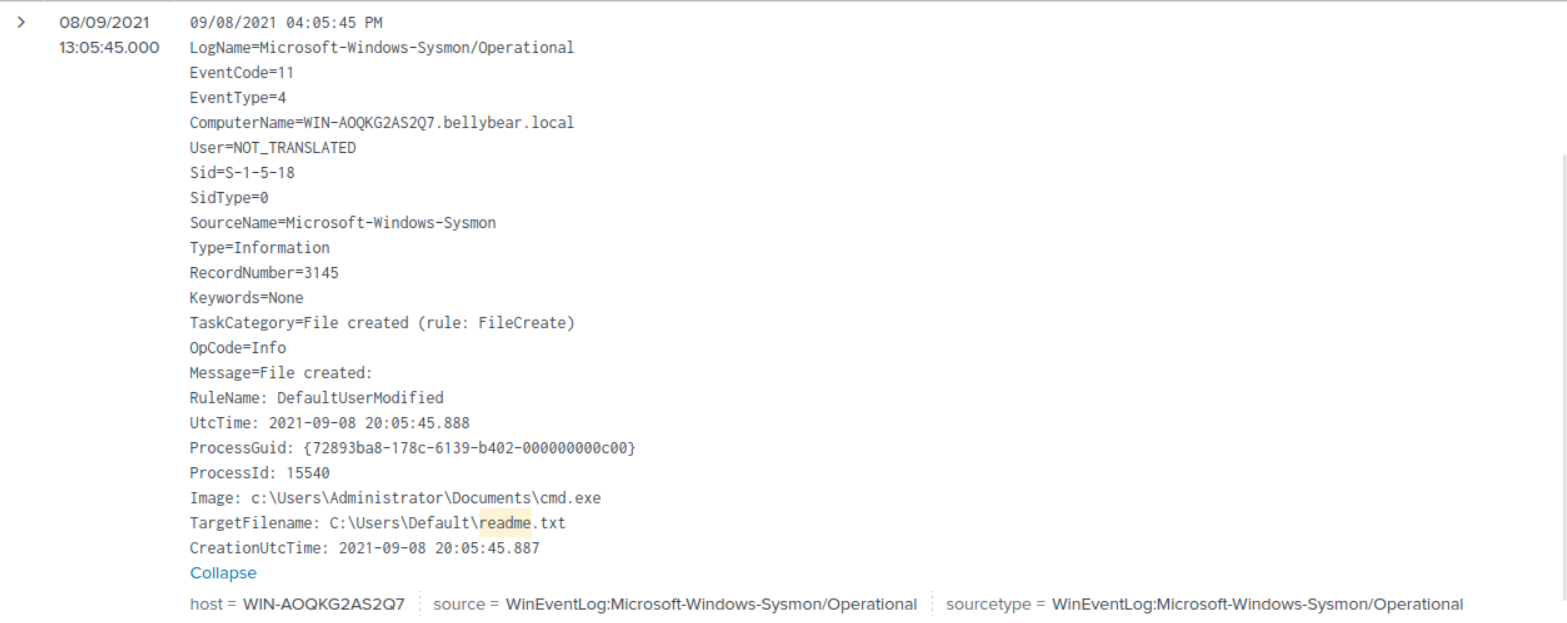
This query provided visibility into Sysmon File Create events (EventCode=11) related to files containing the term Readme.
The query displayed:
UtcTime → event chronologyImage → process responsible for file creationTargetFilename → full path of created files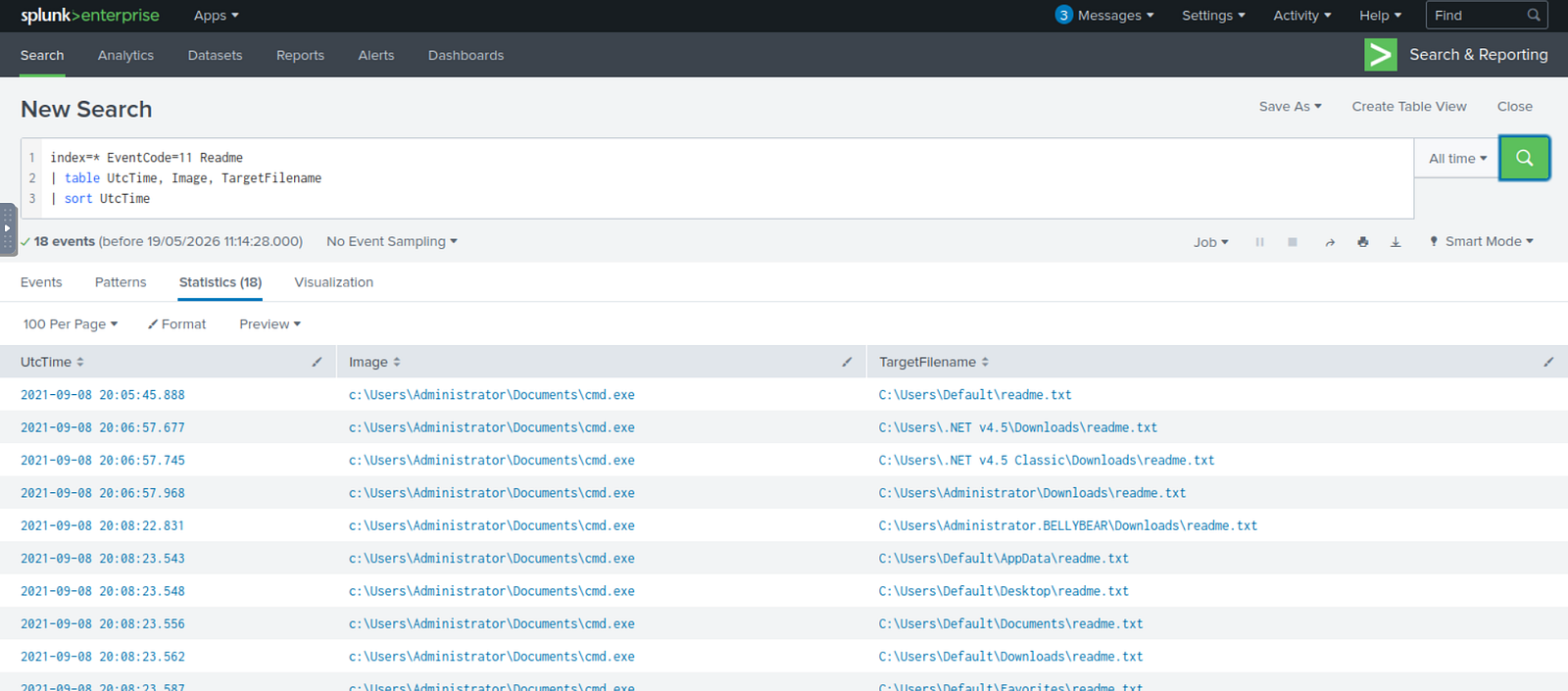
The results immediately revealed suspicious activity involving a file impersonating cmd.exe, but located within the Administrator Documents folder rather than the legitimate Windows system directory.
Additionally, the executable was responsible for creating multiple readme.txt files across several system locations, behavior strongly associated with ransomware note deployment.
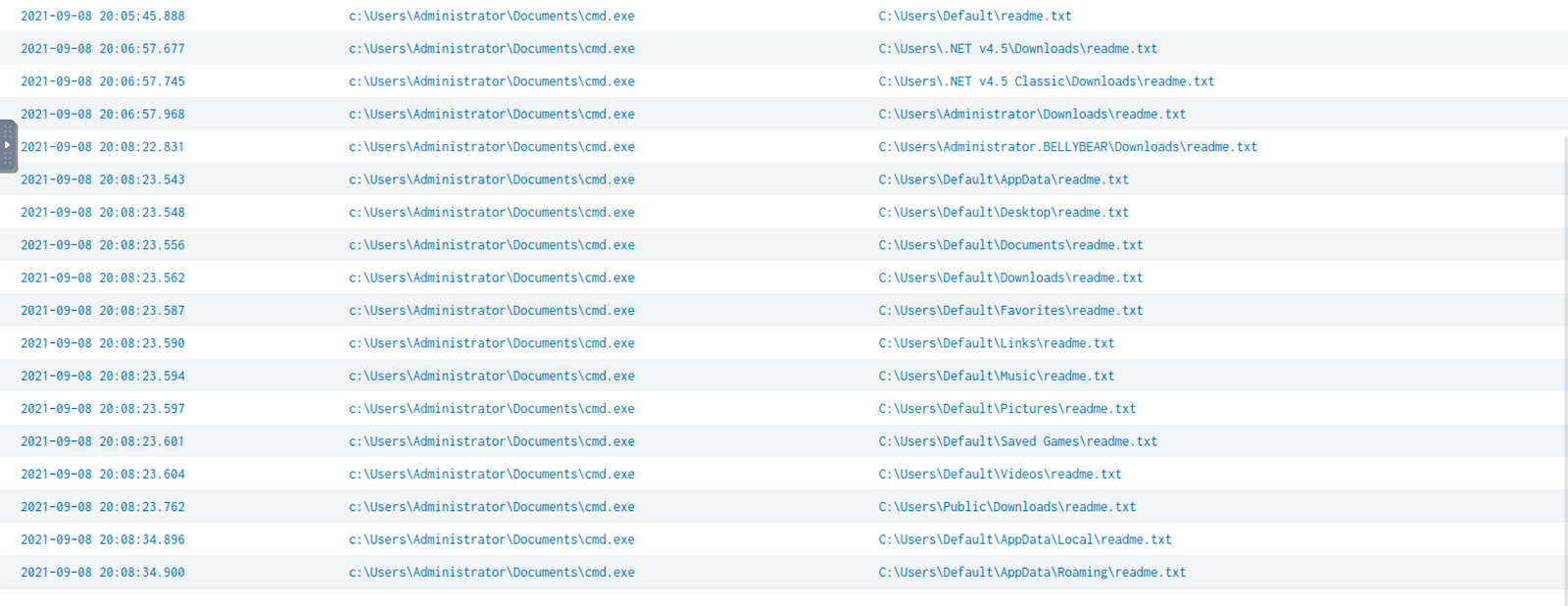
Full details of the first readme.txt creation event:
index=* EventCode=1 Image="C:\\Users\\Administrator\\Documents\\cmd.exe"
| table Image, Hashes
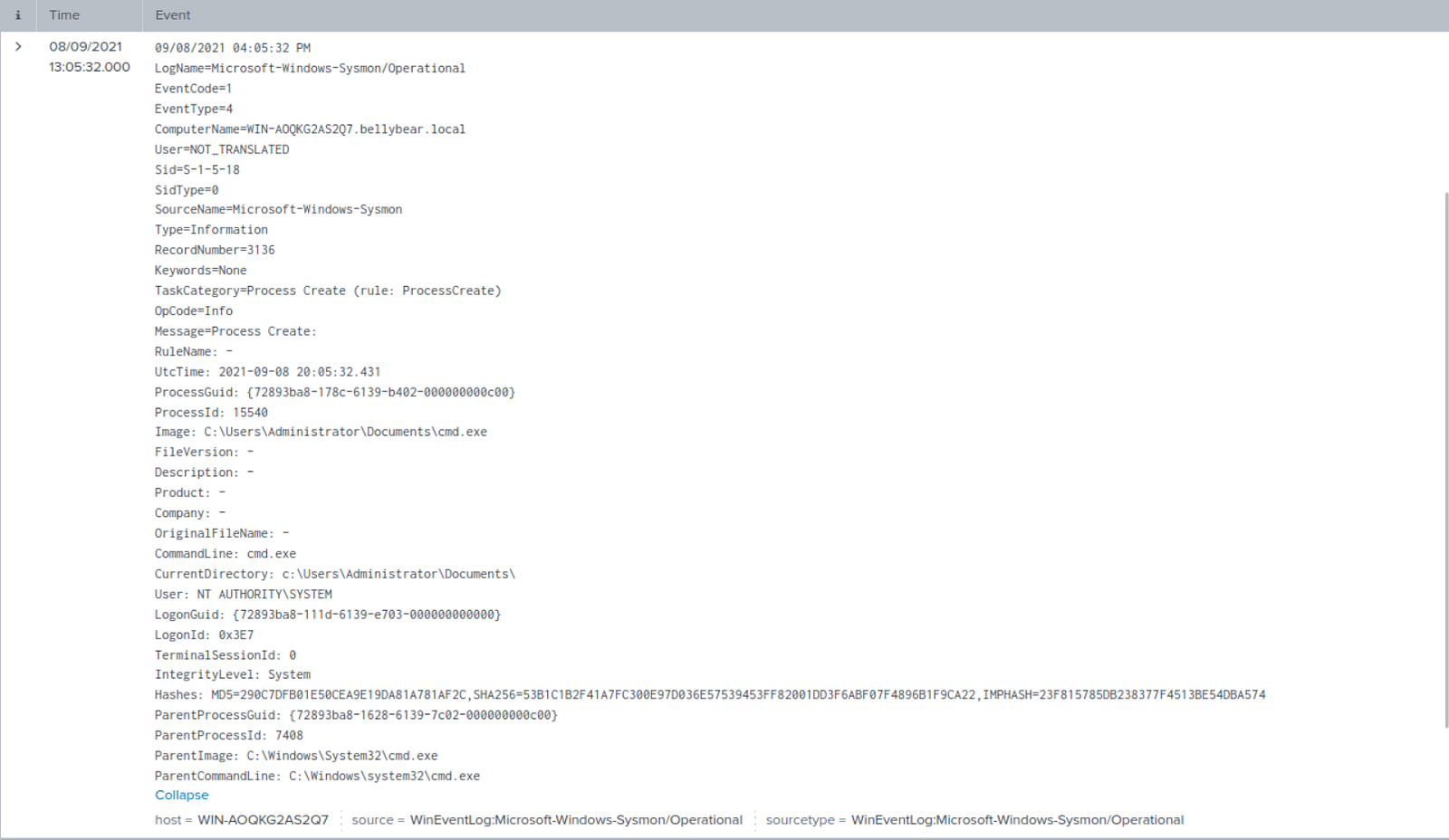
This query searched for Sysmon Process Creation events (EventCode=1) related to the suspicious executable, returning the image path and the file hashes.
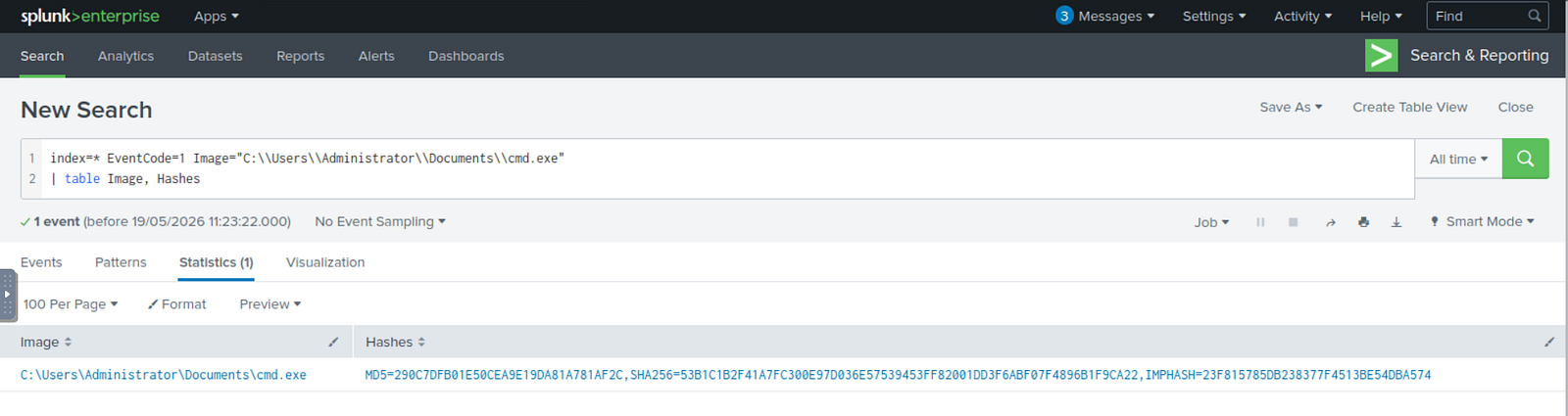
Full details of the execution event:
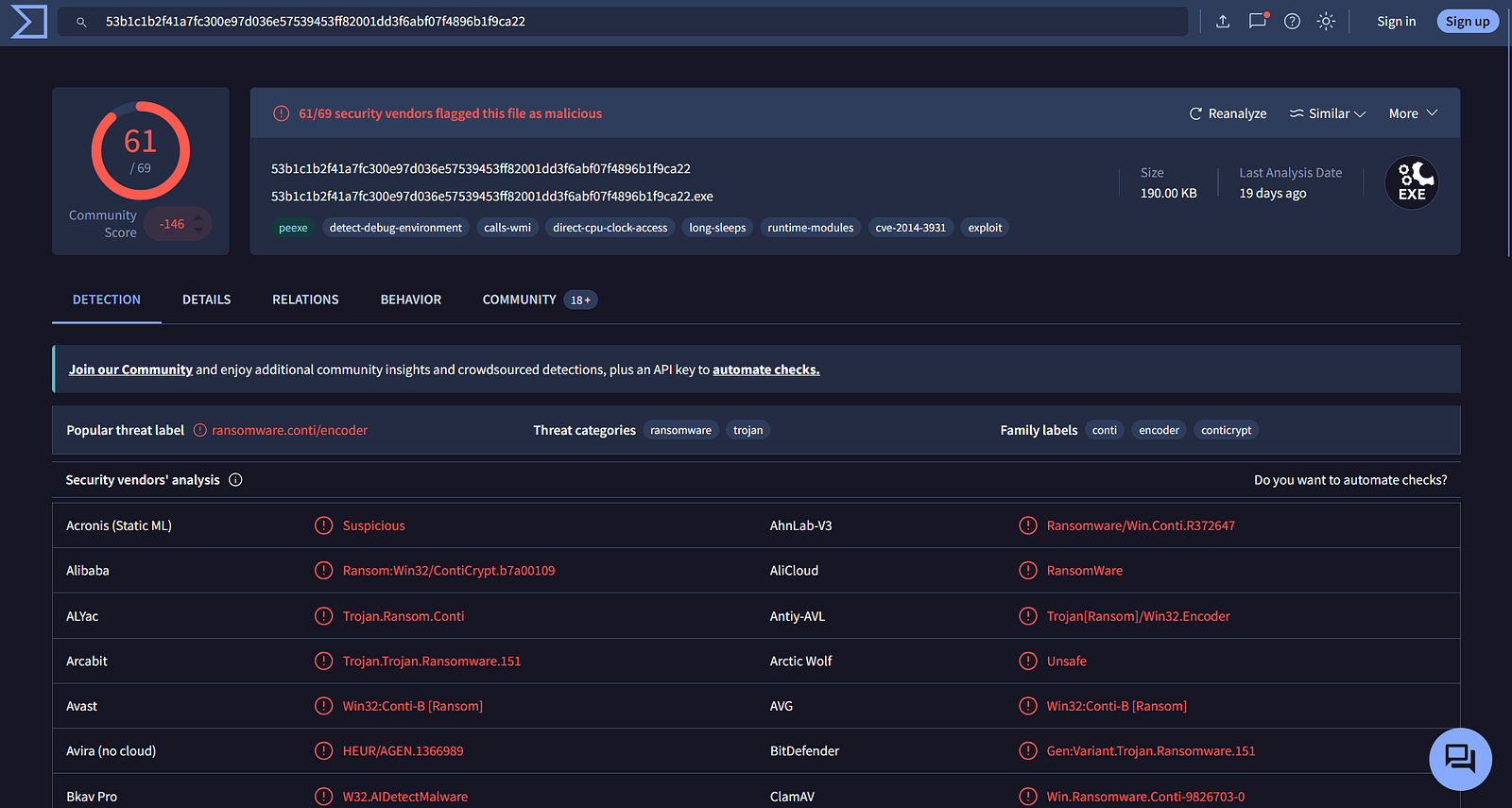
VirusTotal validation results:
index=* EventCode=11 cmd.exe
| table UtcTime, Image, TargetFilename
| sort UtcTime
To identify the origin of the malicious executable, I searched for Sysmon file creation events involving cmd.exe.
The query returned the process responsible for writing the file to disk.
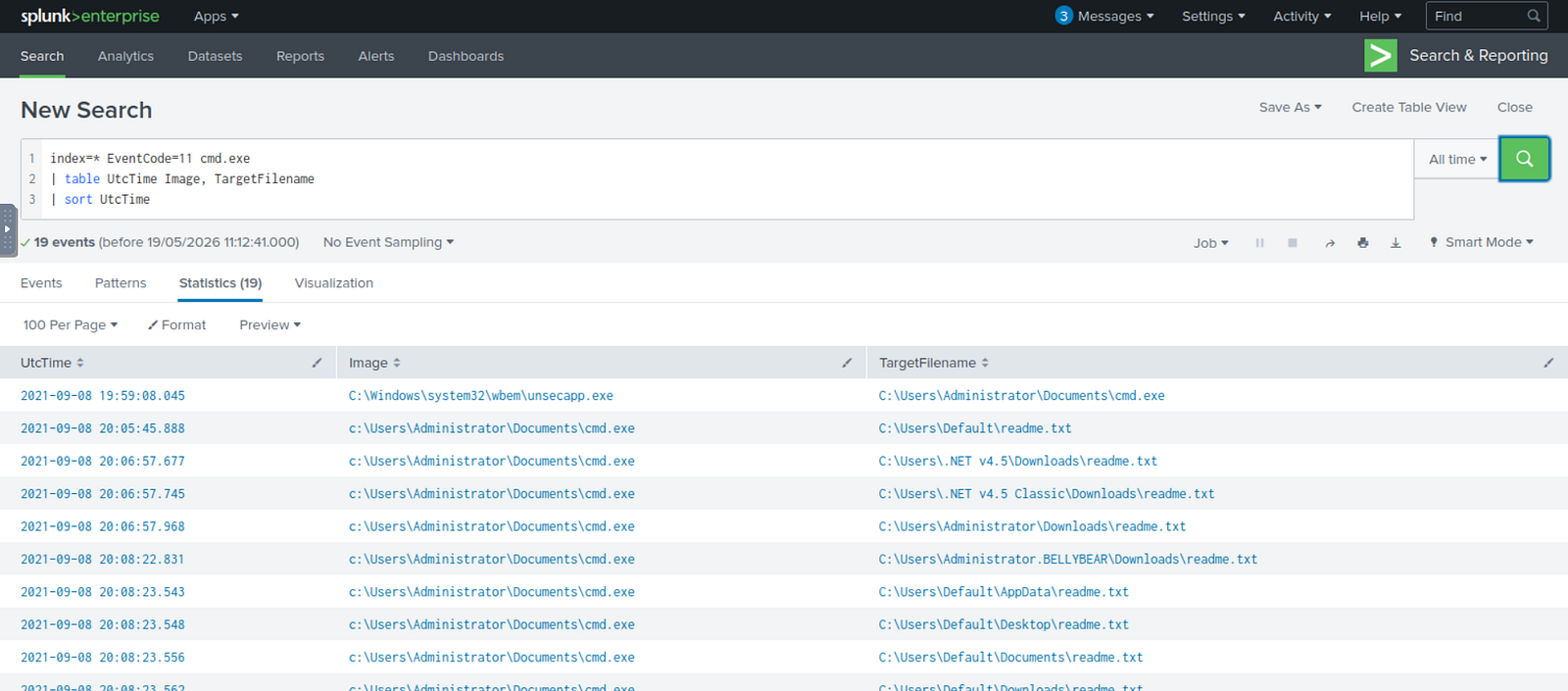
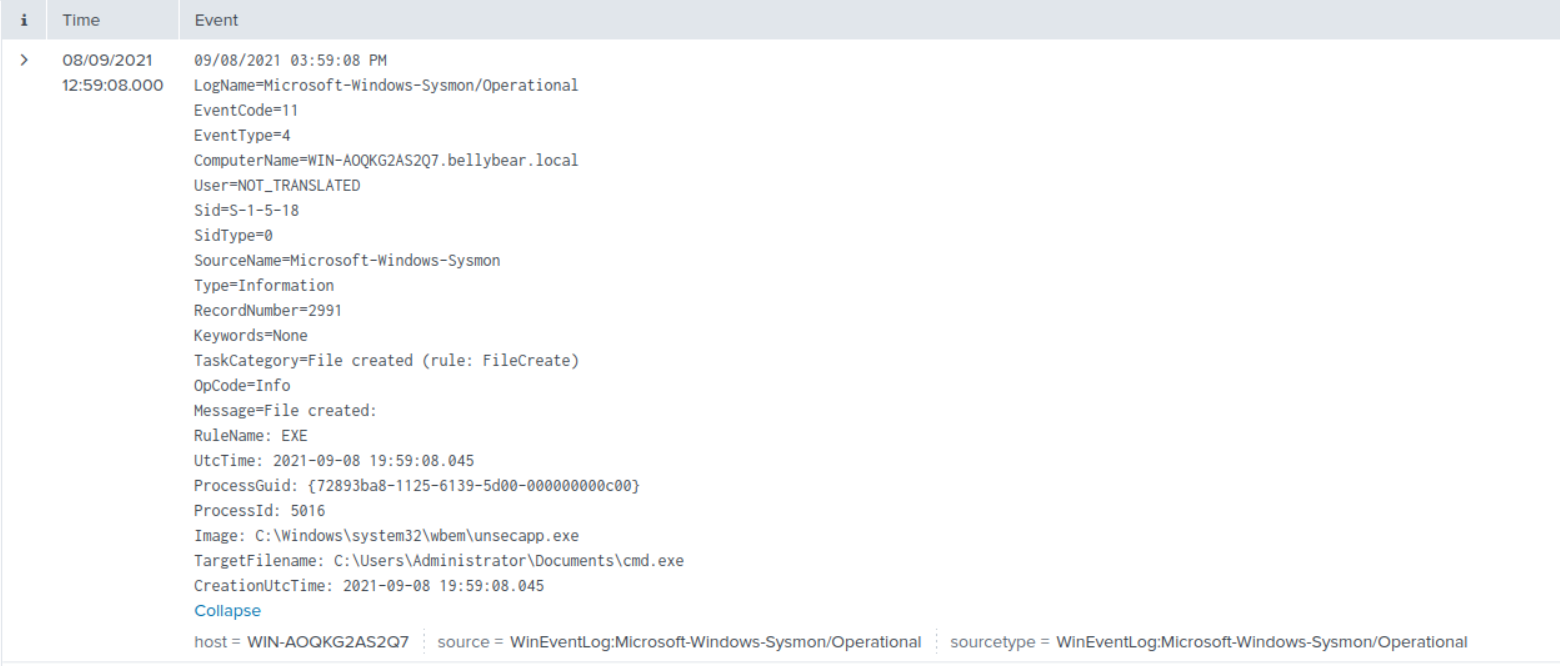
The results showed unsecapp.exe creating the suspicious executable shortly before ransomware deployment activity began.
This behavior strongly suggests abuse of a trusted Windows binary to stage malware execution while attempting to evade detection through LOLBin techniques.
Full details of the file creation event:
 ***
***
Severity: Critical
Endpoint telemetry detected command execution associated with unauthorized local account creation and privilege escalation activity.
2021-09-08 20:04:10.692 UTC
Microsoft-Windows-Sysmon/Operational
WIN-AOQKG2AS2Q7.bellybear.local
NOT_TRANSLATED
A net user command was executed to create a suspicious local account shortly before ransomware execution.
Subsequent commands added the account to privileged groups, indicating the attacker was establishing persistence and administrative access.
net user /add securityninja hardToHack123$
net localgroup administrators securityninja /add
net localgroup "Remote Desktop Users" securityninja /add
4720T1136.001 — Create Account: Local AccountT1098.007 — Additional Local or Domain GroupsTrue Positive — Unauthorized persistence and privilege escalation activity confirmed
Escalated to L2 SOC / Incident Response Team
index=* EventCode=1 CommandLine=* NOT splunk*
| table UtcTime, CommandLine
| sort UtcTime
This query returned process creation events containing command-line activity.
The results were displayed chronologically to identify suspicious administrative commands executed during the intrusion timeline.
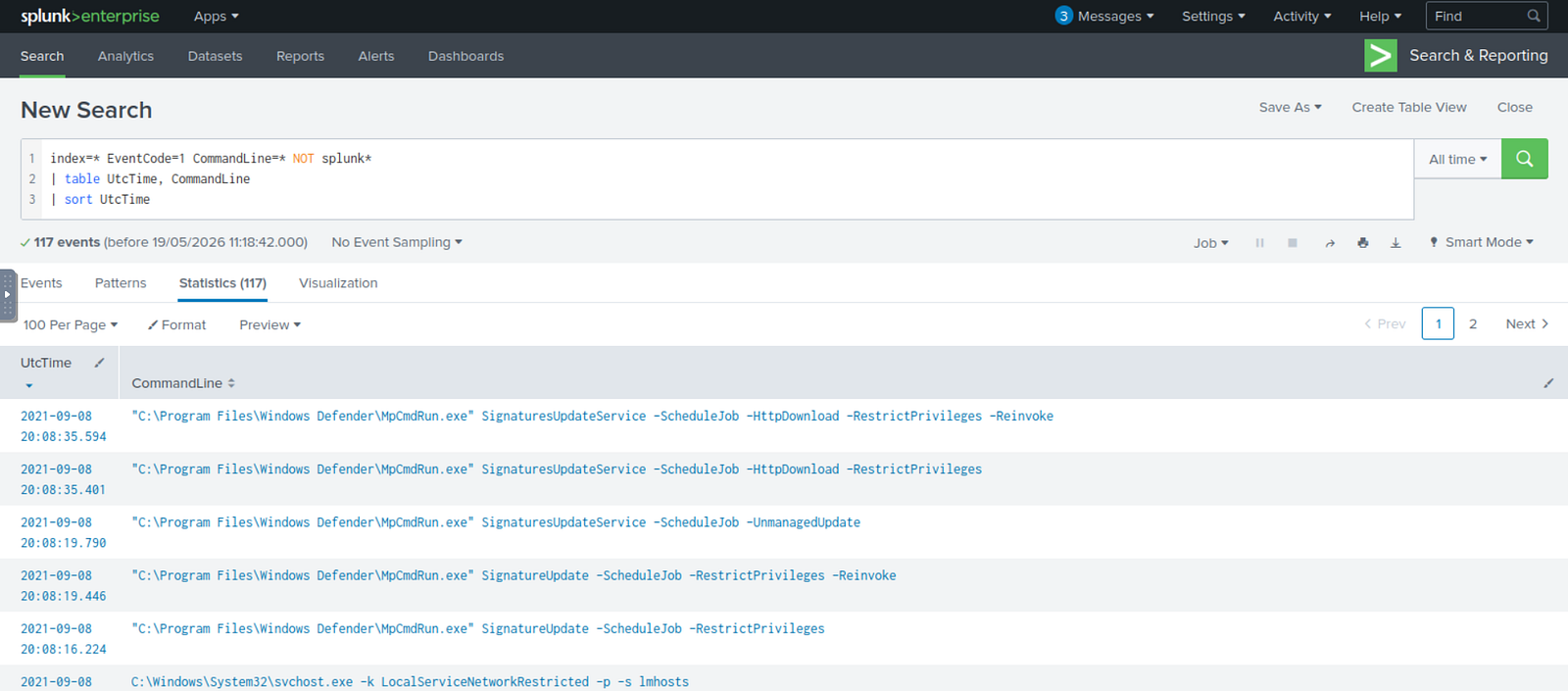
Among the returned entries, commands containing the keywords user and add immediately stood out.
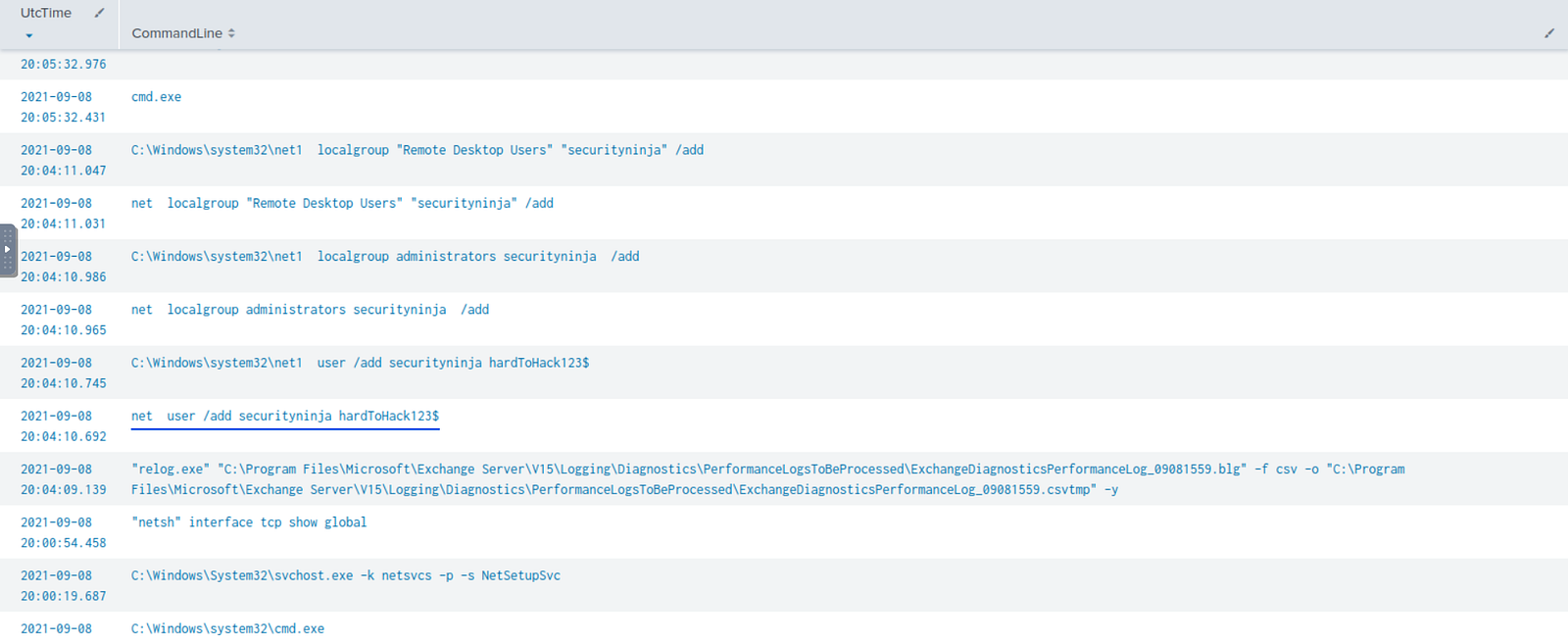
The command revealed that a new local account named securityninja had been created through the Windows net user utility.
Because attackers frequently create local administrator accounts to maintain persistence after initial access, this activity represented a critical escalation point in the attack chain.
To verify whether the command successfully created the account, I pivoted to Windows Security Logs and searched for Event ID 4720 (User Account Created).
index=* EventCode=4720
| table UtcTime, Account_Name, Account_expires, Keywords, ComputerName
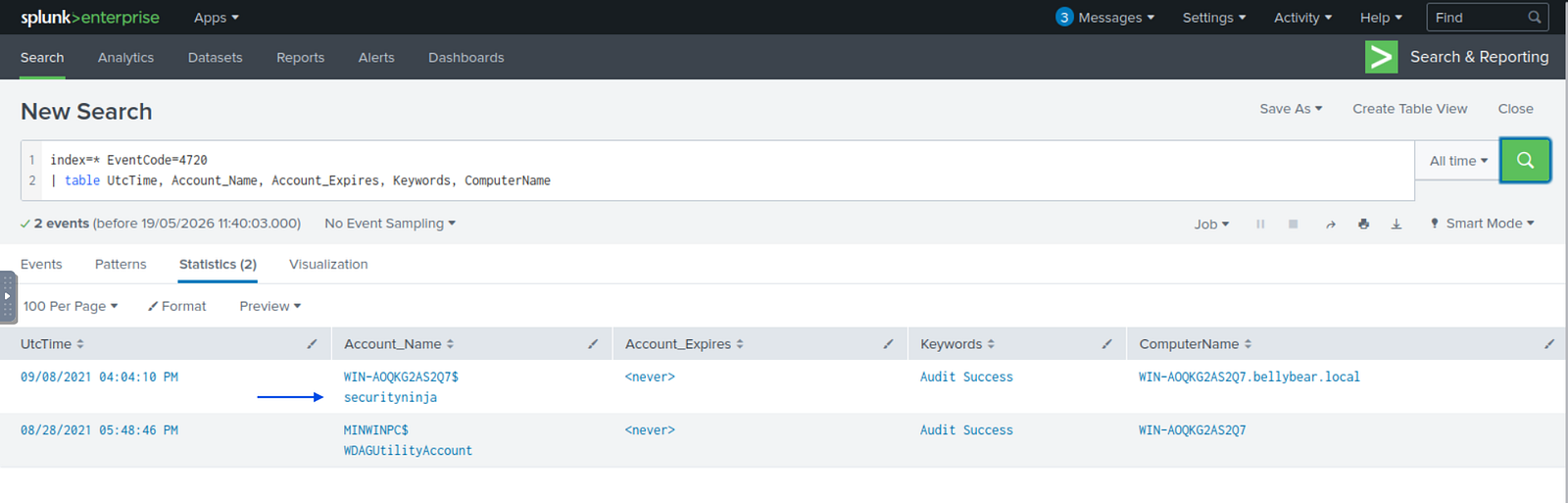
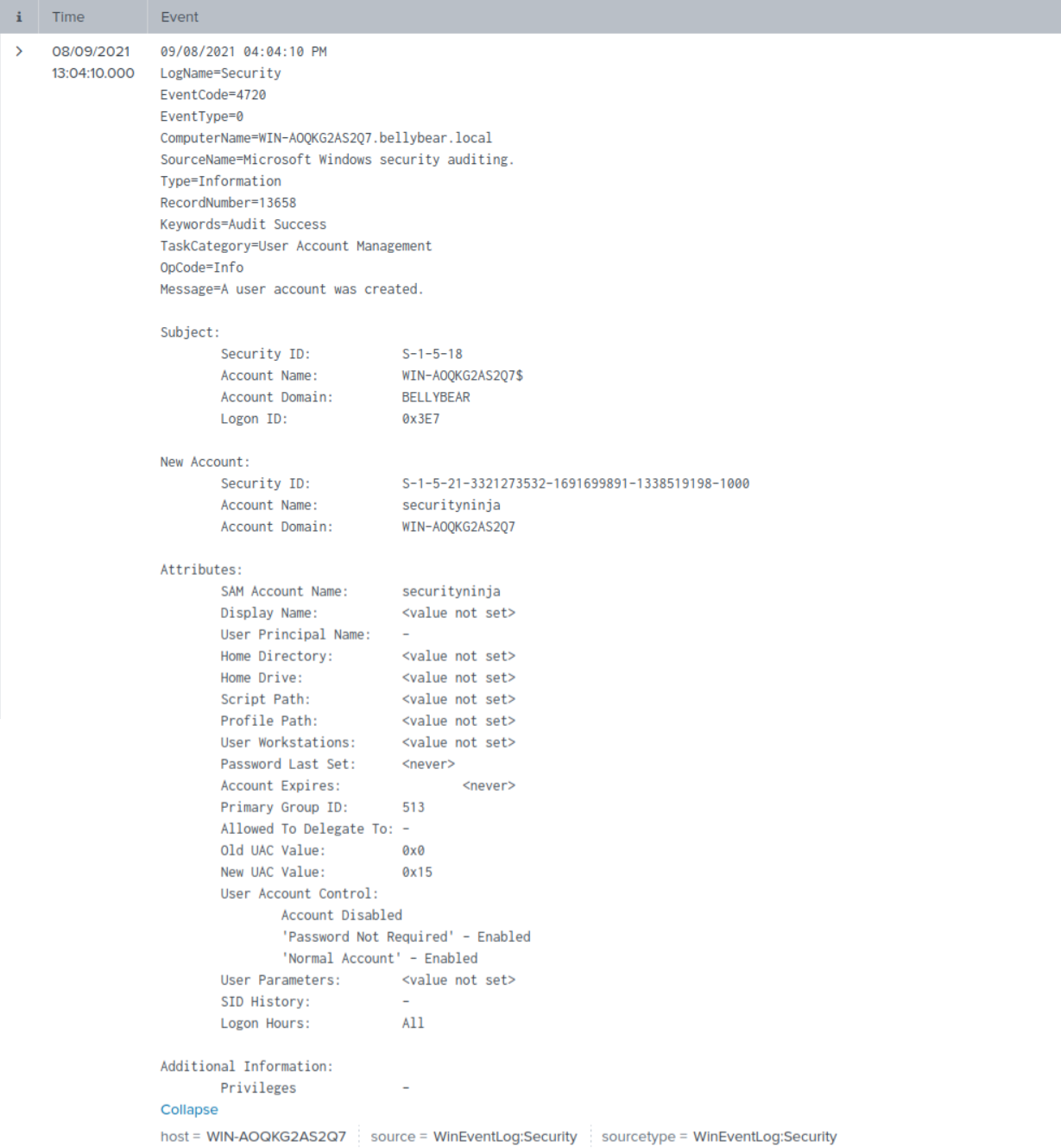
The event confirmed successful creation of the securityninja account.
Full event details:
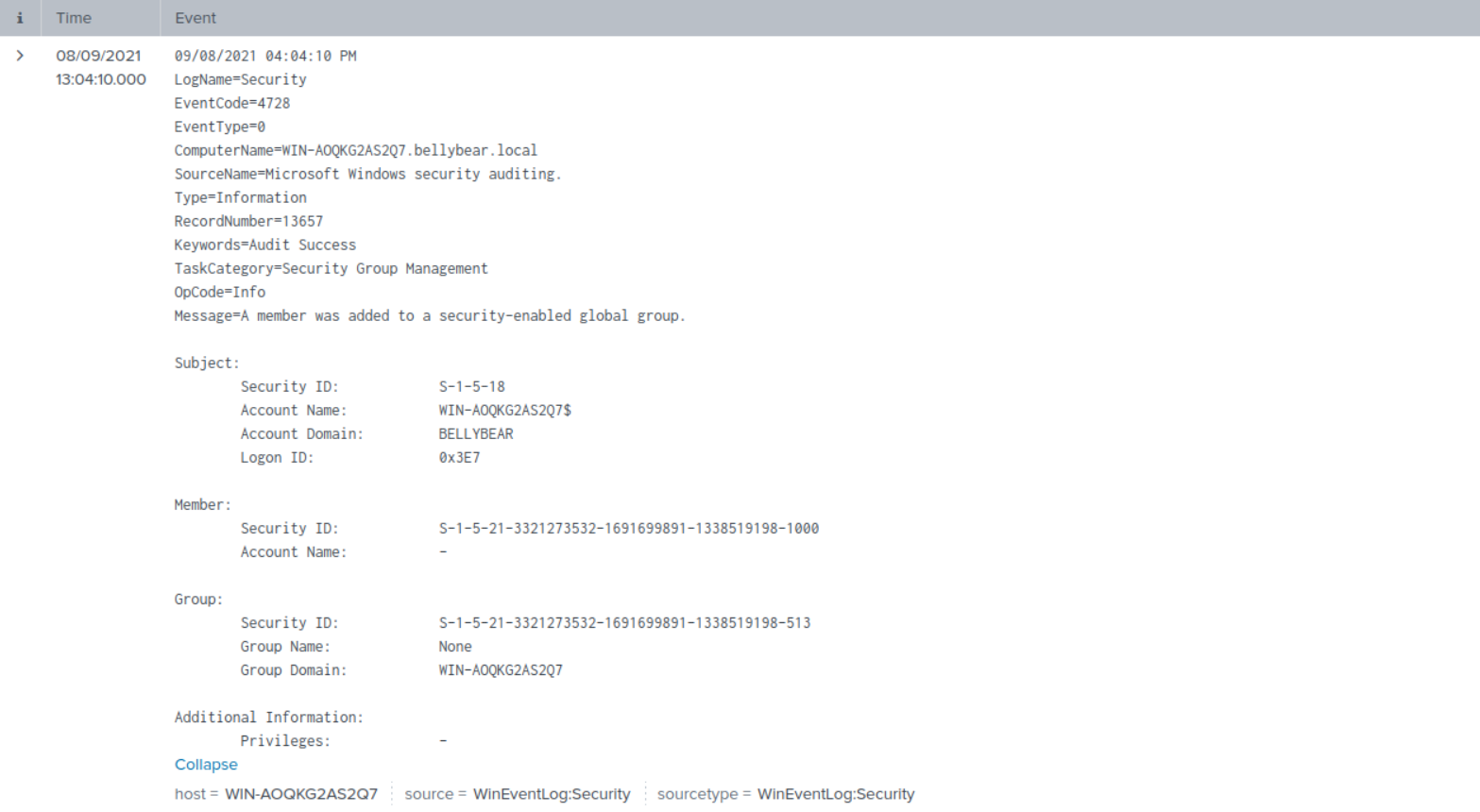
To validate successful privilege escalation activity, I then investigated security group modification events 4728.
index=* EventCode=4728
| table Time, Account_Name, Group_Domain, Keywords, ComputerName, TaskCategory
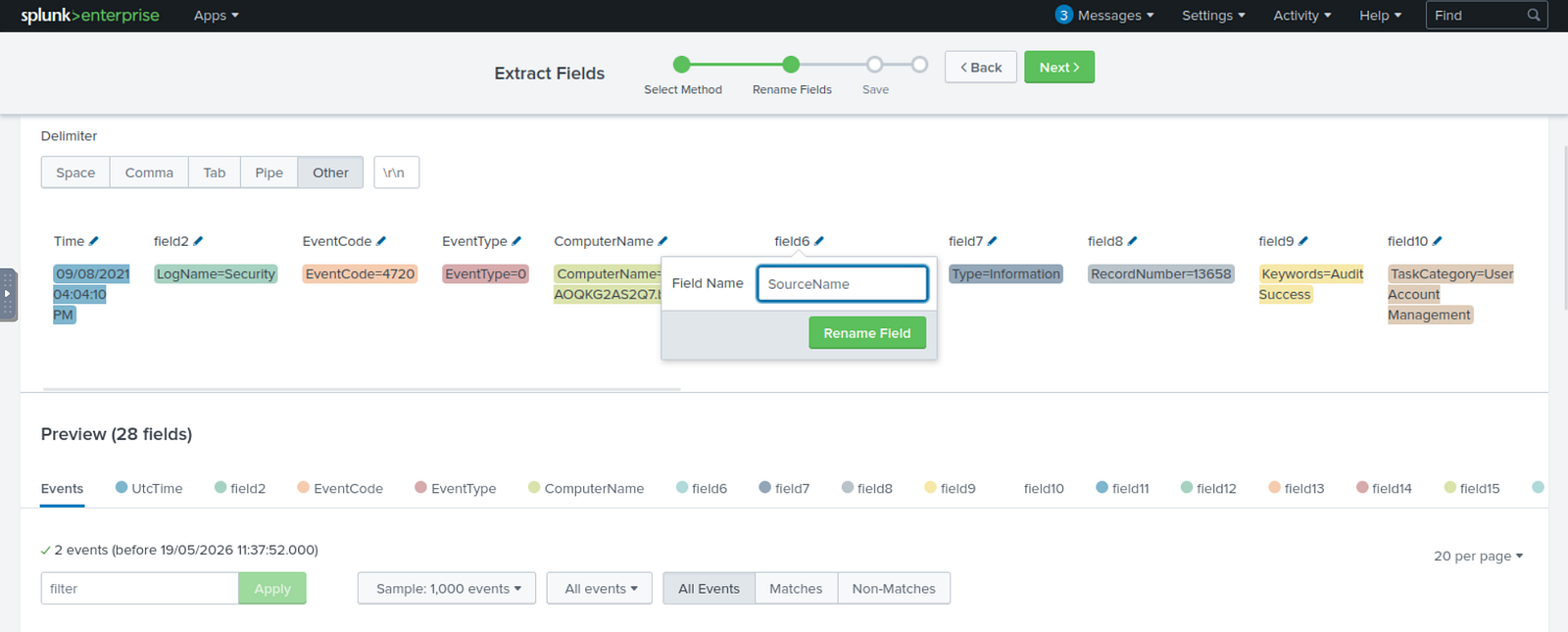
Because the timestamp field was not automatically parsed correctly in some logs, I extracted and normalized the relevant fields within Splunk to improve timeline visibility and event correlation.
The results confirmed the user was successfully added to privileged groups on the affected Exchange server.
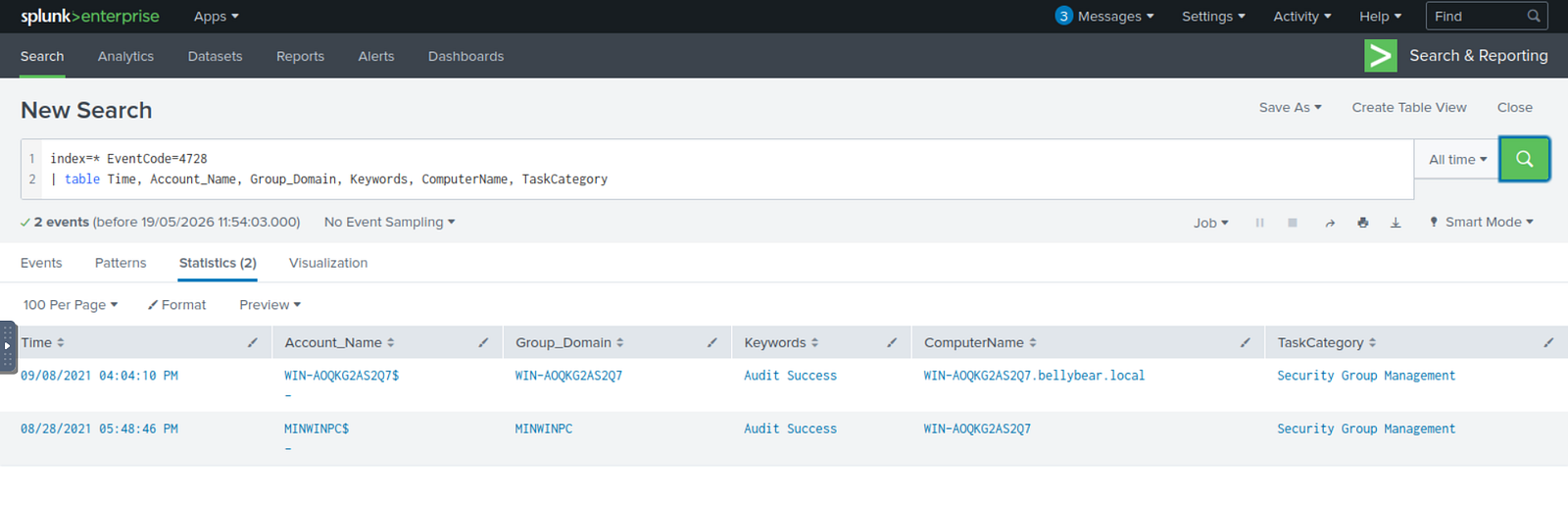
Complete event details:
Severity: Critical
Sysmon telemetry identified process injection activity consistent with attacker process migration techniques used for stealth and defense evasion.
2021-09-08 19:54:12.665 UTC
Microsoft-Windows-Sysmon/Operational
WIN-AOQKG2AS2Q7.bellybear.local
The attacker migrated execution from PowerShell into unsecapp.exe, a legitimate Windows process associated with WMI operations.
This technique is commonly used to blend malicious activity into trusted system processes and evade security monitoring.
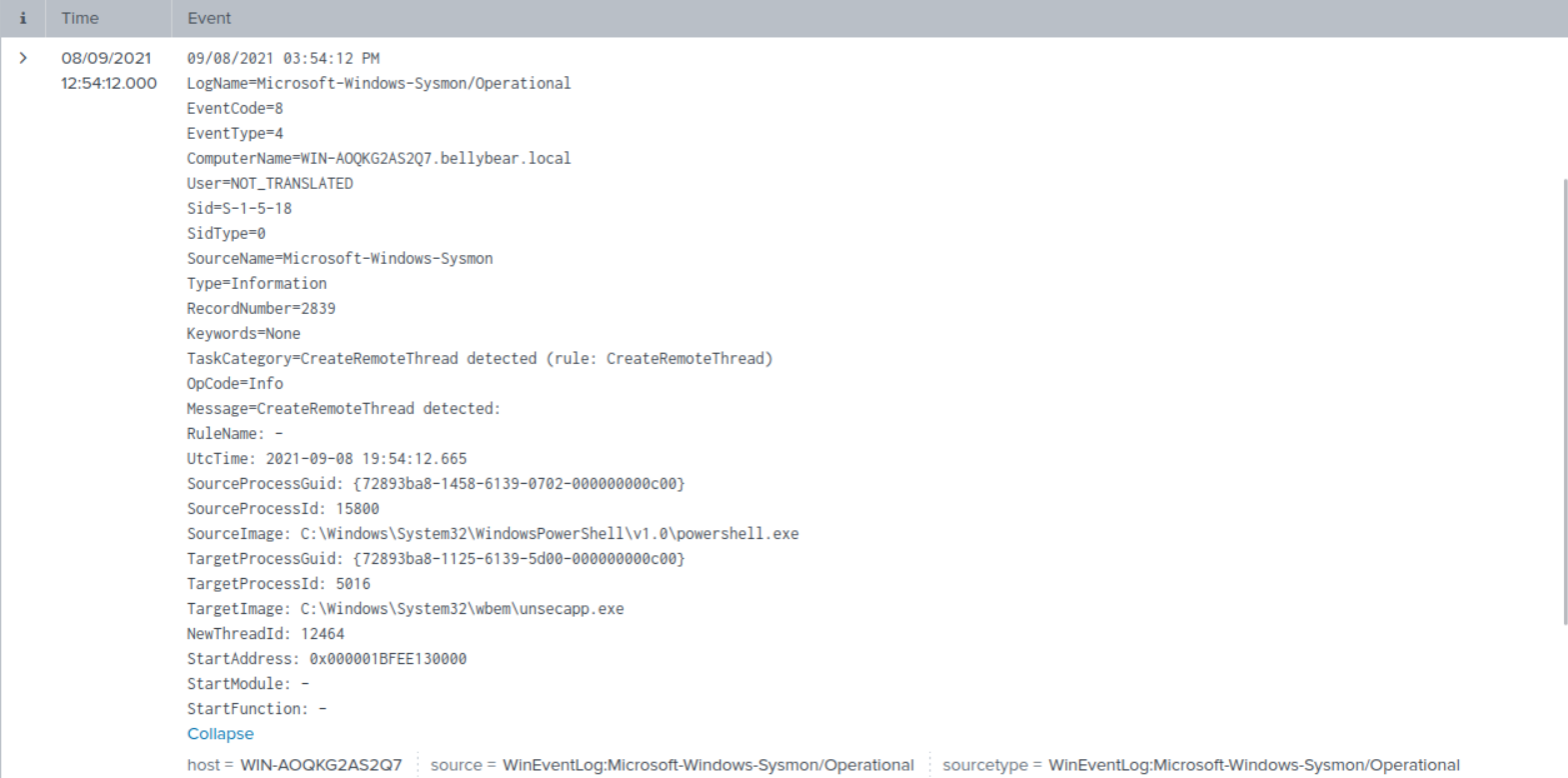
CreateRemoteThread event (EventCode=8) showing process injection activityC:\Windows\System32\WindowsPowerShell\v1.0\powershell.exe
C:\Windows\System32\wbem\unsecapp.exe
unsecapp.exe later participated in malware staging and credential theft activity.T1055 — Process InjectionTrue Positive — Malicious process injection activity confirmed
Escalated to L2 SOC / Incident Response Team
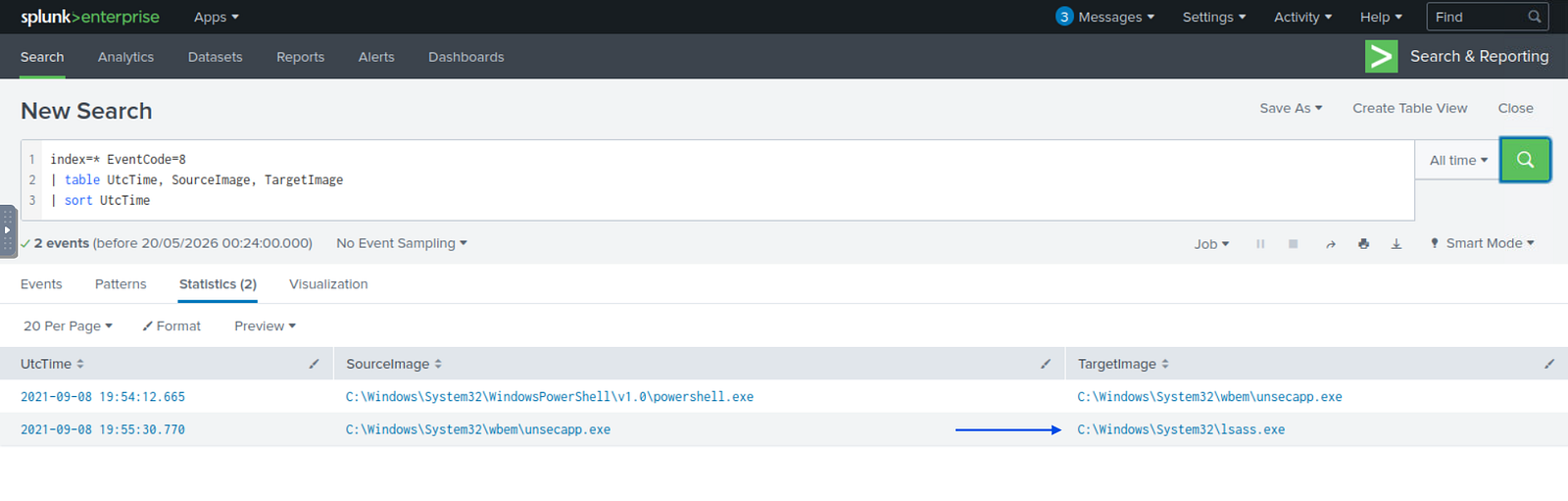
index=* EventCode=8
| table UtcTime, SourceImage, TargetImage
| sort UtcTime
To identify process migration activity, I searched for Sysmon CreateRemoteThread events.
These events are commonly associated with process injection and code migration techniques.
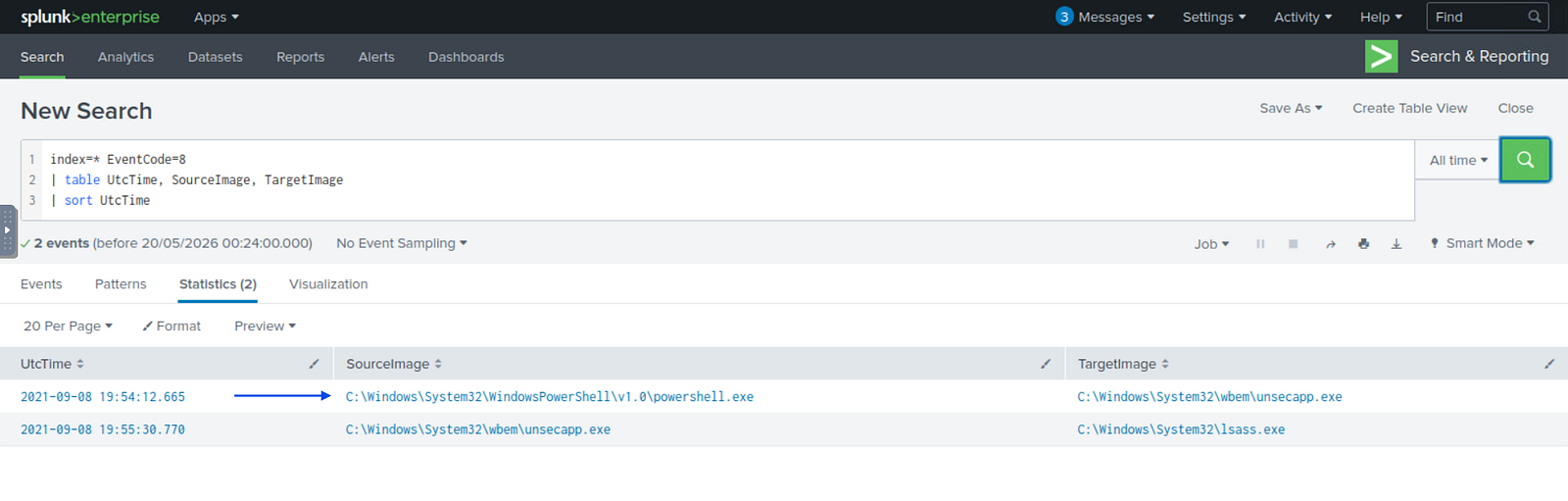
The results revealed PowerShell injecting into unsecapp.exe, a trusted Windows process commonly associated with WMI functionality.
This strongly indicated an attempt to evade detection through LOLBin abuse and trusted process execution.
Complete event details:
Severity: Critical
Telemetry identified attacker interaction with lsass.exe, behavior commonly associated with credential dumping and credential access activity.
2021-09-08 19:55:30.770 UTC
Microsoft-Windows-Sysmon/Operational
WIN-AOQKG2AS2Q7.bellybear.local
Process injection activity targeting lsass.exe was identified shortly after compromise escalation activity involving unsecapp.exe.
Because lsass.exe stores authentication material in memory, it is a common target for credential dumping operations.
C:\Windows\System32\wbem\unsecapp.exe
to:
C:\Windows\System32\lsass.exe
2021-09-08 19:55:30.770 UTCT1055 — Process InjectionT1003.001 — OS Credential Dumping: LSASS MemoryTrue Positive — Credential dumping activity confirmed
Escalated to L2 SOC / Incident Response Team
index=* "C:\\Windows\\System32\\lsass.exe"
I searched for events involving lsass.exe, a common target for credential dumping activity on Windows systems.
The search returned two relevant events.
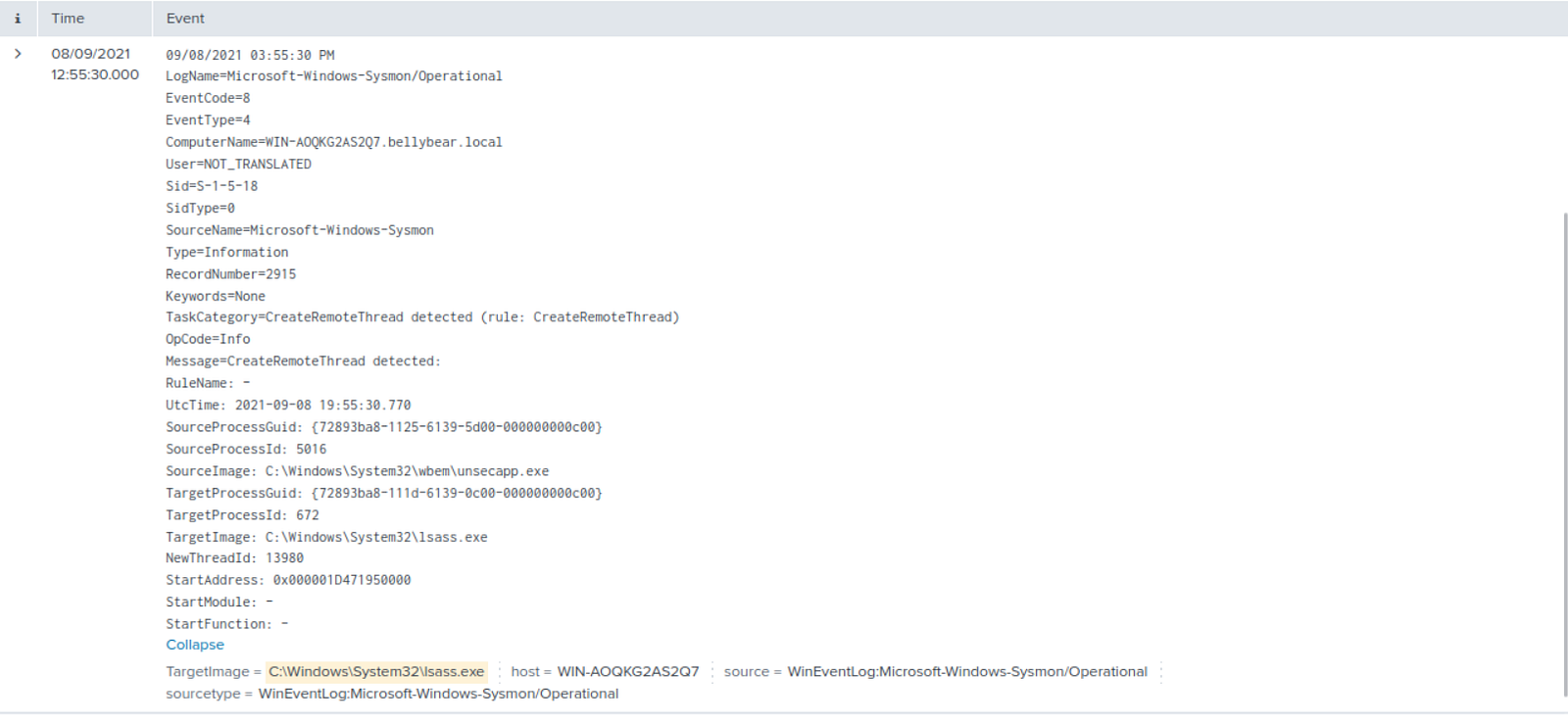
One of them revealed process injection activity from unsecapp.exe into lsass.exe.
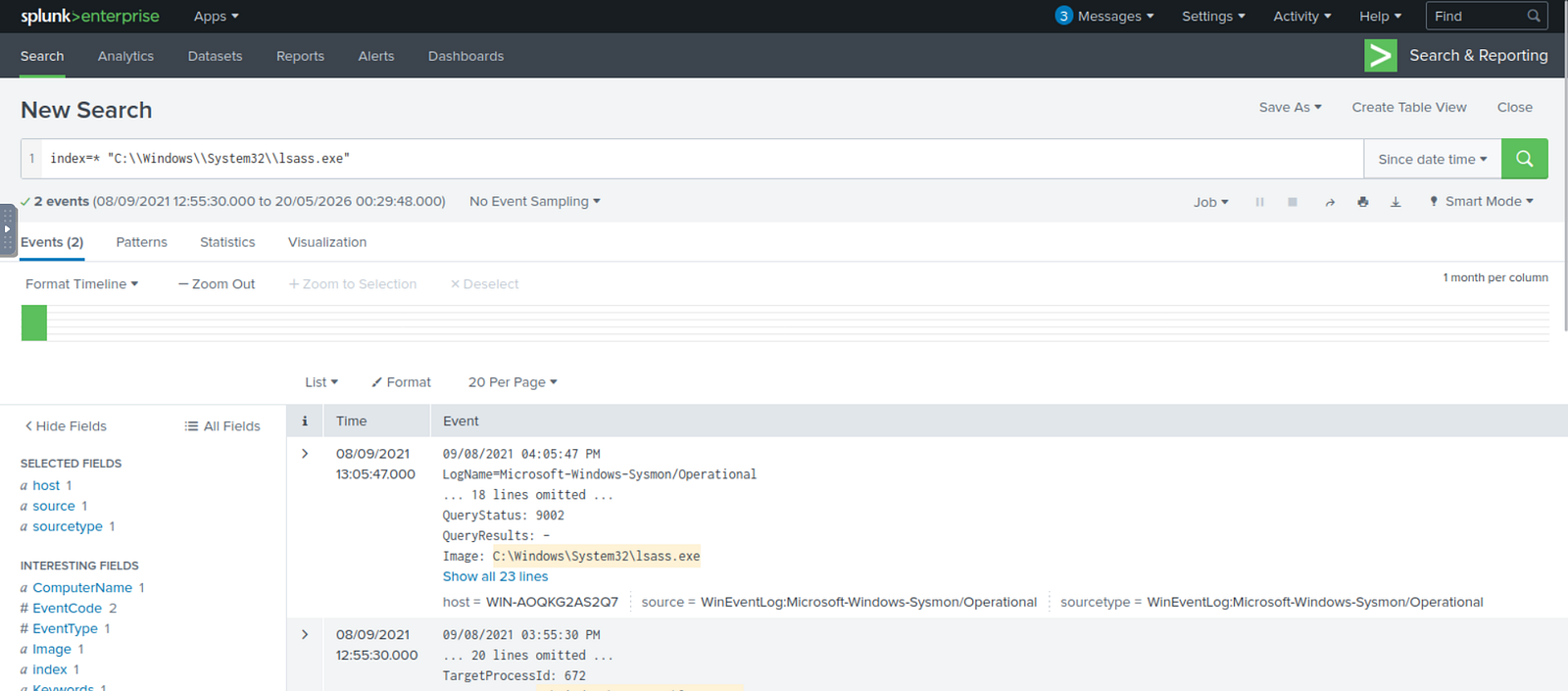
Because attackers frequently target LSASS memory to extract NTLM hashes, Kerberos tickets, and plaintext credentials, this event represented a strong indicator of credential access activity.
Complete event details:
This same activity was also visible during the earlier investigation into Sysmon EventCode=8 process injection events.
Severity: Critical
A suspicious ASPX file consistent with web shell deployment activity was identified within the Microsoft Exchange web application directory.
2021-09-08 19:52:09.748 UTC
Microsoft-Windows-Sysmon/Operational
WIN-AOQKG2AS2Q7.bellybear.local
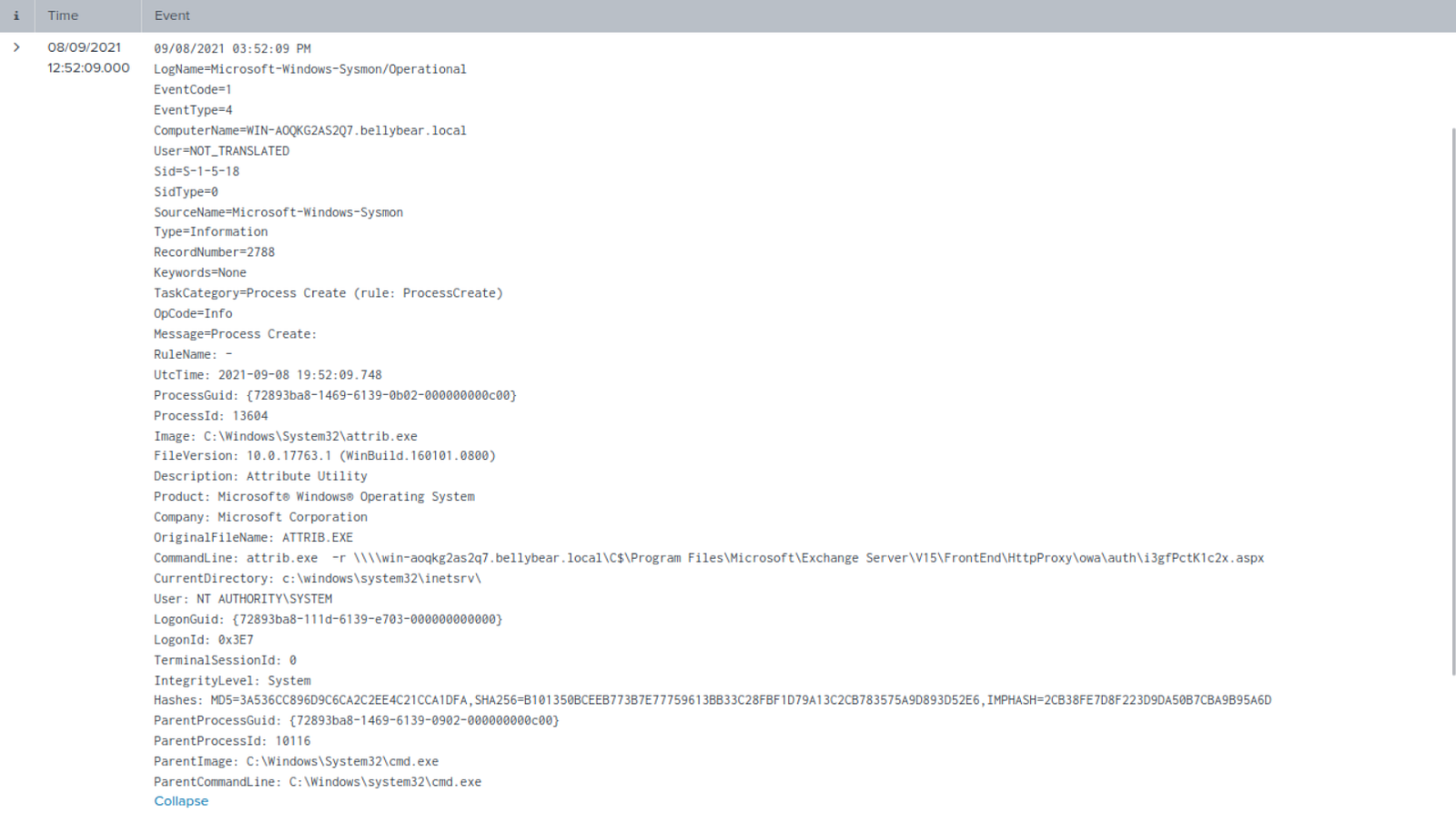
A suspicious .aspx file located inside the Exchange HttpProxy directory was modified using attrib.exe, a legitimate Windows utility frequently abused by attackers.
The file path and extension strongly suggest deployment of a web shell used for remote command execution and persistence.
attrib.exe -r \\win-aoqkg2as2q7.bellybear.local\C$\Program Files\Microsoft\Exchange Server\V15\FrontEnd\HttpProxy\owa\auth\i3gfPctK1c2x.aspx
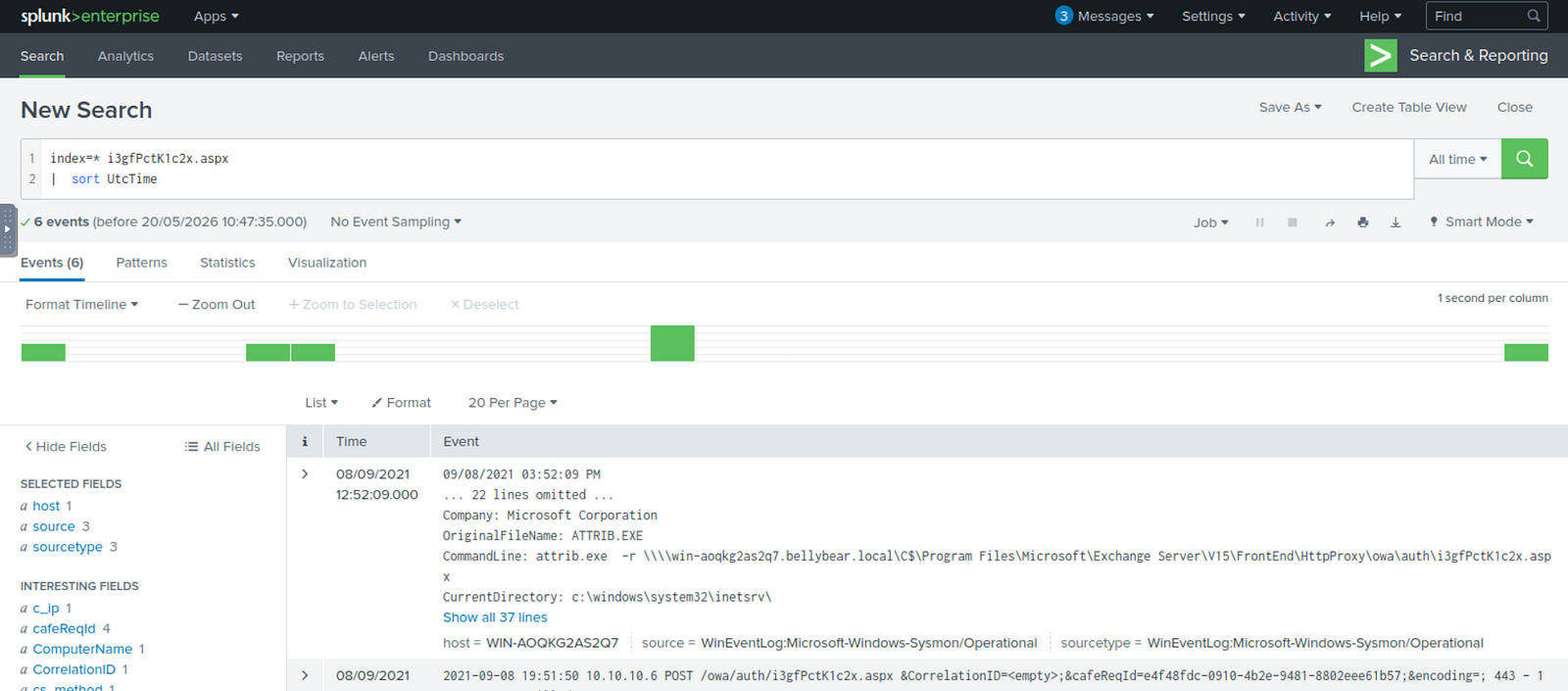
i3gfPctK1c2x.aspx
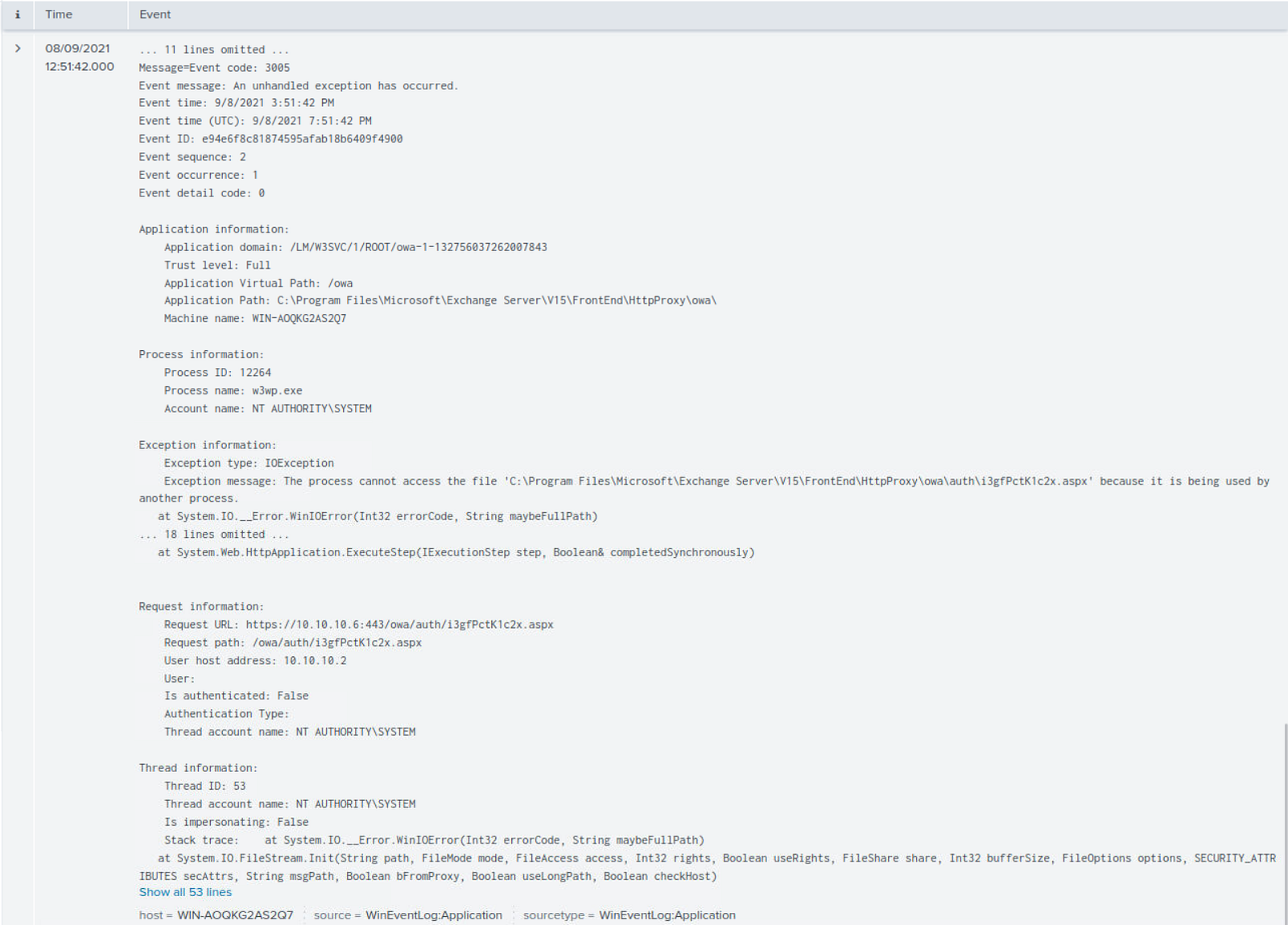
2021-09-08 19:51:36 UTC and 2021-09-08 19:51:50 UTC200 responses and redirect 302 responses associated with the filew3wp.exe activity and identified behavior associated with Metasploit exploitation targeting IIS worker processes2021-09-08 19:30:23.198 UTCT1505.003 — Web ShellT1190 — Exploit Public-Facing ApplicationTrue Positive — Exchange web shell deployment confirmed
Escalated to L2 SOC / Incident Response Team
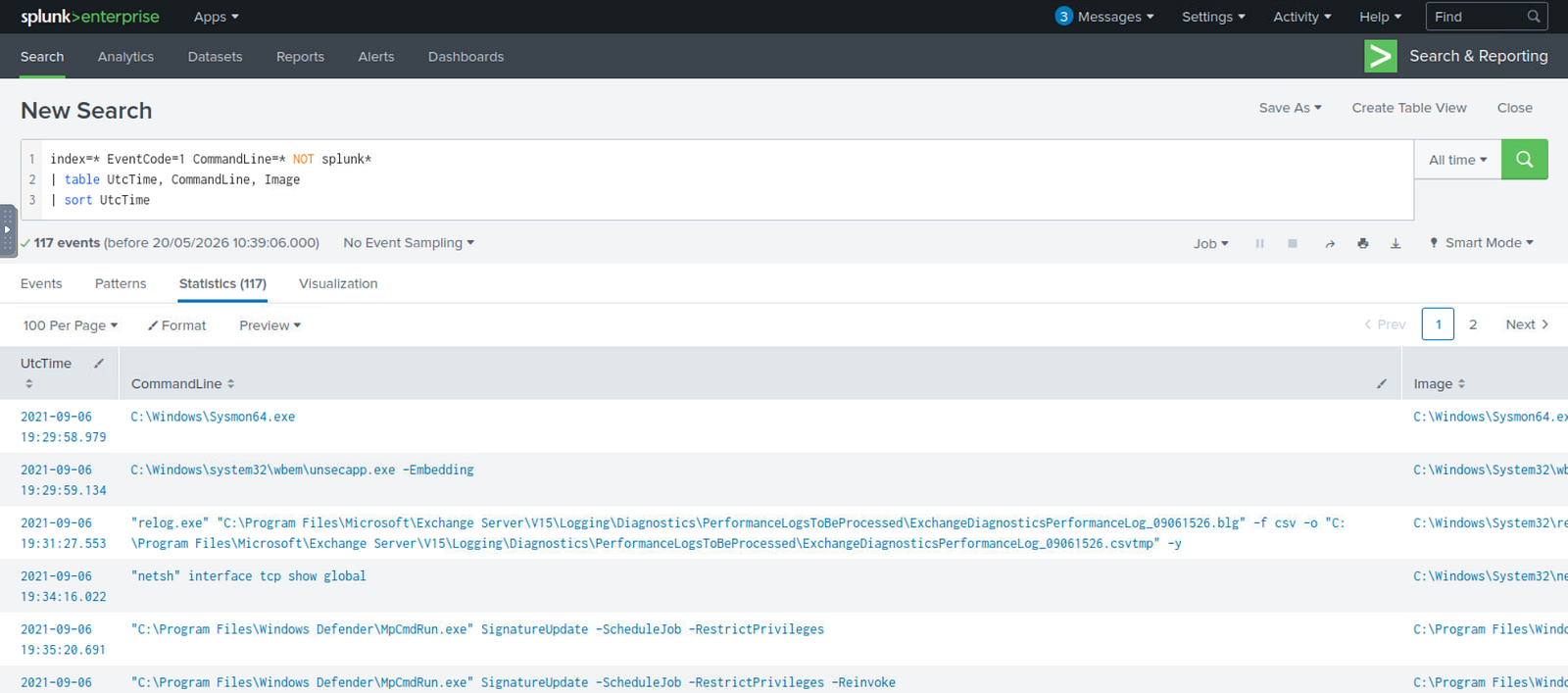
index=* EventCode=1 CommandLine=* NOT splunk*
| table UtcTime, CommandLine, Image
| sort UtcTime
I searched for suspicious command-line activity occurring during the intrusion timeframe.
One result immediately stood out: usage of the LOLBin attrib.exe to remove the read-only attribute from an ASPX file located within the Exchange HttpProxy directory.
The file path strongly suggested deployment or modification of a web shell.
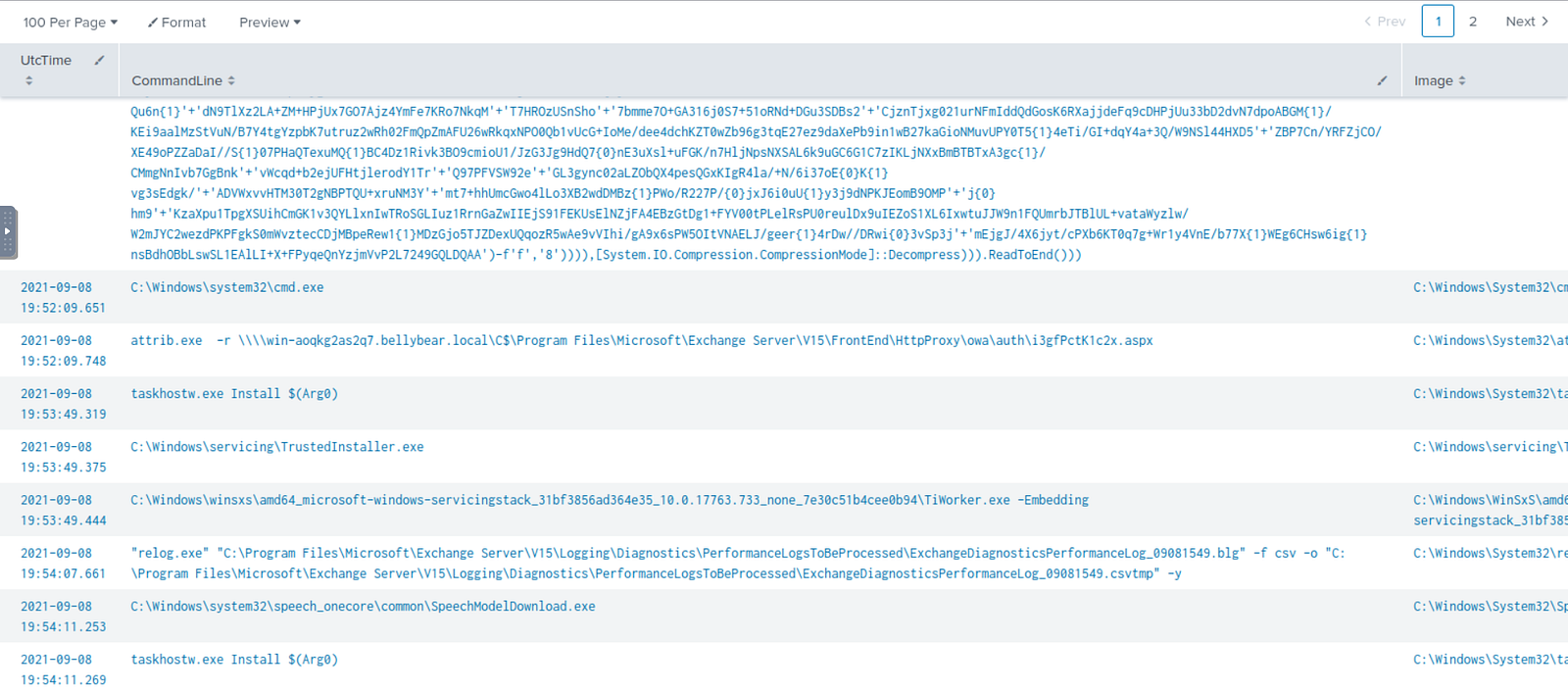
Complete event details:
Related activity involving i3gfPctK1c2x.aspx:
HTTP 200 responses:

HTTP 302 responses:

Unhandled exception event also involving w3wp.exe:
Search results related to w3wp.exe activity:
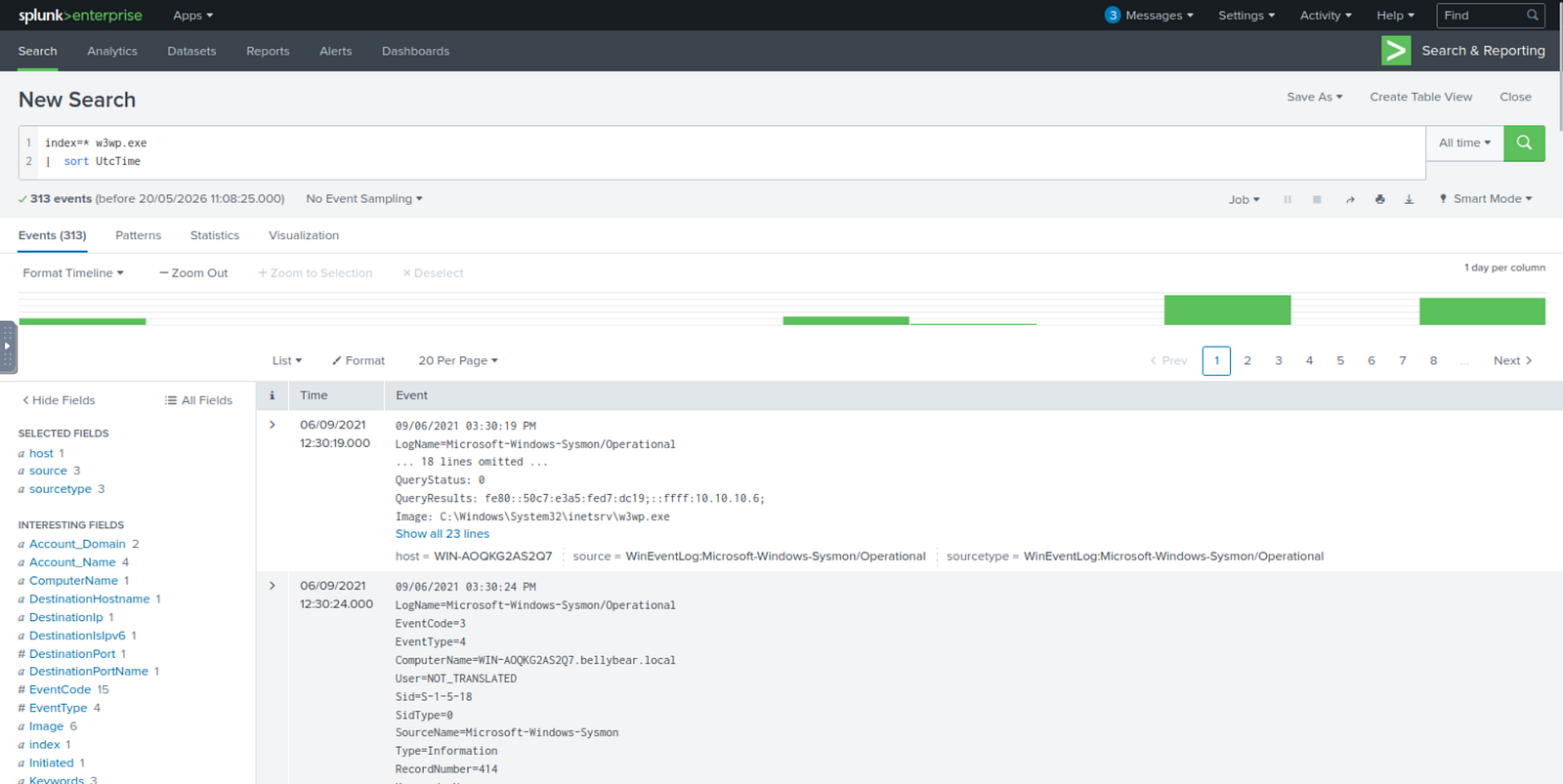
Reviewing the process activity revealed multiple events commonly associated with exploitation frameworks such as Metasploit interacting with Exchange infrastructure.
Because w3wp.exe is responsible for handling IIS web application requests, it is frequently targeted during exploitation of public-facing Microsoft Exchange vulnerabilities and web shell deployment.
Details of the first observed Metasploit-related event:
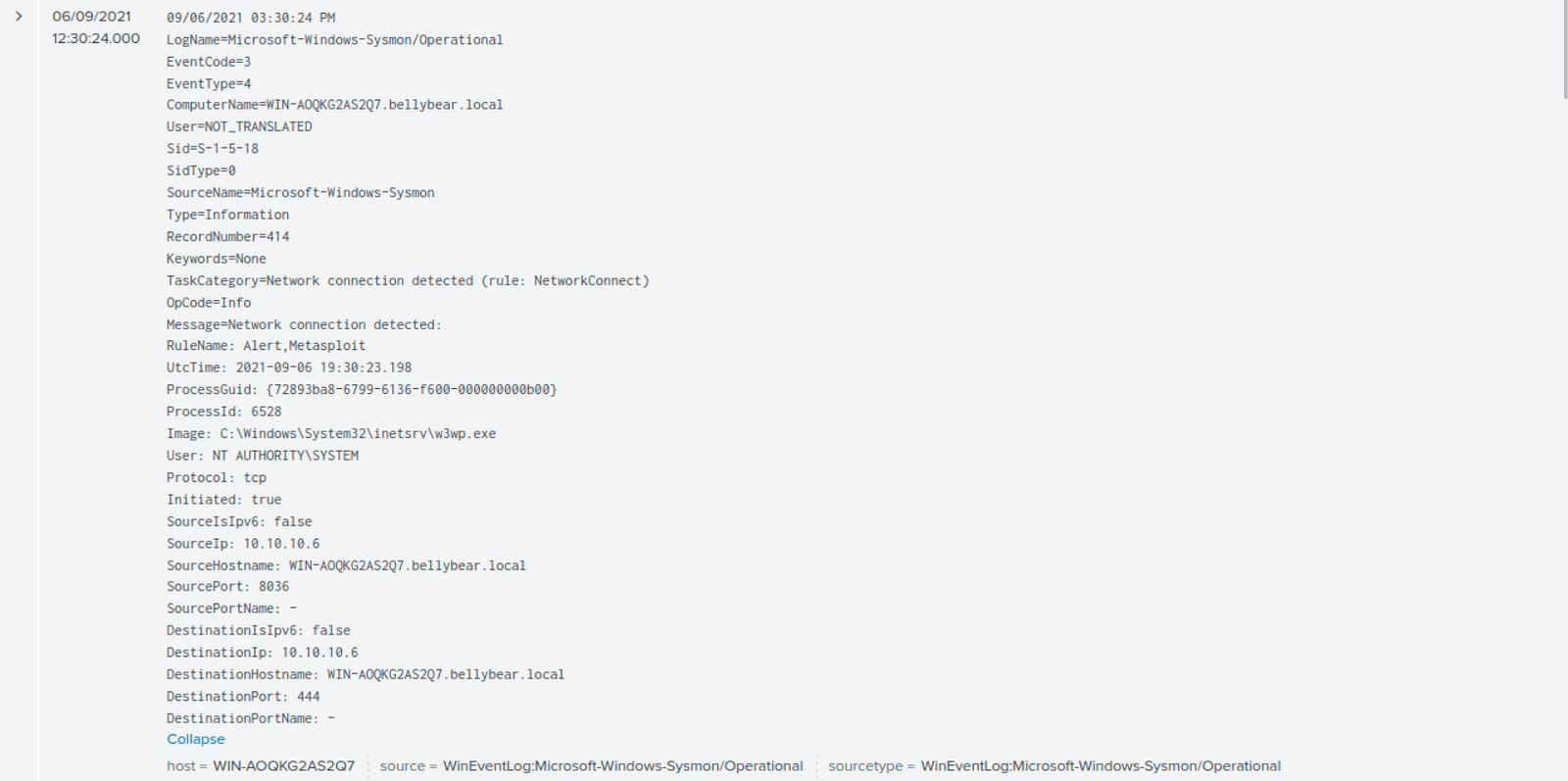
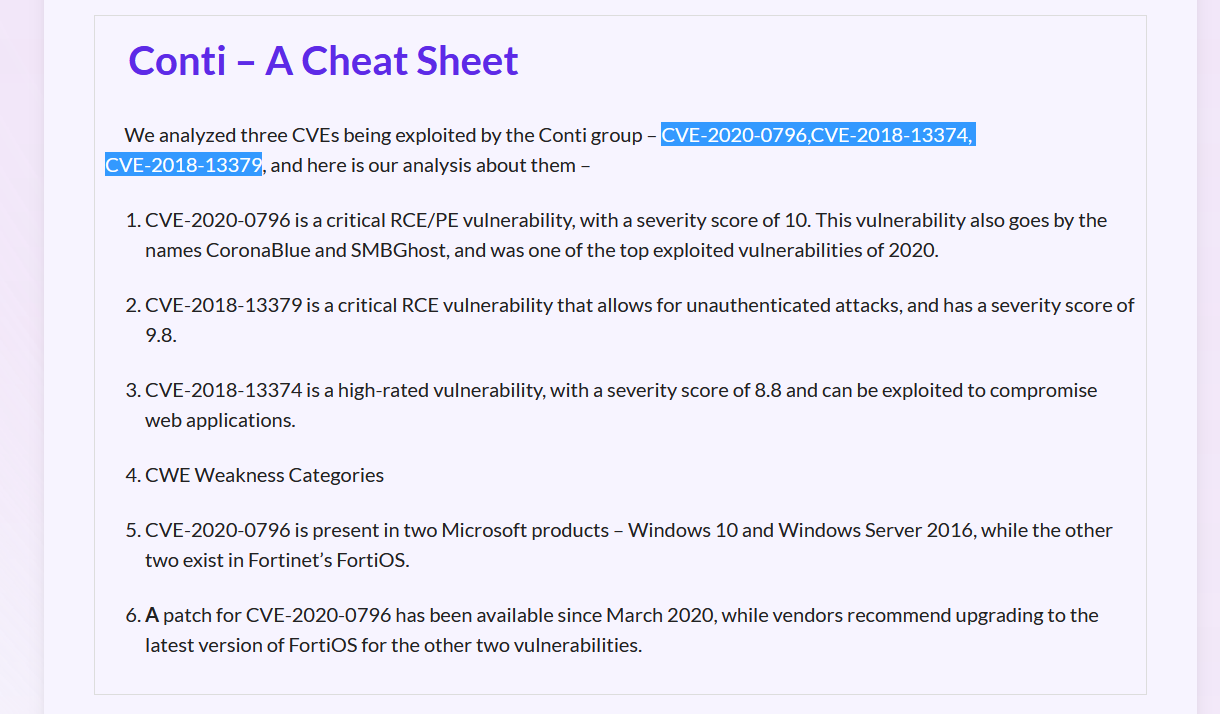
This question required additional threat intelligence research.
Researching known Conti intrusion chains and associated exploitation activity revealed the following CVEs:
CVE-2018-13374
CVE-2018-13379
CVE-2020-0796
2021–09–08 19:30:23.198 UTC — First observed Metasploit-related connection involving w3wp.exe
2021-09-08 19:51:36 - 19:51:50 UTC — Web shell communication activity involving i3gfPctK1c2x.aspx
2021-09-08 19:52:09.748 UTC — Web shell modification activity detected
2021-09-08 19:54:12.665 UTC — PowerShell injected into unsecapp.exe
2021-09-08 19:55:30.770 UTC — unsecapp.exe injected into lsass.exe
2021-09-08 19:59:08.045 UTC — Malicious cmd.exe written to Administrator Documents folder
2021-09-08 20:04:10.692 UTC — Unauthorized securityninja account created
2021-09-08 20:04:10 UTC — securityninja added to privileged groups
2021-09-08 20:05:32.431 UTC — Malicious cmd.exe executed
2021-09-08 20:05:45.887 UTC — First ransomware note readme.txt created
During this investigation, several opportunities for earlier detection became apparent:
CreateRemoteThread) for process injection behaviorunsecapp.exe and attrib.exeThis investigation demonstrates practical application of:
This investigation demonstrated how multiple stages of a ransomware intrusion can be reconstructed through effective SIEM analysis and telemetry correlation.
By approaching each challenge question as a real SOC alert rather than simply extracting answers, the investigation became significantly closer to workflows used in operational Security Operations Centers.
Correlating process injection activity, credential dumping, persistence establishment, web shell deployment, and ransomware execution allowed the full attack chain to be documented from initial compromise through impact.
A detection-engineering exercise using Sigma, Splunk, Windows telemetry, and Atomic Red Team to validate vendor-neutral detection logic
How to Validate PowerShell Detections in Splunk with Sysmon, Atomic Red Team, and MITRE ATT&CK
Designing an Operational Monitoring Dashboard for Authentication, Endpoint, Network, and Threat Hunting Visibility