



TryHackMe SOC Level 2: What Changed, and What It Says About the Future of the SOC Analyst Role
Exploring the new skills, technologies and investigative mindset behind TryHackMe's updated L2 curriculum


Start Snort in sniffer mode and identify the attack source, service, and port. Then write an IPS rule and run Snort in IPS mode to stop the brute-force attack. When the attack is stopped correctly the flag will appear on the desktop.
I ran Snort in sniffer mode and used -X to view the full packet dump for detailed information:
sudo snort -X
From the packet dumps I observed many connection attempts originating from the same IP and targeting port 22 (SSH). The large number of attempts and the targeted service indicated a brute-force attack.
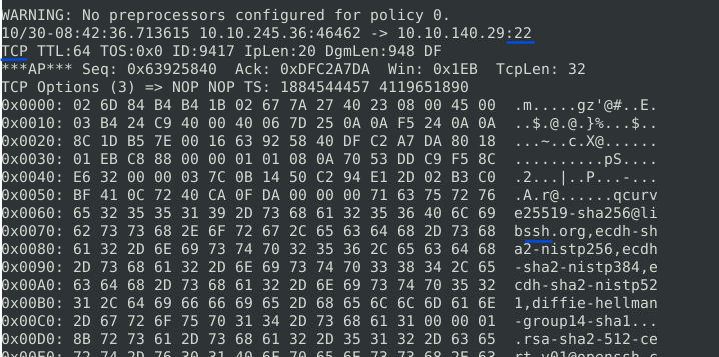
I added the following rules to /etc/snort/rules/local.rules:
alert tcp 10.10.245.36 any -> any 22 (msg: "Brute force attack - SSH"; sid:1000001; rev:1;)
drop tcp 10.10.245.36 any -> any 22 (msg: "Brute force attack - SSH"; sid:1000002; rev:1;)
Then I ran Snort in IPS mode (as I normally run it in my environment):
sudo snort -c /etc/snort/rules/local.rules -A full
After that, the attack was stopped and the flag file appeared on the desktop.
THM{81b7fef657f8aaa6e4e200d616738254}SSHTCP/22Start Snort in sniffer mode and identify the attack source, service, and port. Then write an IPS rule and run Snort in IPS mode to stop the reverse shell. When stopped correctly the flag will appear on the desktop.
Note: The original scenario text mentioned “stop the brute-force attack” again . In this scenario the traffic observed was a reverse-shell, so the objective is to stop that.
I ran Snort in sniffer mode and used -X to inspect packet payloads:
sudo snort -X
I identified traffic targeting port 4444, which is commonly used as a default for Metasploit reverse shells.
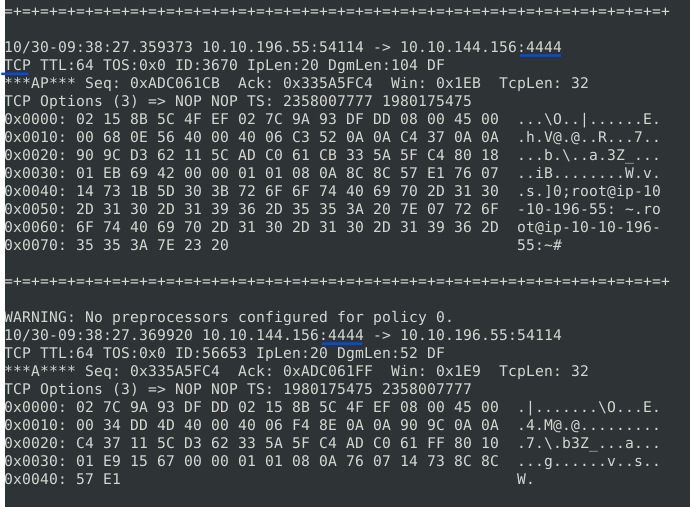
I added these rules to /etc/snort/rules/local.rules:
alert tcp any any <> any 4444 (msg: "Metasploit Reverse Shell"; sid:1000001; rev:1;)
drop tcp any any <> any 4444 (msg: "Metasploit Reverse Shell"; sid:1000002; rev:1;)
After enabling IPS mode, the connection attempts on port 4444 were blocked and the flag appeared.
THM{0ead8c494861079b1b74ec2380d2cd24}TCP/4444Metasploitsrc or dst IPs if known) to reduce false positives.sid values across unrelated rules ; each rule should have a unique SID.drop rules require Snort to run in inline/IPS mode with an appropriate DAQ (Data Acquisition) module configured. In many deployments rules are written in local.rules and referenced from the Snort configuration (snort.conf).msg strings so alerts in logs are immediately meaningful.Exploring the new skills, technologies and investigative mindset behind TryHackMe's updated L2 curriculum
Hands-on Splunk investigation covering ransomware deployment, persistence mechanisms, lateral movement, and AWS data exfiltration
Network Traffic Analysis and Forensics to Identify C2 Channels, ARP Spoofing, and Data Exfiltration Techniques