



CyberDefenders CCDL1: Practical SOC Analyst Training Beyond the Fundamentals
A hands-on path into modern blue team operations


Note: This article contains spoilers for the Windows Forensics Challenge. If you haven’t completed the room yet, proceed with caution!
The objective of this investigation is to analyze suspicious activity detected on a research lab computer.
Here’s what was known:
I received a triage collection captured via KAPE, maintaining the same directory structure as the original system.
To analyze the data, I used Eric Zimmerman’s Registry Explorer.
The main goal was to locate the relevant registry hives, extract the necessary information, and identify digital artifacts that could confirm or disprove the suspicions.
Tip:_ When loading registry hives in Registry Explorer, you’ll see a “dirty hives” warning.
Follow the command prompt instructions to update them using both.LOG1and.LOG2files.
Save the new file, reload it, and reject the “dirty” version — this ensures you’re working with a fully functional hive._
Questions:
THM-4n6?To answer these, I loaded the SAM hive, which stores:
Hive Location:
C:\Windows\System32\Config\SAM
Relevant Key Path:
SAM\Domains\Account\Users
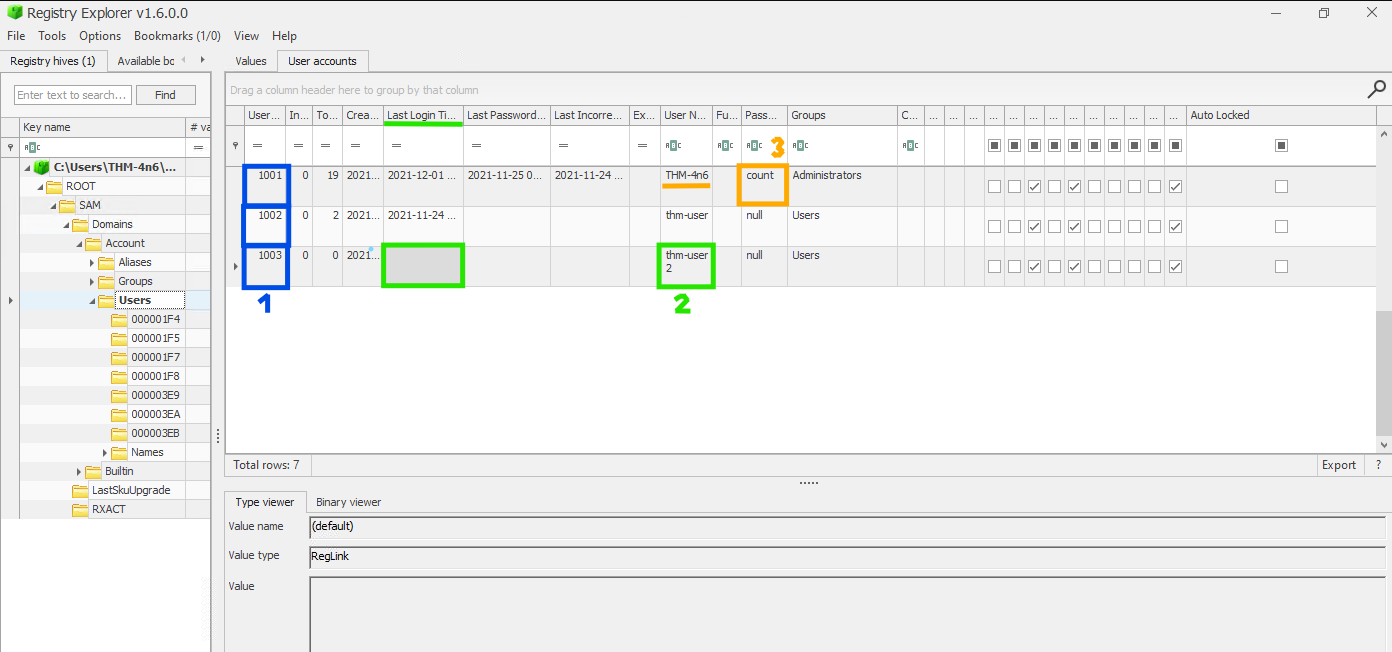
Findings:
Question:
When was the file Changelog.txt last accessed?
This required identifying file access information. Such details are stored in the NTUSER.DAT hive for each user.
Hive Location:
C:\Users\<username>\NTUSER.DAT
Relevant Key Path:
Software\Microsoft\Windows\CurrentVersion\Explorer\RecentDocs
I examined each user’s hive until I found the one listing the file. The user THM-4n6 contained the evidence I needed.
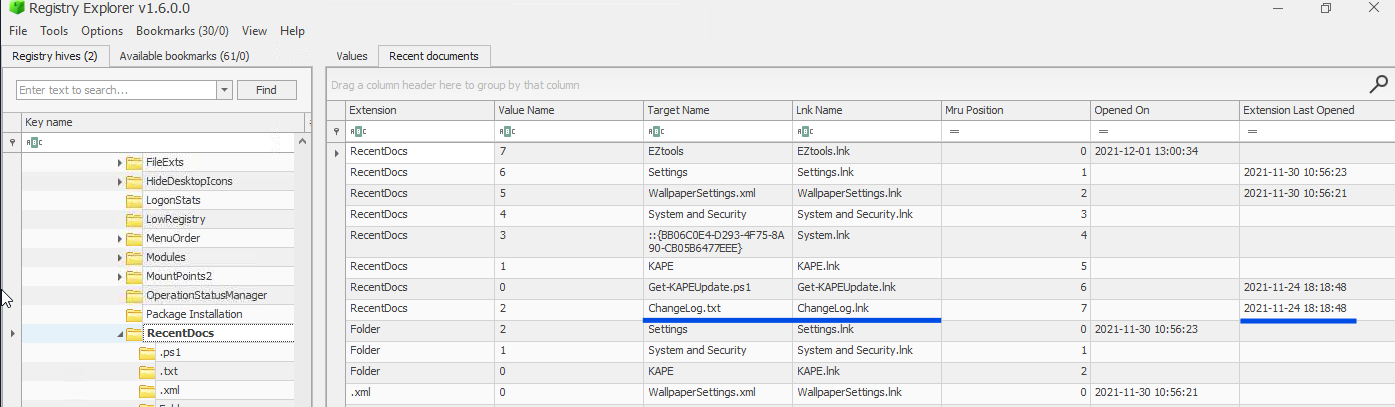
Answer 4: 2021–11–24 18:18:48
Question:
What is the complete path from where the Python 3.8.2 installer was run?
This artifact indicates evidence of execution. Again, I analyzed NTUSER.DAT under the THM-4n6 profile.
Hive Location:
C:\Users\THM-4n6\NTUSER.DAT
Relevant Key Path:
Software\Microsoft\Windows\CurrentVersion\Explorer\UserAssist\{GUID}\Count
Within the GUID {CEBFF5CD-ACE2-4F4F-9178-9926F41749EA}, I found the entry referencing the Python installer.
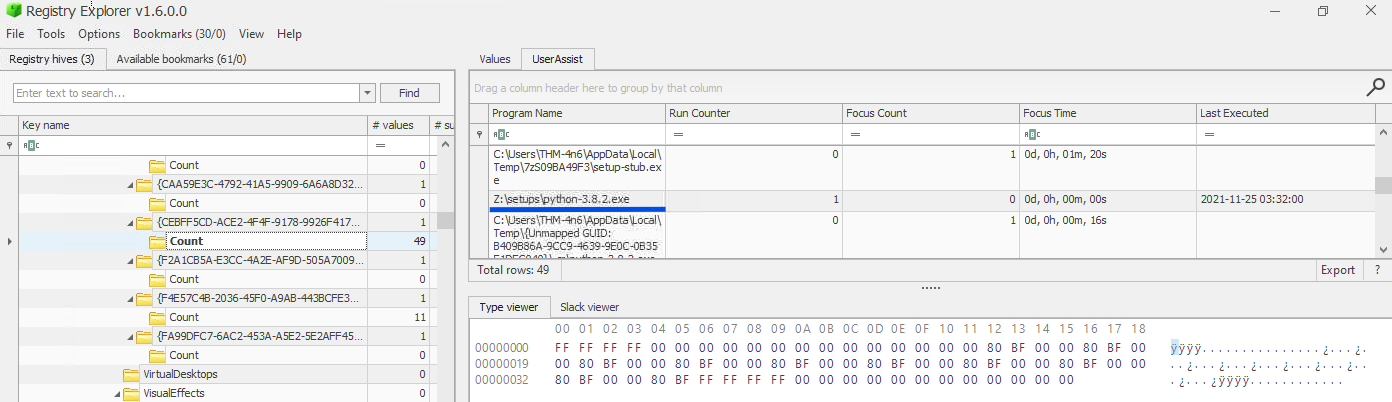
Answer 5: Z:\setups\python-3.8.2.exe
Question:
When was the USB device with the friendly name “USB” last connected?
This question was more challenging.
I started with the SYSTEM hive:
Hive Location:
C:\Windows\System32\Config\SYSTEM
Relevant Key Path:
SYSTEM\CurrentControlSet\Enum\USBSTOR
Initially, no device appeared with the friendly name “USB.”
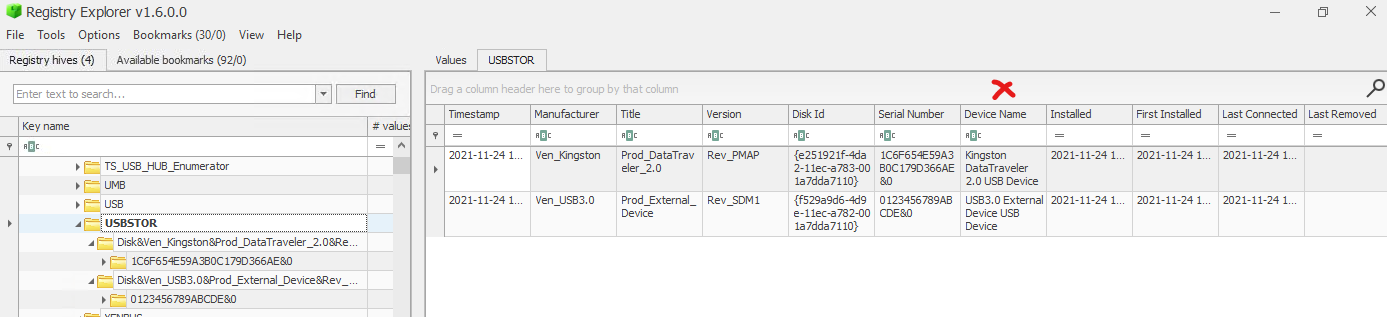
After checking each USB entry, I found a few devices but not the one with the correct name.
The next step was to examine another hive for additional device information.
Hive Location:
C:\Windows\System32\Config\SOFTWARE
Relevant Key Path:
SOFTWARE\Microsoft\Windows Portable Devices\Devices
Here, I found the actual friendly name I was looking for — but not the last connection time.
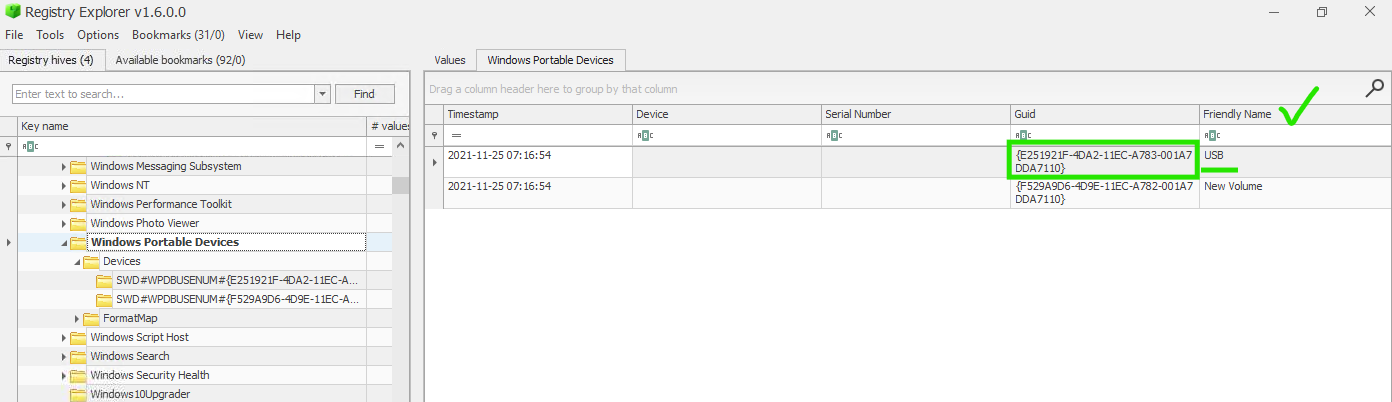
By correlating the device’s GUID back in the USBSTOR registry path, I identified the correct device and timestamp.
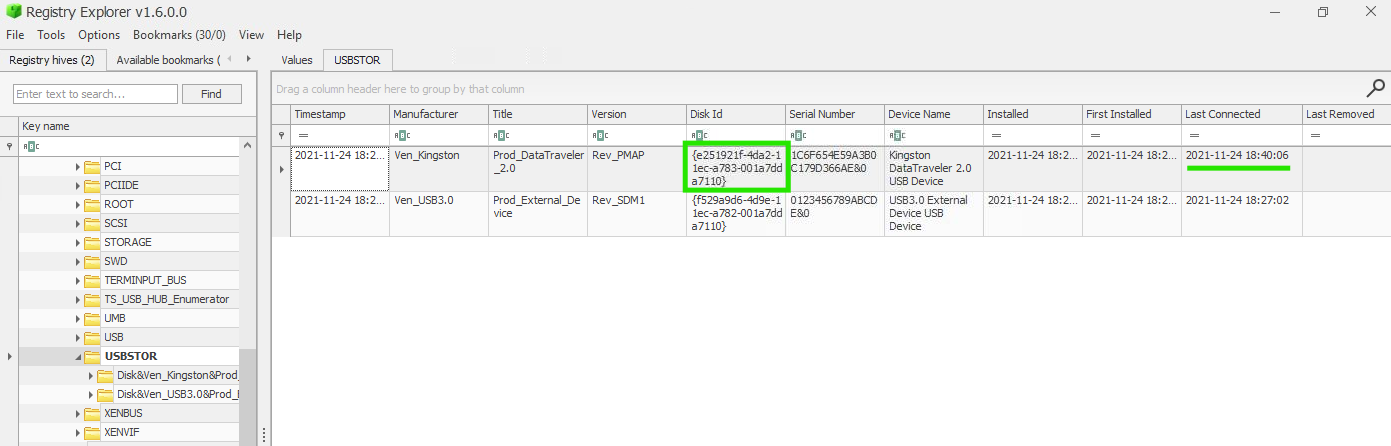
It turned out to be the Kingston DataTraveler device.
Answer 6: 2021–11–24 18:40:06
This investigation confirmed suspicious activity on the system, including the presence of an unexpected user account and a connected external USB drive.
Through analyzing the SAM, SYSTEM, SOFTWARE, and NTUSER.DAT hives, I successfully located and interpreted key forensic artifacts relevant to the case.
Working on this challenge strengthened my practical understanding of Windows Registry analysis, artifact correlation, and triage workflows ; all crucial skills for a SOC analyst or digital forensics investigator.
A hands-on path into modern blue team operations
A hands-on DFIR walkthrough covering phishing analysis, malicious macros, memory forensics, C2 investigation, and persistence detection.
Complete writeup with binary analysis, string decoding, and DFIR techniques