


TryHackMe SOC Level 2: What Changed, and What It Says About the Future of the SOC Analyst Role
Exploring the new skills, technologies and investigative mindset behind TryHackMe's updated L2 curriculum


In the world of network forensics, tools like NetworkMiner are essential for extracting valuable information from captured network traffic. This walkthrough will guide you through Task 5 of TryHackMe’s “NetworkMiner” room, Task 5: Tool Overview 2, providing answers to questions based on analysis of PCAP files and email metadata. I will cover the steps for identifying Linux distributions, frames associated with possible anomalies, and email details — all using the powerful NetworkMiner tool.
Question 1: What is the name of the Linux distro mentioned in the file associated with frame 63075?

Question 2: What is the header of the page associated with frame 75942?
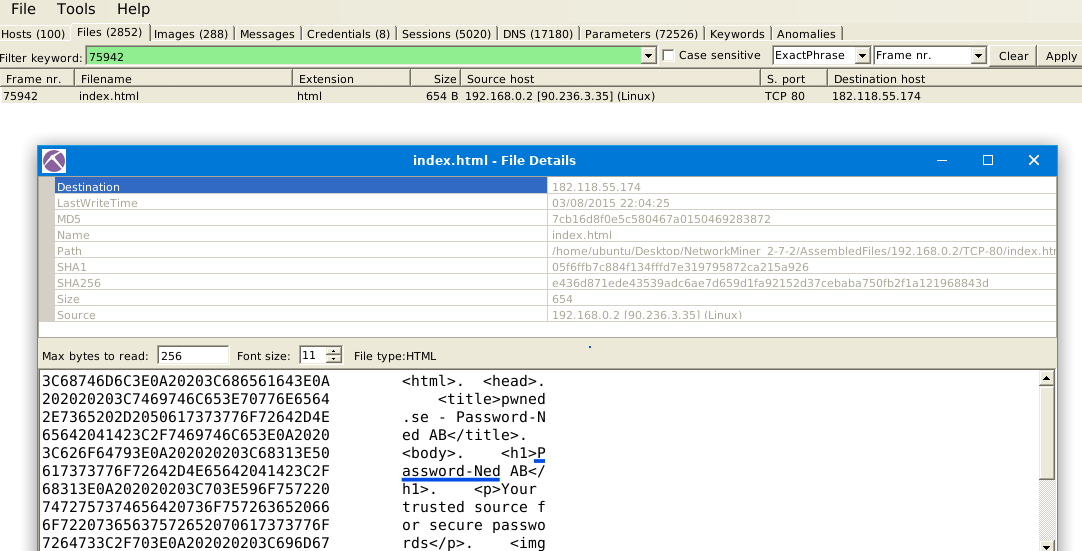
Question 3: What is the source address of the image “ads.bmp.2E5F0FD9.bmp”?

Question 4: What is the frame number of the possible TLS anomaly?

Question 5: Look at the messages. Which platform sent a password reset email?
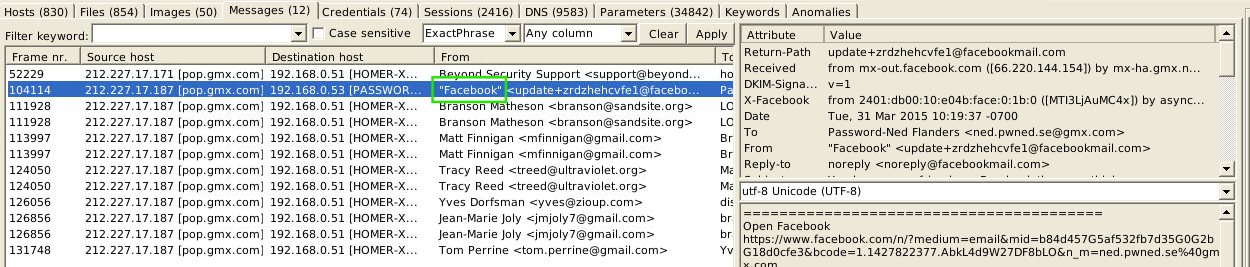
Note: Even though the correct answer appears to be Facebook, the content of the email doesn’t seem to specifically relate to a password reset.
Question 6: What is the email address of Branson Matheson?

Tip: If there were many more results, I would search for Branson’s name in the search bar to narrow down the options.
By following these steps in NetworkMiner, you can uncover a wealth of data hidden in network traffic, from identifying device information to analyzing anomalous behaviors. The ability to extract such information is essential for any cybersecurity professional working in the field of network forensics.
Exploring the new skills, technologies and investigative mindset behind TryHackMe's updated L2 curriculum
Hands-on Splunk investigation covering ransomware deployment, persistence mechanisms, lateral movement, and AWS data exfiltration
Network Traffic Analysis and Forensics to Identify C2 Channels, ARP Spoofing, and Data Exfiltration Techniques