

TryHackMe SOC Level 2: What Changed, and What It Says About the Future of the SOC Analyst Role
Exploring the new skills, technologies and investigative mindset behind TryHackMe's updated L2 curriculum


In this TryHackMe Detecting Web Shells room writeup, we investigate a compromised WordPress website by analyzing Apache access logs. The goal of this task is to identify attacker behavior, trace malicious requests, and uncover evidence of web shell activity using common Linux command-line tools. This walkthrough focuses on practical log analysis techniques that are highly relevant to real-world incident response and blue team operations.
You have been called to investigate potential signs of a compromise on a WordPress site. Suspicious activity has been reported, and your goal is to analyze the available logs to identify indicators of web shell usage.
You have been provided Apache access logs to help conduct your investigation.\
`/var/log/apache2/access.log`
When reviewing the logs, remember to be on the lookout for
* repeated or suspicious requests (especially ones to `.php` files)
* strange request patterns (look for different response codes)
* unusual user-agents (e.g. `curl/0.00.0`)
This is also a great chance to use tools like `grep` to filter the access log file.
For example, `cat /var/log/apache2/access.log | grep “404”` can help highlight logs that contain `404` error responses.
Once you start to build a profile on your attacker, you can further refine your search.
Process:
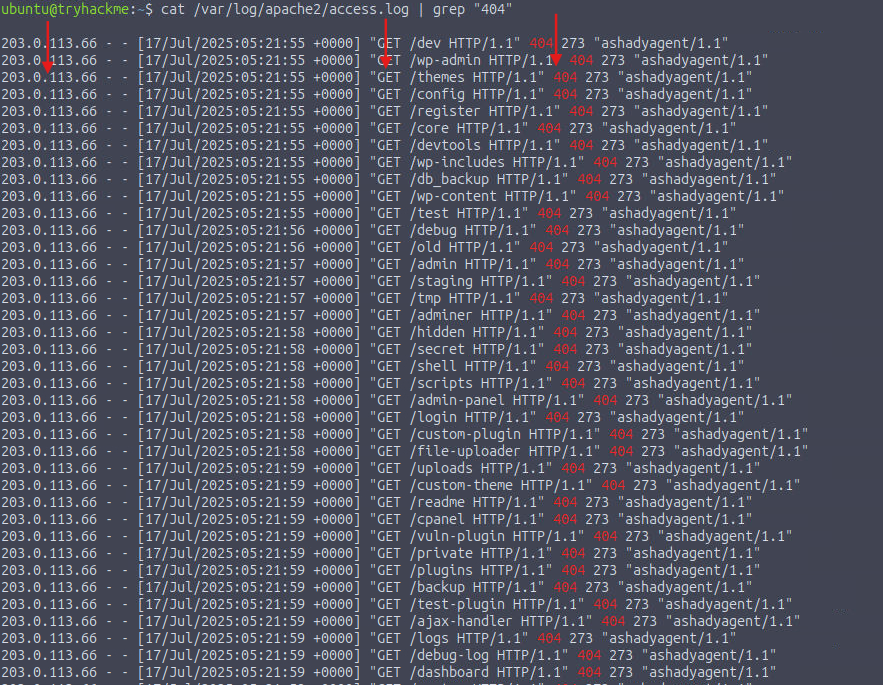
By searching for 404 (Not Found) responses in the log file, I was able to identify an IP address responsible for an unusually high number of requests across many different directories.
cat /var/log/apache2/access.log | grep "404"
Answer:
203.0.113.66
Process:
By searching for successful 200 OK responses in the log file, I identified the first directory that returned a valid response to the attacker’s GET requests.
cat /var/log/apache2/access.log | grep "200"

Answer:
/wordpress
.php file the attacker uses to upload the web shell?Process:
Using grep to search for POST requests involving the .php extension, I identified a web shell upload and the vulnerable form that was exploited.
cat /var/log/apache2/access.log | grep "POST" | grep "php"

Answer:
upload_form.php
Process:
By searching the logs for evidence of command execution, I found multiple requests containing command parameters that were issued after the web shell was uploaded.
cat /var/log/apache2/access.log | grep "cmd="

Answer:
whoami
Process:
Using the same command execution results, I observed a request that leveraged wget to download a secondary file named linpeas.sh.

Answer:
linpeas.sh
Process:
After navigating to the directory where the web shell was uploaded (/var/www/html/wordpress/wp-content/uploads), I used cat shadyshell.php to inspect the file contents.


Answer:
THM{W3b_Sh3ll_Int3rnals}
This investigation demonstrates how much insight can be gained from careful analysis of Apache access logs. By identifying suspicious request patterns, HTTP methods, and command execution attempts, we were able to trace the attacker’s actions from reconnaissance to post-exploitation. Mastering these log analysis techniques is essential for detecting web shells, responding to compromises, and strengthening the security of WordPress and other web applications.
Exploring the new skills, technologies and investigative mindset behind TryHackMe's updated L2 curriculum
Root Cause Analysis, Fixes and Lessons Learned During My SOC Homelab Deployment
A Complete Write-Up Demonstrating Real SOC Investigation Methodology