


From Manual Testing to Repeatable Detection Validation with Atomic Red Team
How to Validate PowerShell Detections in Splunk with Sysmon, Atomic Red Team, and MITRE ATT&CK


Sysmon is one of the most powerful tools available for Windows endpoint visibility, but its real value only becomes clear when you start investigating real attack scenarios. In this article, I walk through Task 10: Practical Investigations from the TryHackMe Sysmon Room, focusing on how to analyze Sysmon logs using both Event Viewer and PowerShell.
Please note that, in addition to investigating with Event Viewer, I challenged myself to prioritize using PowerShell and to determine the appropriate queries for each situation. In real-world scenarios involving larger log sets, these queries would prove extremely useful for narrowing investigations to specific time frames and relevant events.
In this investigation, your team has received reports that a malicious file was dropped onto a host by a malicious USB device. The logs were collected, and you have been tasked with investigating the activity.
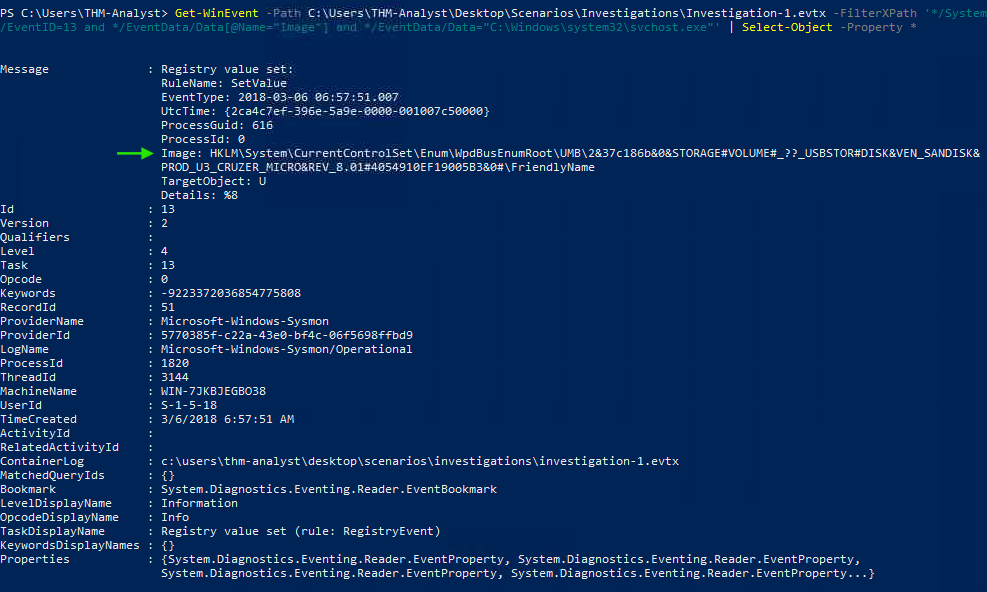
What is the full registry key of the USB device calling svchost.exe in Investigation 1?
Process:
Using PowerShell, I filtered for EventID=13 (Registry Value Set) and for events where the Image field equals C:\Windows\system32\svchost.exe.
The Registry Value Set event occurs when a value within a registry key is modified in a Windows operating system. This event is crucial for monitoring changes that can affect system behavior or security.
PowerShell Query:
Get-WinEvent -Path C:\Users\THM-Analyst\Desktop\Scenarios\Investigations\Investigation-1.evtx `
-FilterXPath '*/System/EventID=13 and */EventData/Data[@Name="Image"]="C:\Windows\system32\svchost.exe"' |
Select-Object -Property *
Answer:
HKLM\System\CurrentControlSet\Enum\WpdBusEnumRoot\UMB\2&37c186b&0\&STORAGE#VOLUME#_??_USBSTOR#DISK\&VEN_SANDISK\&PROD_U3_CRUZER_MICRO\&REV_8.01#4054910EF19005B3&0#\FriendlyName
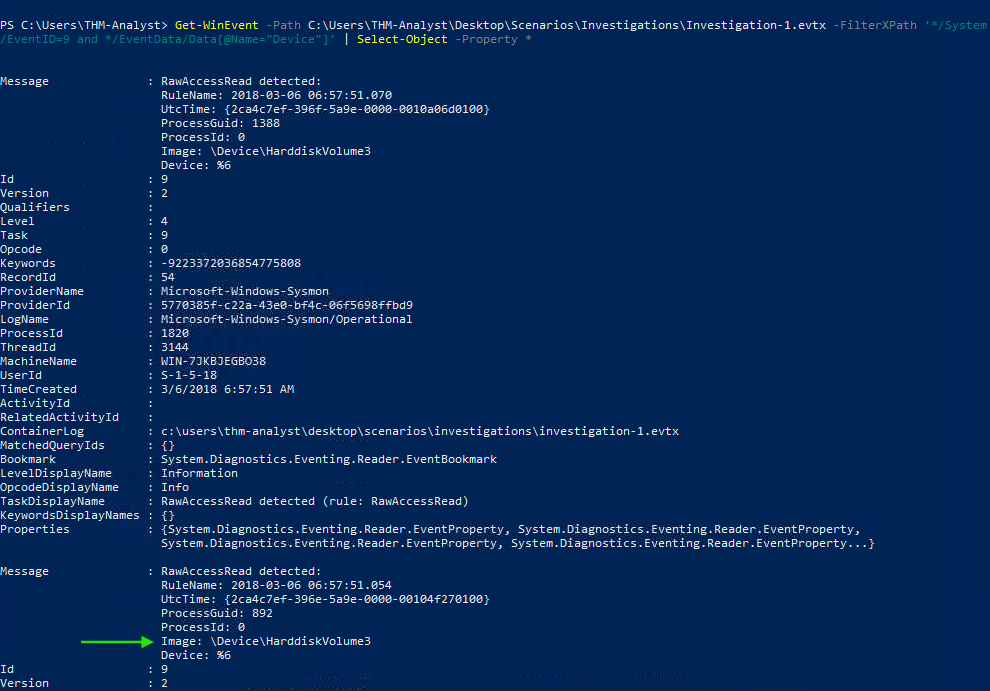
What is the device name when being called by RawAccessRead in Investigation 1?
Process:
I filtered for EventID=9 (RawAccessRead) events.
The Raw Access Read event detects when a process reads data directly from a drive using the \\.\ notation. This is often associated with disk-level access and can indicate malicious behavior.
PowerShell Query:
Get-WinEvent -Path C:\Users\THM-Analyst\Desktop\Scenarios\Investigations\Investigation-1.evtx `
-FilterXPath '*/System/EventID=9' |
Select-Object -Property *
Answer:
\Device\HarddiskVolume3
What is the first exe the process executes in Investigation 1?
Process:
I filtered for EventID=1 (Process Create) and reviewed the earliest relevant event.
The Process Create event logs detailed information about newly created processes, including the command line and image path.
PowerShell Query:
Get-WinEvent -Path C:\Users\THM-Analyst\Desktop\Scenarios\Investigations\Investigation-1.evtx `
-FilterXPath '*/System/EventID=1' -MaxEvents 1 |
Select-Object -Property *
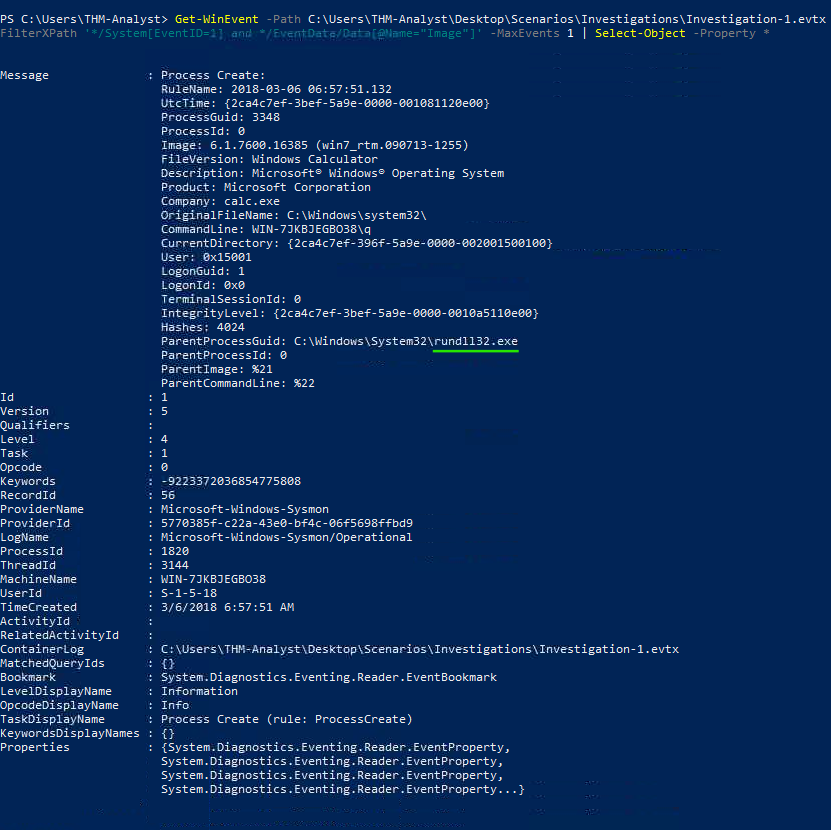
Answer:
rundll32.exe
Another suspicious file appeared in the logs and managed to execute code while masking itself as an HTML file, evading antivirus detection.
What is the full path of the payload in Investigation 2?
Process:
To identify newly created processes, I reviewed EventID=1 (Process Create) events. One entry revealed a suspicious .hta file.
PowerShell Query:
Get-WinEvent -Path C:\Users\THM-Analyst\Desktop\Scenarios\Investigations\Investigation-2.evtx `
-FilterXPath '*/System/EventID=1' |
Select-Object -Property *
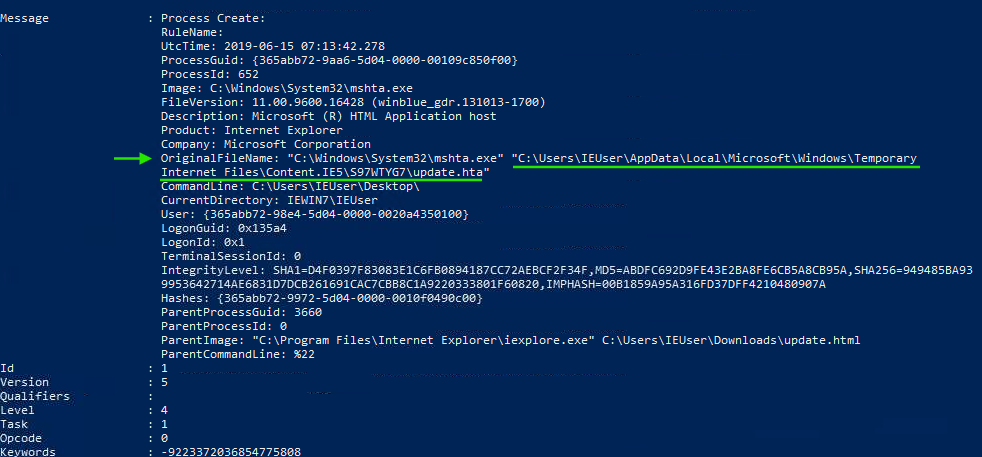
Answer:
C:\Users\IEUser\AppData\Local\Microsoft\Windows\Temporary Internet Files\Content.IE5\S97WTYG7\update.hta
What is the full path of the file the payload masked itself as in Investigation 2?
Process:
From the same event, I examined the ParentImage field to identify the file that initiated execution.
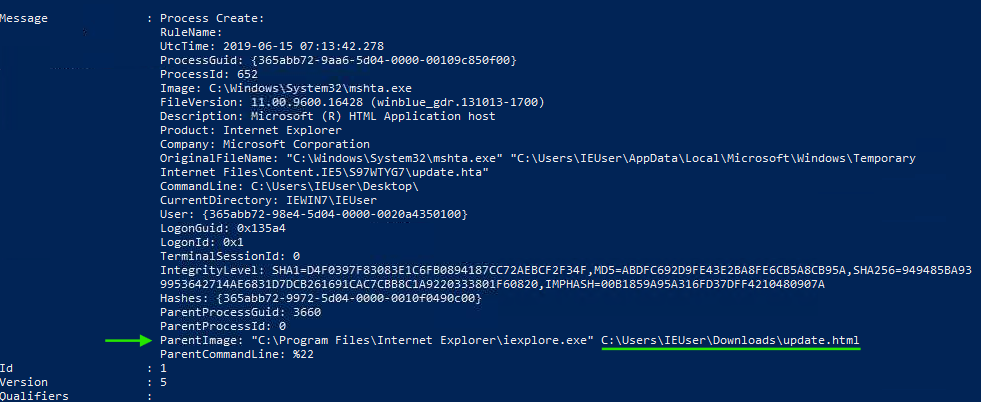
Answer:
C:\Users\IEUser\Downloads\update.html
What signed binary executed the payload in Investigation 2?
Process:
Reviewing the Image field in the same event revealed the signed binary responsible for execution.
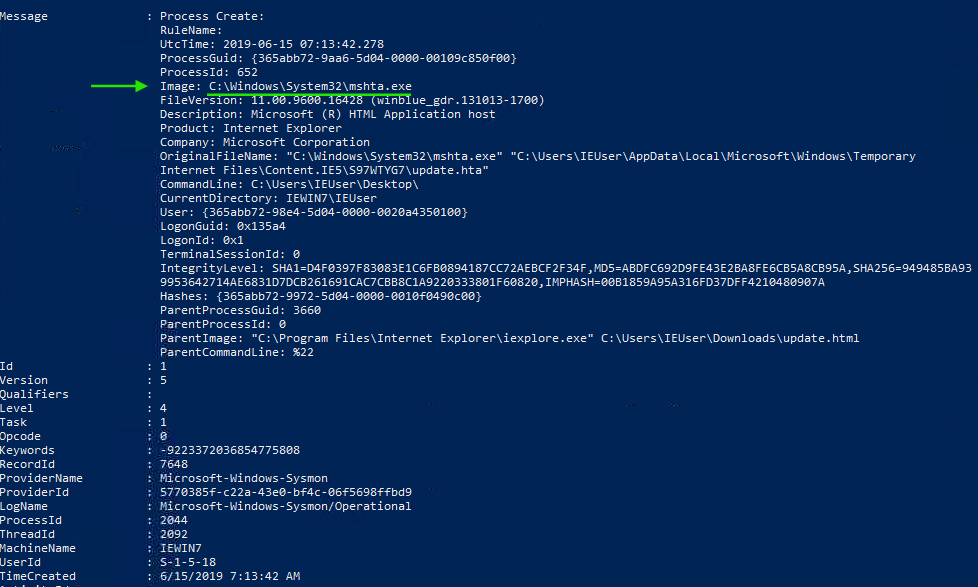
Answer:
C:\Windows\System32\mshta.exe
What is the IP of the adversary in Investigation 2?
Process:
I filtered for Network Connection events (EventID=3) and checked the DestinationIp field.
PowerShell Query:
Get-WinEvent -Path C:\Users\THM-Analyst\Desktop\Scenarios\Investigations\Investigation-2.evtx `
-FilterXPath '*/System/EventID=3' |
Select-Object -Property *
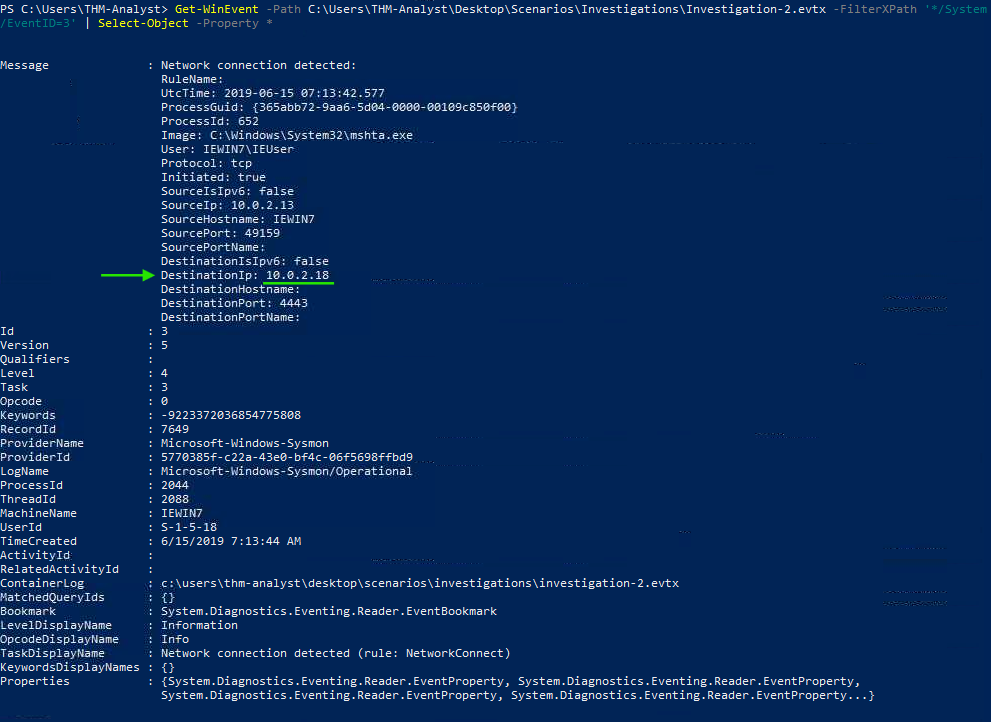
Answer:
10.0.2.18
What back connect port is used in Investigation 2?
Process:
The port was visible in the same network event under DestinationPort.
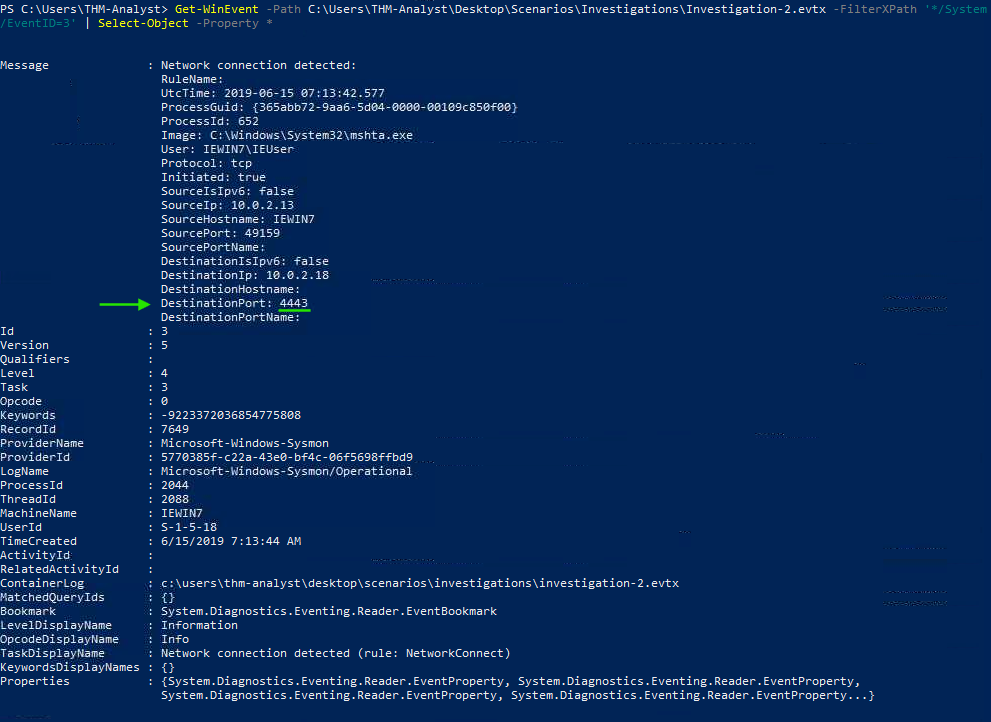
Answer:
4443
Your team has identified that the adversary established persistence on multiple endpoints.
What is the IP of the suspected adversary in Investigation 3.1?
Process:
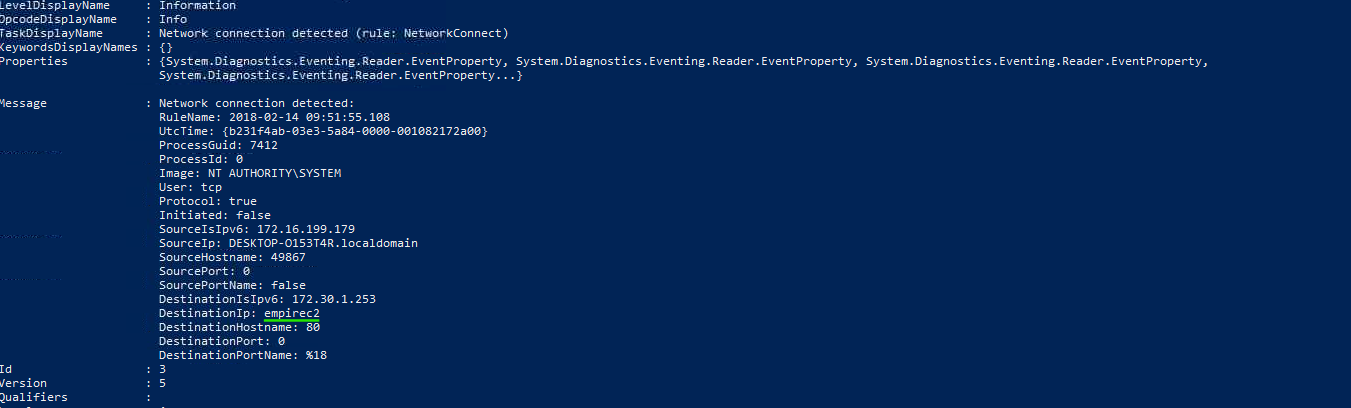
Using Network Connection (EventID=3) events, I identified traffic to a C2 host named empirec2. Although the IP was an IPv4 address, it appeared under the DestinationIsIpv6 field. The correct key-value mapping was confirmed in Event Viewer.
PowerShell Query:
Get-WinEvent -Path C:\Users\THM-Analyst\Desktop\Scenarios\Investigations\Investigation-3.1.evtx `
-FilterXPath '*/System/EventID=3' |
Select-Object -Property *
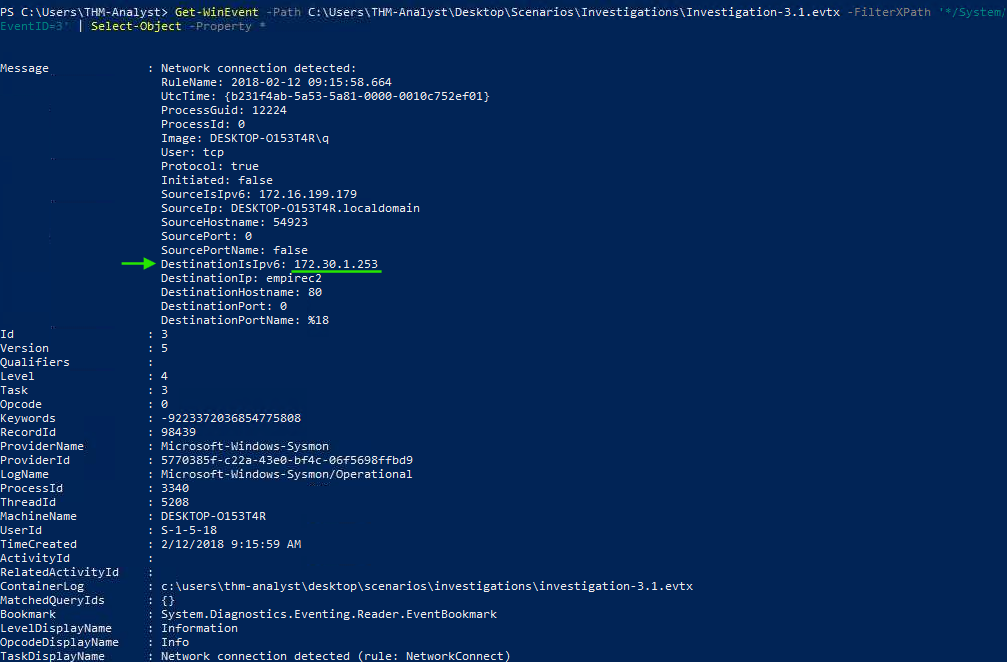
Query successful, but results show a key–value pair formatting bug.
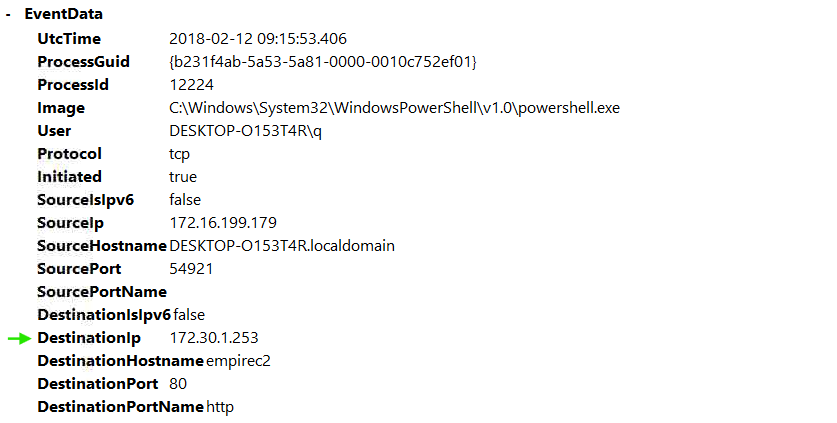
Correct field confirmed in Event Viewer
Answer:
172.30.1.253
What is the hostname of the affected endpoint in Investigation 3.1?
Process:
The hostname was found in the SourceHostname field of the same event in Event Viewer, and wrongly formatted in PowerShell asSourceIP.
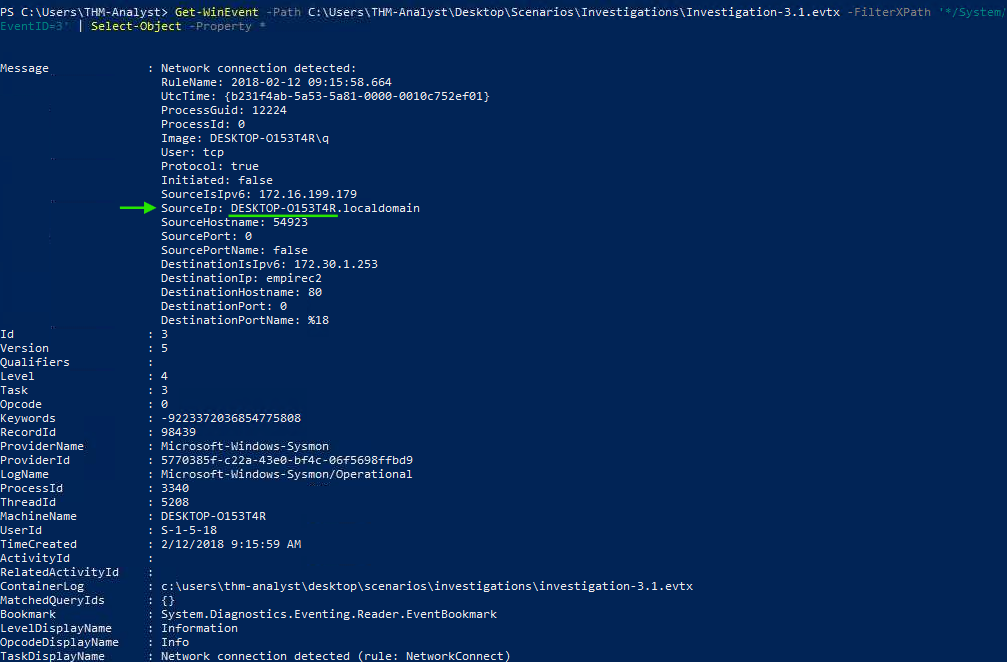
Query successful, but results show a key–value pair formatting bug.
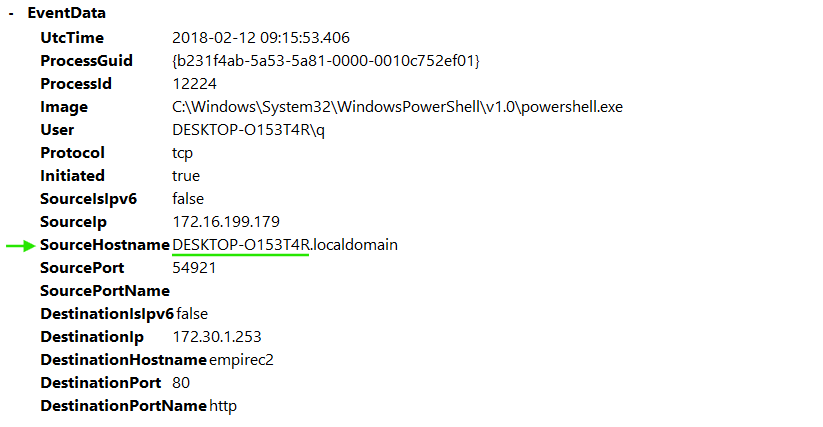
Correct field confirmed in Event Viewer
Answer:
DESKTOP-O153T4R
What is the hostname of the C2 server connecting to the endpoint in Investigation 3.1?
Process:
The C2 hostname was visible in the same network event and confirmed in Event Viewer.
The previously mentioned bug also affected these fields, so I provide screenshots of both sources for reference.
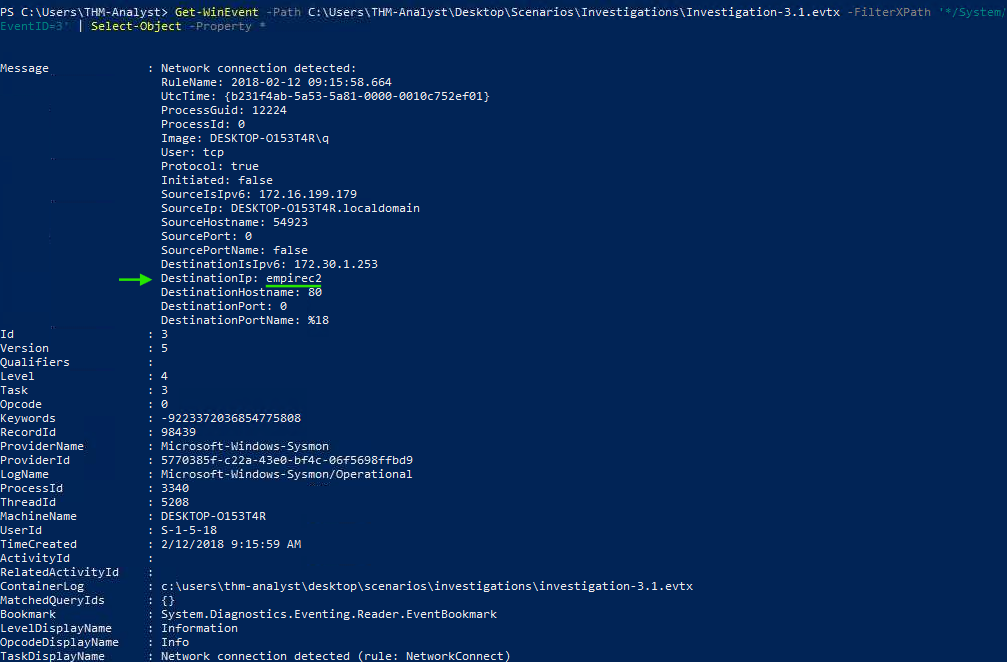
PowerShell results.
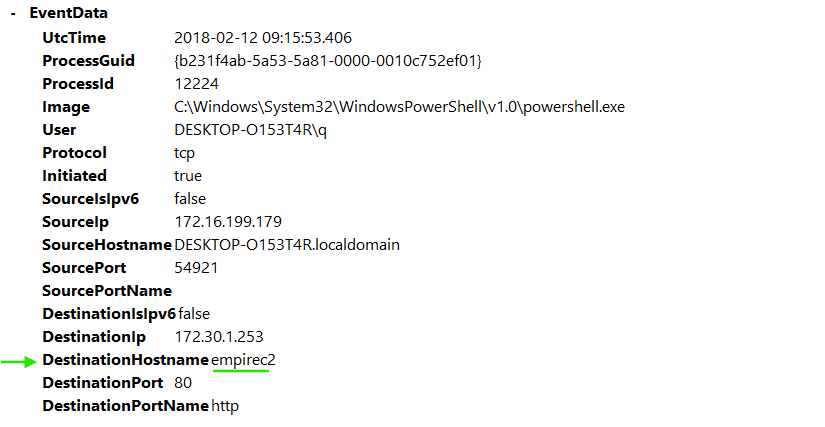
Event Viewer results.
Answer:
empirec2
Where in the registry was the payload stored in Investigation 3.1?
Process:
I filtered for EventID=12 (Registry Value Added) and EventID=13 (Registry Value Set) events and reviewed the results.
The previously mentioned bug also affected these fields, so I provide screenshots of both sources for reference.
PowerShell Query:
Get-WinEvent -Path C:\Users\THM-Analyst\Desktop\Scenarios\Investigations\Investigation-3.1.evtx `
-FilterXPath '*/System/EventID=12 or */System/EventID=13' |
Select-Object -Property *
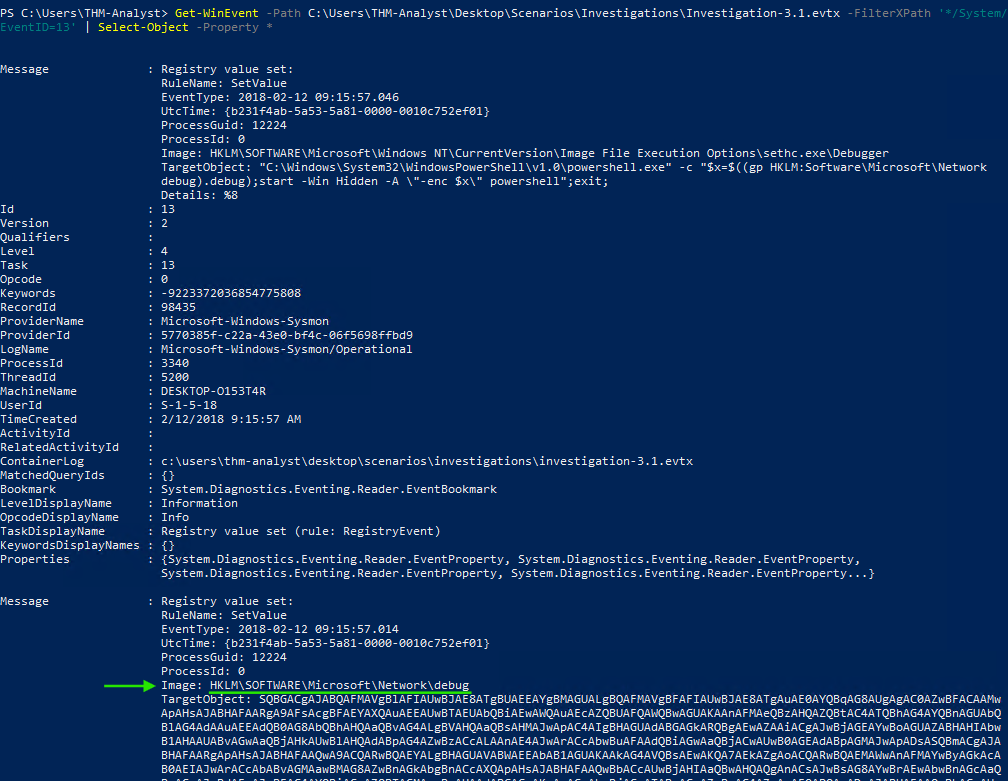
PowerShell results.
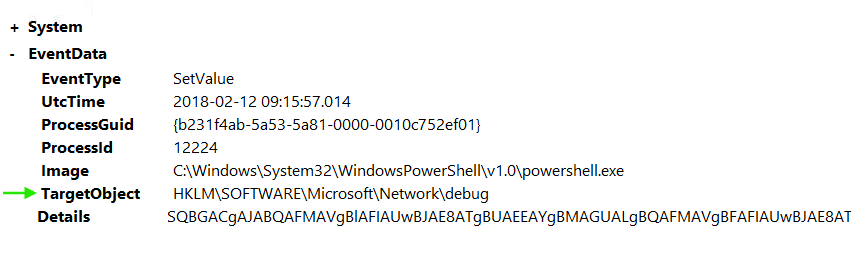
Event Viewer results.
Answer:
HKLM\SOFTWARE\Microsoft\Network\debug
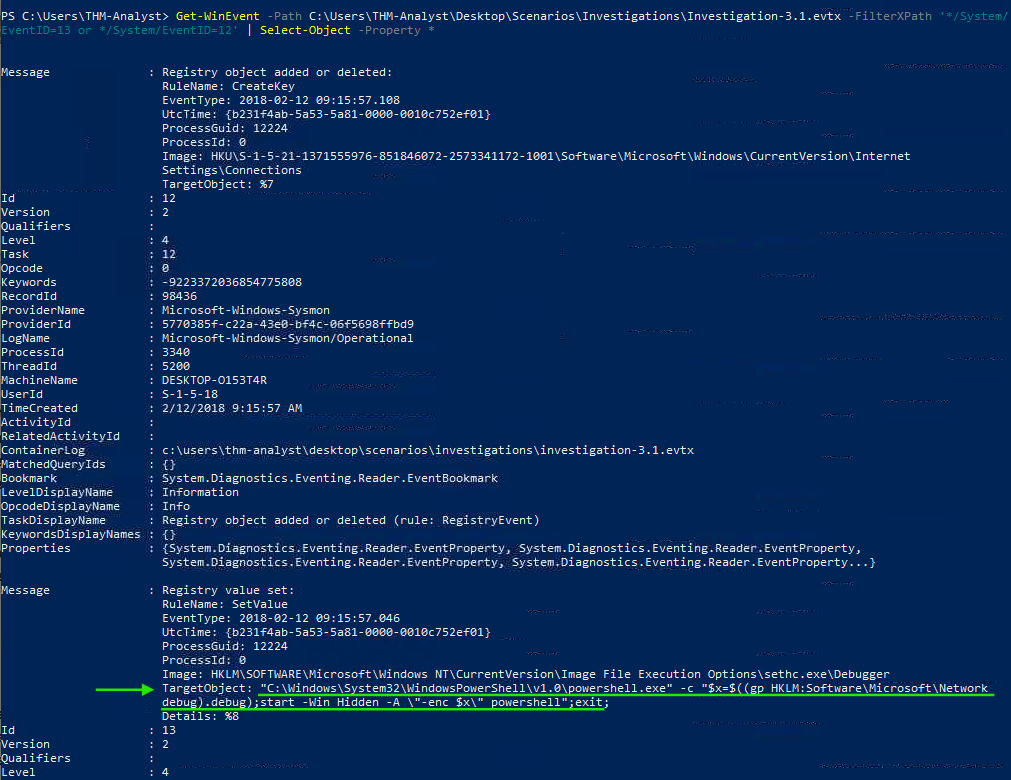
What PowerShell launch code was used to launch the payload in Investigation 3.1?
Process:
The PowerShell launch command was visible in the registry value from the previous query.
Answer:
“C:\Windows\System32\WindowsPowerShell\v1.0\powershell.exe” -c “$x=$((gp HKLM:Software\Microsoft\Network debug).debug);start -Win Hidden -A “-enc $x” powershell”;exit;
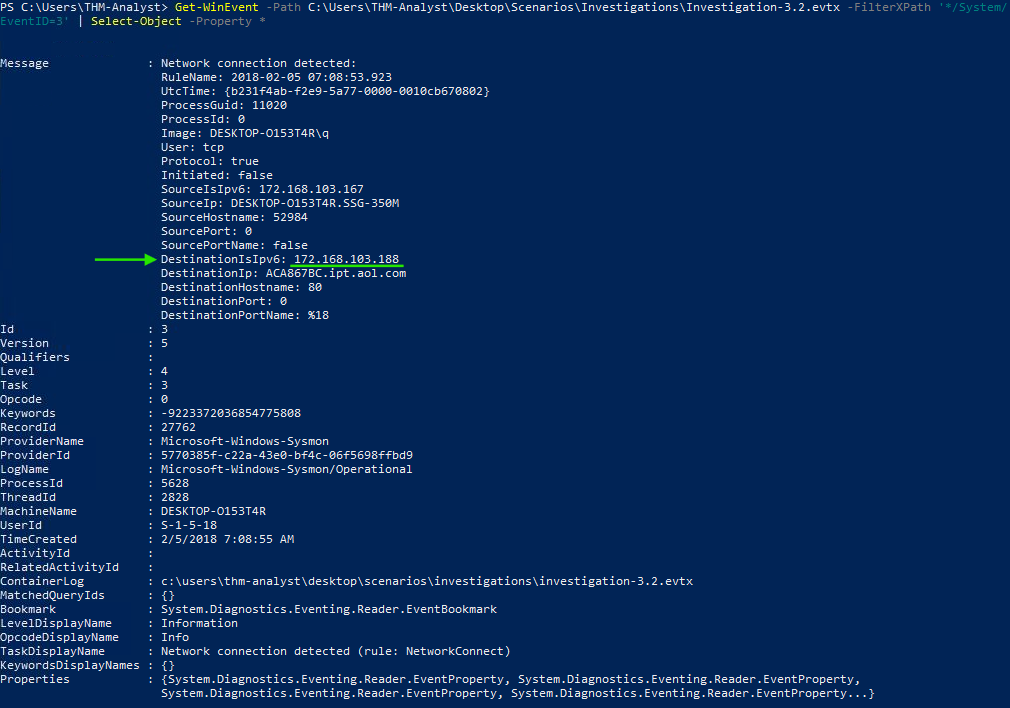
What is the IP of the adversary in Investigation 3.2?
Process:
I reviewed Network Connection (EventID=3) events related to the malicious activity.
Answer:
172.168.103.188
What is the full path of the payload location in Investigation 3.2?
Process:
Using Process Create (EventID=1) events, I identified the payload location.
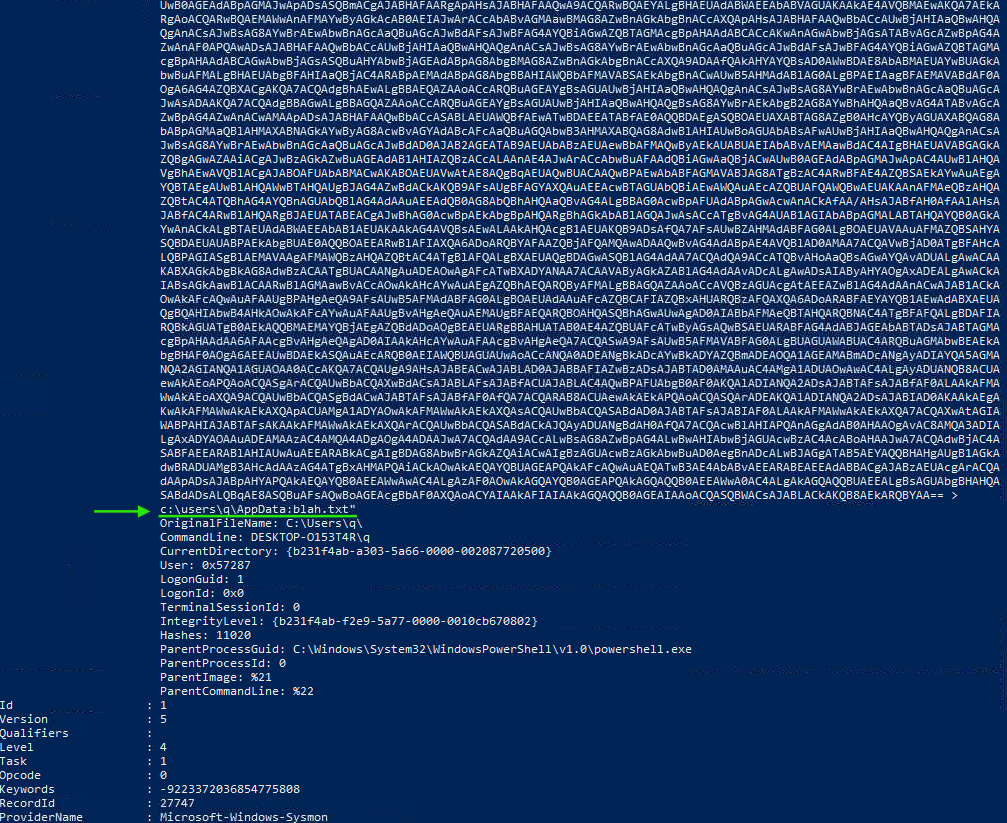
Answer:
c:\users\q\AppData:blah.txt”
What was the full command used to create the scheduled task in Investigation 3.2?
Process:
The command was visible in the Process Create (EventID=1) logs.
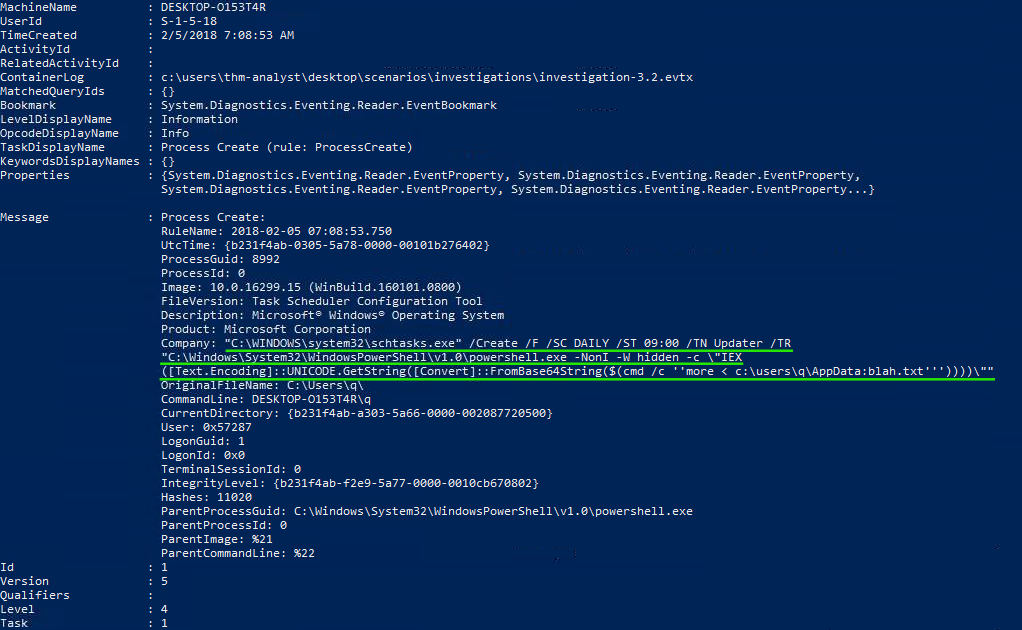
Answer:
C:\WINDOWS\system32\schtasks.exe” /Create /F /SC DAILY /ST 09:00 /TN Updater /TR
“C:\Windows\System32\WindowsPowerShell\v1.0\powershell.exe -NonI -W hidden -c “IEX
([Text.Encoding]::UNICODE.GetString([Convert]::FromBase64String($(cmd /c ‘’more < c:\users\q\AppData:blah.txt’’’))))””
What process was accessed by schtasks.exe that would be considered suspicious behavior in Investigation 3.2?
Process:
This answer was only identifiable by manually reviewing the logs in Event Viewer. I also suspect the question intended to ask which process accessed schtasks.exe.
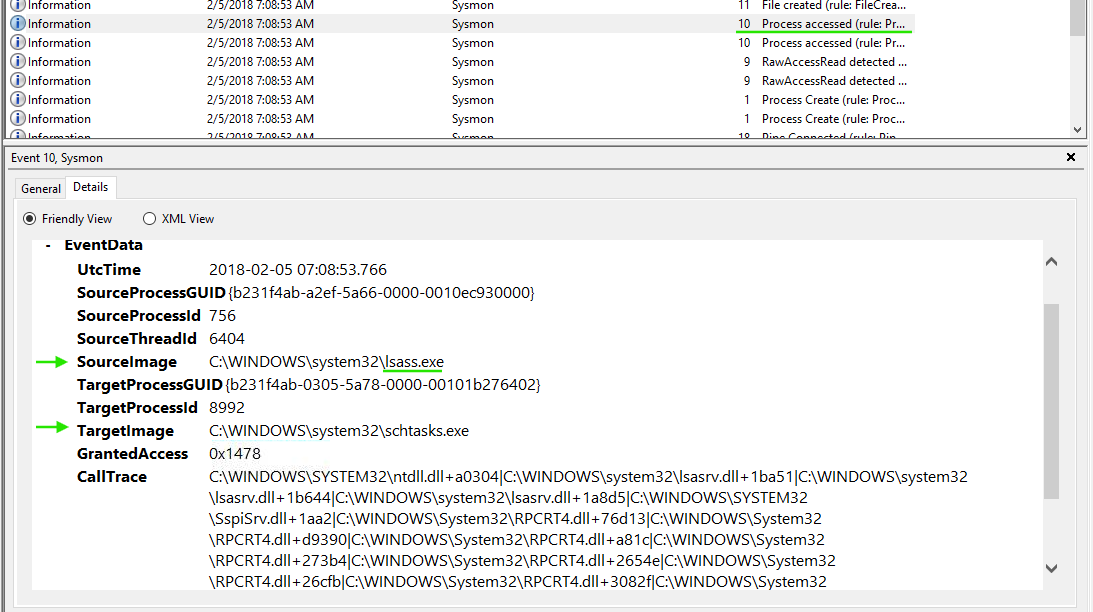
The process was lsass.exe.
To answer the question as it was phrased, the corresponding query would involve filtering by _EventID=10 (_Process Accessed_) and ParentImage pointing to C:\WINDOWS\system32\schtasks.exe, but no relevant results were returned._
Answer: No answer needed.
The adversary appears to have established command-and-control communications on multiple endpoints.
What is the IP of the adversary in Investigation 4?
Process:
I filtered Network Connection (EventID=3) events, which revealed me suspicious events showing communication with the empirec2 domain.
PowerShell Query:
Get-WinEvent -Path C:\Users\THM-Analyst\Desktop\Scenarios\Investigations\Investigation-4.evtx `
-FilterXPath '*/System/EventID=3' |
Select-Object -Property *
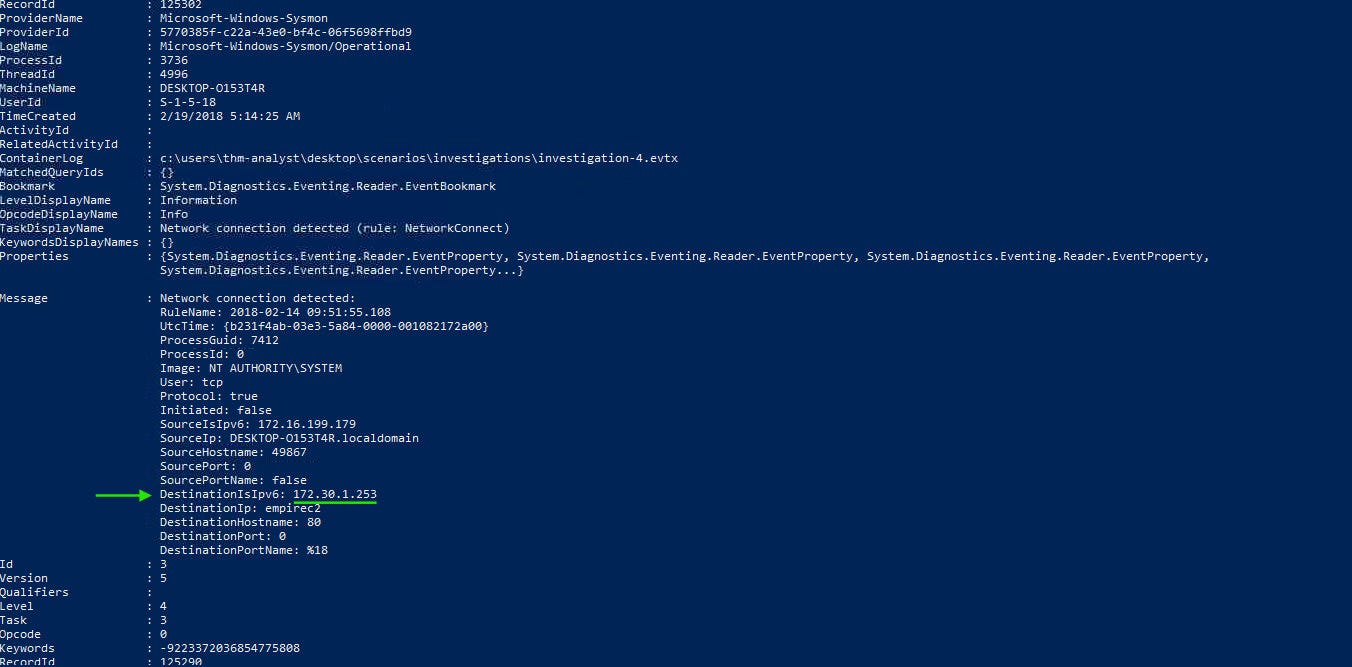
Answer:
172.30.1.253
What port is the adversary operating on in Investigation 4?
Process:
The port number was visible in the same network events.
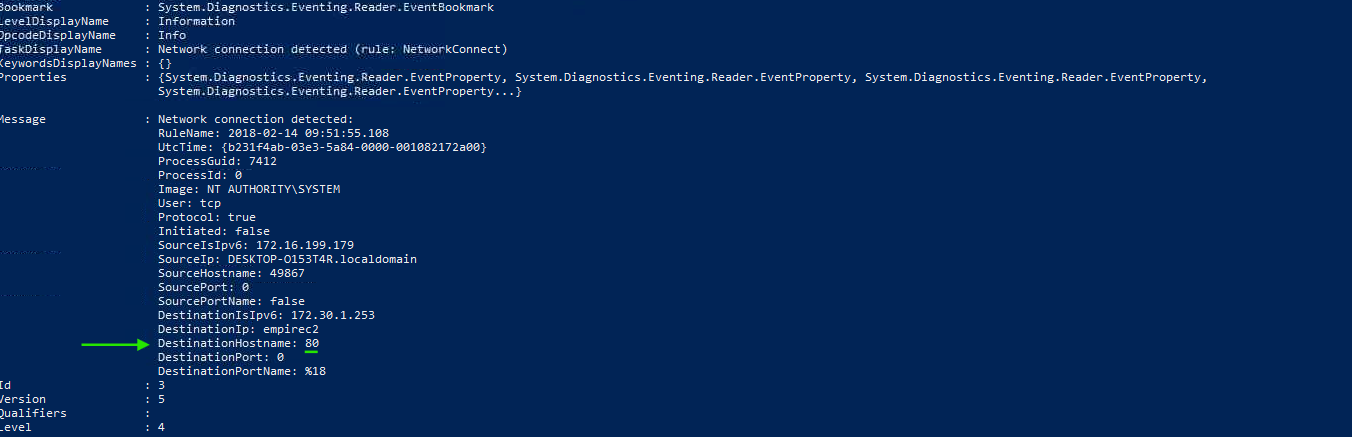
Answer:
80
What C2 is the adversary utilizing in Investigation 4?
Process:
The C2 framework name was visible in the same events.
Answer:
empire
This walkthrough demonstrates how Sysmon logs can be leveraged to uncover malicious activity, persistence mechanisms, and command-and-control communications across multiple investigations. While Event Viewer provides valuable context, combining it with targeted PowerShell queries significantly improves efficiency — especially when working with large log sets in real-world environments. Mastering this approach is essential for effective threat hunting and incident response on Windows systems.
How to Validate PowerShell Detections in Splunk with Sysmon, Atomic Red Team, and MITRE ATT&CK
Exploring the new skills, technologies and investigative mindset behind TryHackMe's updated L2 curriculum
Simulating common PowerShell abuse techniques and investigating endpoint telemetry in Splunk